


Selection tool issues

Copy link to clipboard
Copied
This just recently started happening, this week. I try to select an object, it won't select, or it will select an object nearby. The selection tool has a small black box with dots around it next to it. As I try to resize the object I can't resize properly then try to undo and it takes me back multiple steps. I've never had this happen. I've tried "Show bounding box" but that is not the issue. Not sure what's wrong. I've tried restarting computer, uninstall/reinstall Illustrator. Sound familiar to anyone?



Explore related tutorials & articles
 13
Replies
13
13
Replies
13




Copy link to clipboard
Copied
Have you tried trashing your Preferences?
Copy link to clipboard
Copied
I did. I tried uninstall/reinstall, resetting preferences, "bounding box". The only thing that works is trashing the doc and starting over. It must be some shortcut or command I'm accidentally hitting and can't figure out what to search for to fix. The multiple undos, not being able to select my object or transform it. It's happened several times and I just end up deleting the file and starting over.

Copy link to clipboard
Copied
Please show a screenshot of that cursor.
Which version on which system?
Copy link to clipboard
Copied
Illustrator CC 2018 on a Mac OS Sierra 10.12.6.
Here is a screenshot of what it did this morning. Wouldn't select that text behind the cursor and this is how the cursor looks when this issue is happening .
.
Copy link to clipboard
Copied
Can you try if updating Illustrator to CC2018.1 solves the issue?
Also: which pointing devices do you use? Is there perhaps a graphic tablet connected? Does the issue also happen without it?

Copy link to clipboard
Copied
allisonr98162785 wrote
Wouldn't select that text behind the cursor...
Which text wouldn't it select? The green path that is a “C” appears to be selected.
Are the other shapes Paths or live text?
Does Cmd + A work to select?
Copy link to clipboard
Copied
I've converted all this text to paths, true. But on a previous file this same issue happened with live text. The screenshot does show it selected by Direct Selection (A), but the Selection Tool (V) with the bounding box won't select properly, can't move around the object/text, can't use the bounding box corners to transform/resize, then the Command Z or undo will go back or forth several steps.... very frustrating. I don't know how to recreate the issue, but it has occurred three times this week alone (once in front of my manager and I looked like I didn't know what I was doing!  ). Never had this issue before the past several days on this particular computer or any other computer ever. That's why I tried uninstall/reinstall first... I figured there was a bug in the latest update I installed. I've checked creative cloud since I reinstalled and there does not appear to be a new update to install either.


Copy link to clipboard
Copied
Hi Allison,
Sorry to hear about this.
Please try these steps.
1) Boot system to safe boot with the same account and check how it works, if it works fine close all third party running services. For details click here Use safe mode to isolate issues with your Mac - Apple Support
If still does not work,
2) Log in to root account For details check here How to enable the root user on your Mac - Apple Support
Check how the application works there, If it works fine
- Go to Location ~/Library/Preferences
- Right-click preferences folder and click get info
- Click the lock icon to unlock it, then enter an administrator name and password.
- Change permissions to read and write.
- Click the Action pop-up menu, then choose “Apply to enclosed items.”
- If you do not see your account there click on plus symbol on the bottom left corner and add account and follow same steps

Follow same steps for
~/Library/Caches
~/Library/Application support
/Library/Preferences
/Library/Caches
/Library/Application support
Note: If you are on office system, these (/Library/Application Support and /Library/Preferences) folders may or may not allow you to add the user, that is completely fine.
Then reboot the system back to the normal account
and check performance.
Regards
Srishti

Copy link to clipboard
Copied
Hello,
I am also new to Illustrator and I seem to have an issue similar to Allison's problem with the select/direct select tools.
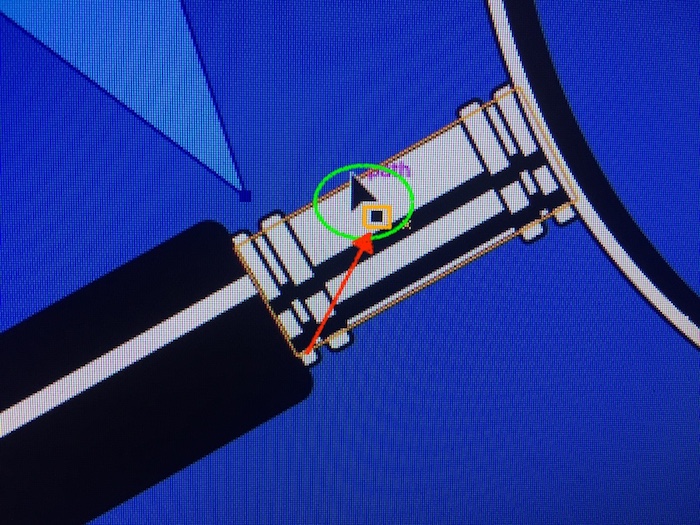
When using either the select or direct select tool, the tool's cursor displays along with an additional icon directly offset right (see item in orange callout).
When the additional icon displays, functions are disabled within the tool.
How do I remove the additional icon and restore normal tool function?
Thank you.

Copy link to clipboard
Copied
Also, just noticed when I quit the program to exit and start over it always treats it as if the program crashed. even though I manually quit the program.
Copy link to clipboard
Copied
Hi there,
I just had this issue and saw a quick tutorial online. Try under View-Show Bounding Box, that should do it.
All the best,
GB

Copy link to clipboard
Copied
I have also had a similar problem with the cursor selecting objects that are about a half inch or more away from it. This is aggravating as unwanted objects always getting unintentionally selected. I've changed the preferences in the application and in the library, and this annoying thing keeps happening and slowing down my workflow. This has been happening for years, and I always thought this was Adobe's idea of an "improvement" by making the precise selection of objects completely impossible. What gives?

Copy link to clipboard
Copied
I'm having this same exact problem (PC) and when I look up how to try to fix it, all I see are people bringing up the problem with no actuual answers to be given. What's the point of having these extremely expensive programs if these issues persist for month-years with absolutely no Adobe Team member even acknowledgeing this problem. It's extremely frustrating, especially when on a deadline and the program was working perfectly fine before 3 hours ago.


Get ready! An upgraded Adobe Community experience is coming in January.
Learn more
 AdChoices