


Exit
  • Global community
    • Language:
      • Deutsch
      • English
      • Español
      • Français
      • Português
  • 日本語コミュニティ
  • 한국 커뮤니티
0

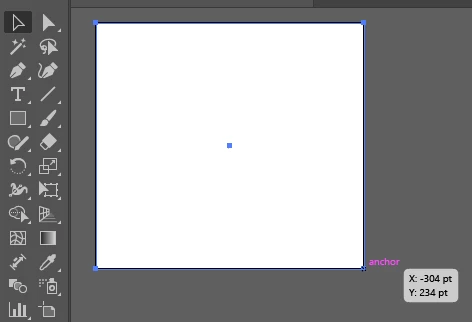
Selection Tool Not Showing Anchor Points for Resizing
New Here ,
Oct 07, 2025 Oct 07, 2025

Screenshot 2025-10-07 120713.png


Hi everyone,

As shown in the image above, my selection tool isn’t displaying the anchor points that allow me to drag and resize objects. This issue has been occurring frequently lately.

I’ve tried reinstalling and even rolling back to previous versions, but the problem returns after a few days with each version.

Could someone please guide me on how to permanently fix this issue?

Thanks in advance for your help!

TOPICS
Bug , Draw and design , How-to , Tools
160
Translate
Report
Community guidelines
Be kind and respectful, give credit to the original source of content, and search for duplicates before posting. Learn more
community guidelines

correct answers 1 Correct answer

Community Expert , Oct 07, 2025 Oct 07, 2025

Did you try View > Show Bounding Box?

Translate
Adobe
Community Expert ,
Oct 07, 2025 Oct 07, 2025

Did you try View > Show Bounding Box?

Translate
Report
Community guidelines
Be kind and respectful, give credit to the original source of content, and search for duplicates before posting. Learn more
community guidelines
New Here ,
Oct 07, 2025 Oct 07, 2025

Yes, thanks. It's working now.

Translate
Report
Community guidelines
Be kind and respectful, give credit to the original source of content, and search for duplicates before posting. Learn more
community guidelines
Community Expert ,
Oct 07, 2025 Oct 07, 2025
LATEST

Good to hear that helped.

Translate
Report
Community guidelines
Be kind and respectful, give credit to the original source of content, and search for duplicates before posting. Learn more
community guidelines