
ashimg23377171
Inspiring
January 8, 2020
Answered

selection unusually large in Illustrator

  • January 8, 2020
  • 3 replies
  • 4308 views

hello

I am a novice when it comes to Illustrator so my explanation to my problem may fall short so please bear with me.

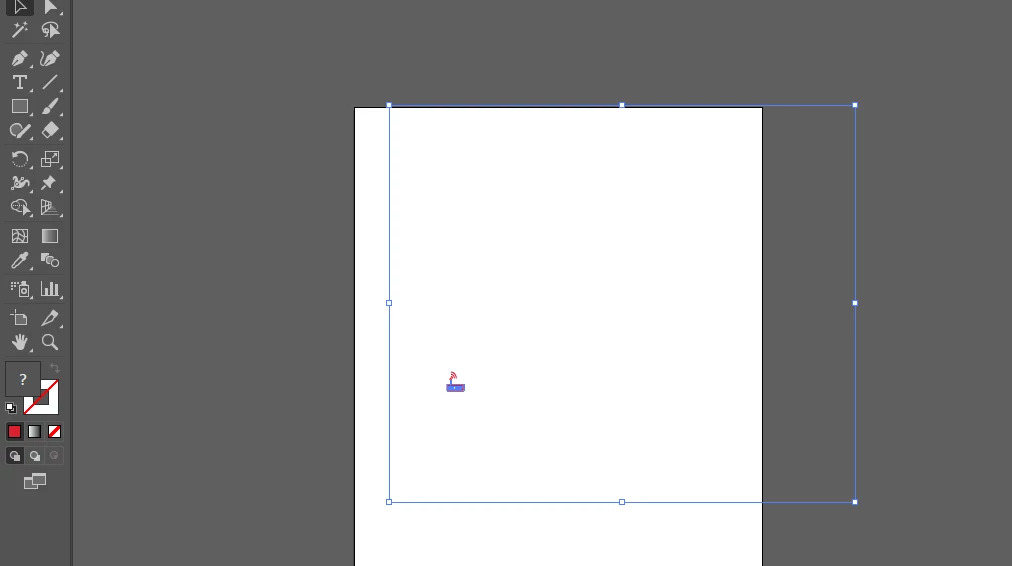
i have an icon that i have grouped. however, the selection is unusually large - blue frame around. so when i select other elements on the page, it gets all distorted.

attached is the screenprint. any informaiton on how to fix this would be appreciated.


Thank you

Correct answer Jacob Bugge

ashimg,


In both cases, I believe you may have (accidentally) grouped the your objects with a large nofill/nostroke rectangle, maybe forming a Clipping Mask with the rectangle as the Clipping Path, in which case you may release/ungroup/delete.


I believe the expanded Layer in the Layers palette will show whatever it is, and you can make changes there.


Edit: Hi Sam.


3 replies

Jacob Bugge
Community Expert
Community Expert
January 8, 2020

For my part you are welcome, ashimg.


There are different possible causes for the creation of unneeded and unwanted Clipping Masks, different versions just to mention one; and sometimes Illy (job description Adobe Illustrator) moves in mysterious ways (some would say most of the time).


Jacob Bugge
Community Expert
Jacob BuggeCommunity ExpertCorrect answer
Community Expert
January 8, 2020

ashimg,


In both cases, I believe you may have (accidentally) grouped the your objects with a large nofill/nostroke rectangle, maybe forming a Clipping Mask with the rectangle as the Clipping Path, in which case you may release/ungroup/delete.


I believe the expanded Layer in the Layers palette will show whatever it is, and you can make changes there.


Edit: Hi Sam.


ashimg23377171
Inspiring
January 8, 2020

thanks Jacob. i did look up the layers panel. i was able to select and delete the blue selection without it affecting anything on the image.

i think that is what i was looking for. thanks everyone.

ashimg23377171
Inspiring
January 8, 2020

the illustration in the screenprint below is from an existing file... i was wondering why would someone do that though


sishamIAGD
Community Expert
Community Expert
January 8, 2020

If you have a look in outline view (PC: Ctrl+Y Mac: Opt+Y) does it show if your icon has a foreign object within it's group? If so use the direct selection tool to delete this.

ashimg23377171
Inspiring
January 8, 2020

Hi Sisham

All i see is the following:


ashimg23377171
Inspiring
January 8, 2020

i have an existing illustration and some of the elements in the illustration have disproportionate selections spanning the entire page. for example, in the page below:

the mobile icon has a large selection. so i am having a hard time working with other elements, coz when i select other elements the mobile icon also gets selected.