


Known Participant
Oct 25, 2024 4:05 PM UTC
Question

Separate objects in the pattern without getting duplicates

Hi!
I want to release objects from a pattern (swatch filled), and I have tried to follow recomended steps: See the image where I show how I proceeded.
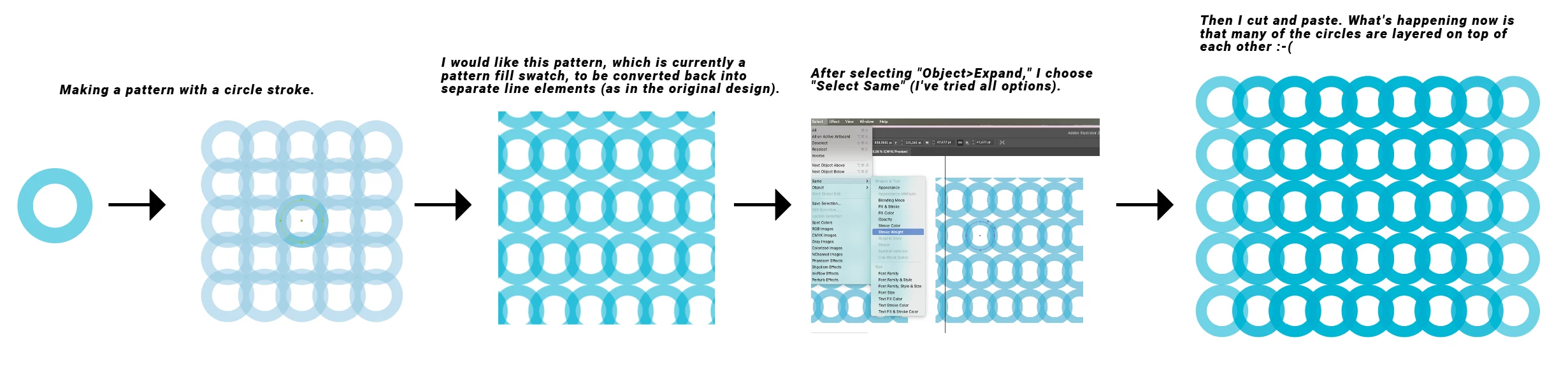
The problem is that all the objects released from the pattern are layered multiple times on top of each other. This creates a lot of extra work for me. I need to create many patterns that will also need to be released as single objects, so I hope someone can help me with this!

This topic is closed to new replies. Start a new post to keep the conversation going.

6 replies

Monika Gause
Community Expert
Community Expert
Oct 25, 2024 5:13 PM UTC

If you plan to release them I would probably not use patterns at all, because when expanding it will create excessive clipping masks as well and there will always be duplicates along the edges after releasing the masks. Use the repeat instead. To Expand it, go to Object > Expand. There will be one clipping mask after wards. Release that and then you are done.

https://youtu.be/H0h5mg7AG0E

Translate
Reddhare_Author
Known Participant
Oct 25, 2024 5:45 PM UTC

Thank you for taking the time to show me this, but I need to use the "Make Pattern" option to get enough flexibility with the patterns. I’ll be creating many patterns, and some will be a bit more complex. The reason I want to release the objects is to be able to create slightly different "endings" for the patterns.

Translate
Monika Gause
Community Expert
Community Expert
Oct 25, 2024 6:02 PM UTC

What kind of complexity are we talking about, because there is more complexita in the repeat than visible in my video?


You cannot solve the overlapping stuff in patterns and neither can you solve the clipping masks. It's inherent.

Translate