
Known Participant
October 25, 2024
Question

Separate objects in the pattern without getting duplicates

  • October 25, 2024
  • 1 reply
  • 819 views
Hi!
I want to release objects from a pattern (swatch filled), and I have tried to follow recomended steps: See the image where I show how I proceeded.
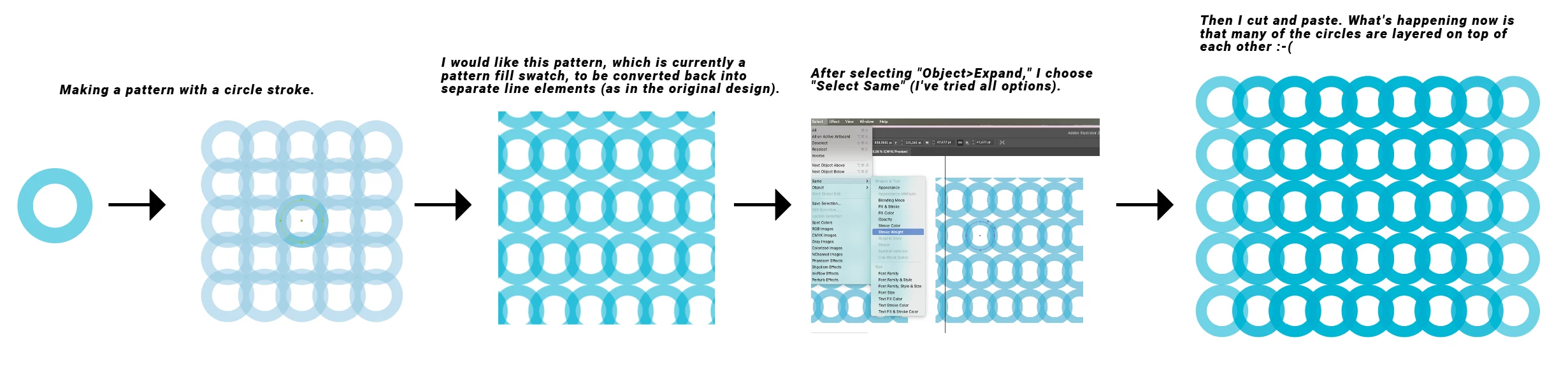
The problem is that all the objects released from the pattern are layered multiple times on top of each other. This creates a lot of extra work for me. I need to create many patterns that will also need to be released as single objects, so I hope someone can help me with this!

This topic has been closed for replies.

1 reply

Monika Gause
Community Expert
Community Expert
October 25, 2024

If you plan to release them I would probably not use patterns at all, because when expanding it will create excessive clipping masks as well and there will always be duplicates along the edges after releasing the masks. Use the repeat instead. To Expand it, go to Object > Expand. There will be one clipping mask after wards. Release that and then you are done.

https://youtu.be/H0h5mg7AG0E

Reddhare_Author
Known Participant
October 25, 2024

Thank you for taking the time to show me this, but I need to use the "Make Pattern" option to get enough flexibility with the patterns. I’ll be creating many patterns, and some will be a bit more complex. The reason I want to release the objects is to be able to create slightly different "endings" for the patterns.

Monika Gause
Community Expert
Community Expert
October 25, 2024

What kind of complexity are we talking about, because there is more complexita in the repeat than visible in my video?


You cannot solve the overlapping stuff in patterns and neither can you solve the clipping masks. It's inherent.