Copy link to clipboard
Copied
Hi,
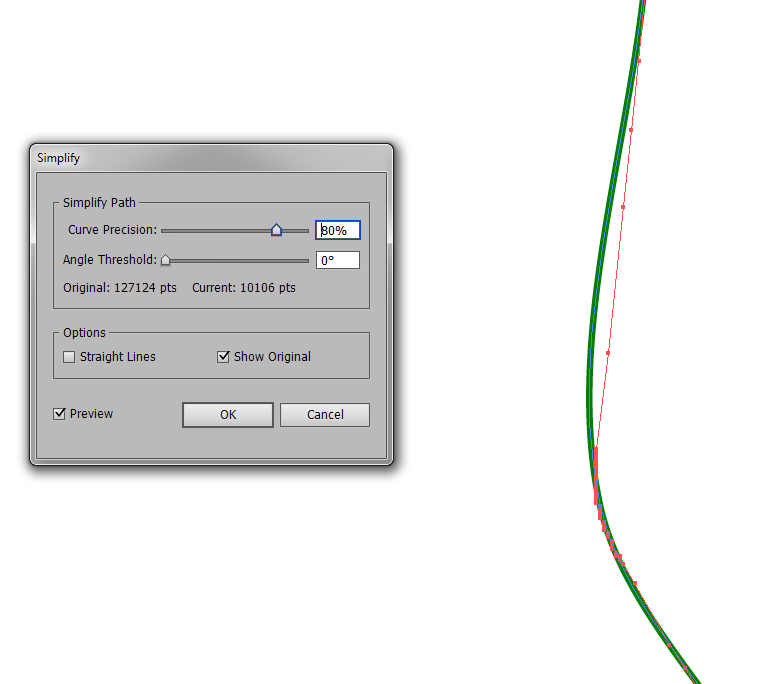
I am trying to simplify path in Illustrator CS6 and the dialog box let me choose the Curve Precision (as shown attached). I also tick on Original and Preview to view the simplification on screen...
Howerver, is there any was to "limit" the simplification to a certain limit/offset, in drawing units, such as cm? For example, if I want to limit the simplification to 1mm offset (maximum), how can I do that?
The paths are from a map and it looks essential to control the simplification process.
Thanks

You can't.
You might want to ask for improvements to the Simplify function in https://illustrator.uservoice.com/
But until then give VectorScribe a try.
Copy link to clipboard
Copied
If you want to show a screenshot please upload it via the web interface of the forum.
That said: you can't limit the simplification. Other than by the controls available or by selecting some points with lasso or direct selection tool and only smoothing them.
If you want more control, give the plugin VectorScribe a try. in its Simplification tool you can enter limits for the precision of the simplification result.
Copy link to clipboard
Copied
I forgot to attach the screenshot...
the offset mentionned is the distance in mm or cm between the orignial path (in red) and the simplified path previewed in green. I would like to control/set with maximum offset.

Copy link to clipboard
Copied
You can't.
You might want to ask for improvements to the Simplify function in https://illustrator.uservoice.com/
But until then give VectorScribe a try.
Get ready! An upgraded Adobe Community experience is coming in January.
Learn more