Nicky G.
Known Participant
March 29, 2023
Answered

settings raster effects value visible main screen

  • March 29, 2023
  • 4 replies
  • 5164 views


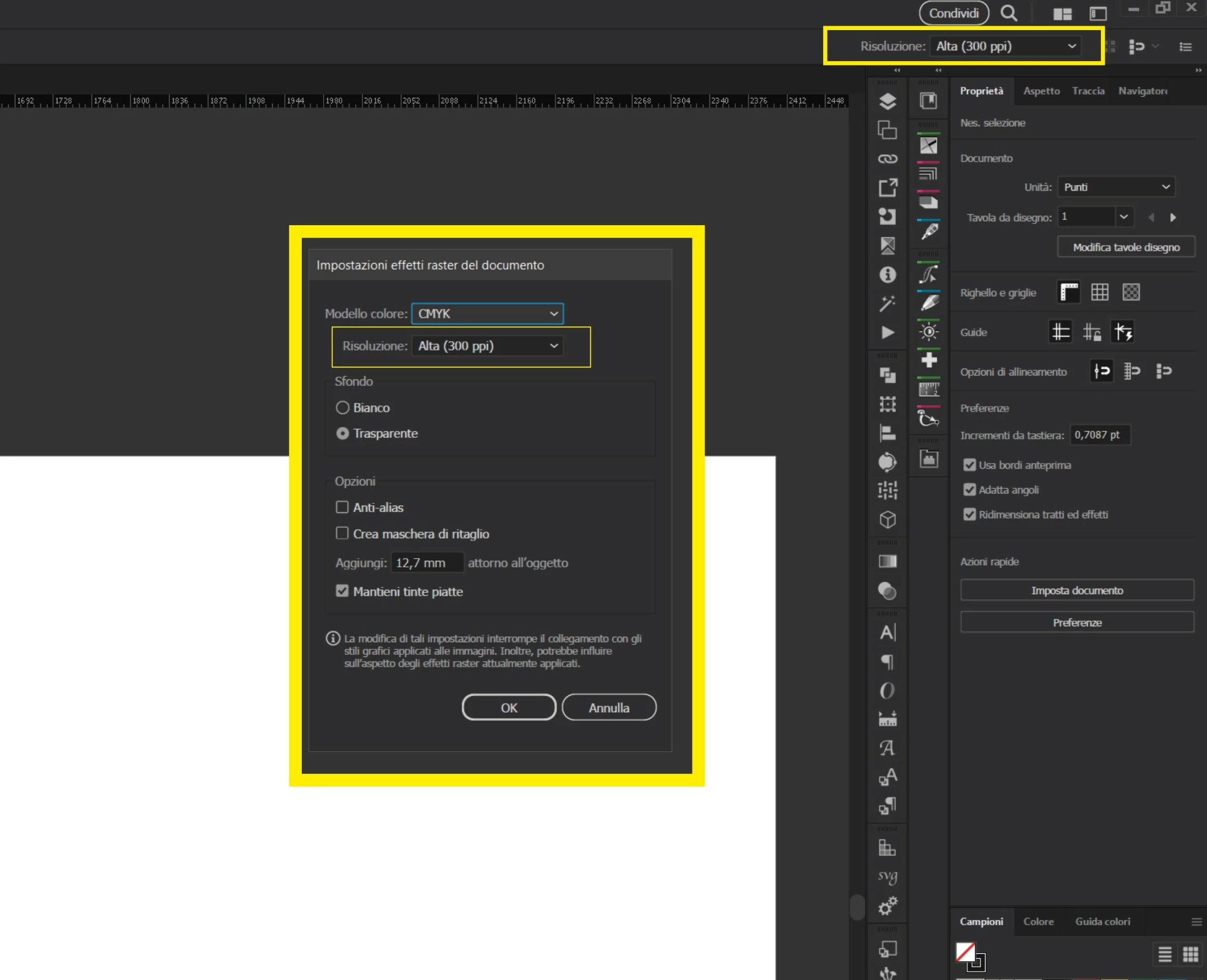
I need to view somewhere in the Illustrator interface, the value set in the "raster effects settings" panel.

Is there a scripted way to implement this?

I've created actions that set this value to 72ppi / 300ppi so that I can change it when the document becomes heavy and unmanageable (thanks to using only 1 CPU CORE, thanks Adobe ❤).
The problem is that if I save the file, I will probably save it at 72ppi, but for printing the effects are poor and you have to set them to 300ppi.
So having the value always visible on the screen, I can have more control in knowing which value is set...
The problem: Can it be done and how is it done?


Correct answer Inventsable

great!!!!   WOW!!! 


Excellent, perfect like this.
last tips:

1. Tab title: "Raster Effect Settings"
2. Is it possible to set a minimum height of the non-resizable tab that ends under the buttons 72,150,300 ?
3. if I click on the buttons 72,150,300 the values are applied in the effect panel/Raster Effect Settings of the document, but if I insert them in the menu the button in the CEP panel does not update. where am i wrong?
3a.  Correct
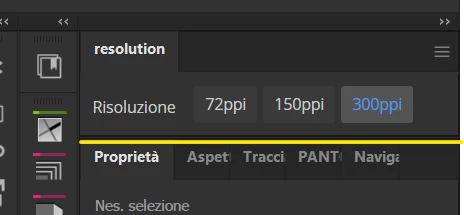
72ppi
150ppi
300ppi

(ppi space)


4.AIHostAdapter I don't know this I have not installed anything. I installed Resolution.zxp file with Anastasiy Extension Manager https://install.anastasiy.com/

PS: but if I want to change the writing in the panel directly, which files should I put my hands on in all that zip file? Tried to peek but couldn't find anything that made me figure out where to change "the html part of the panel let's say"... Tab name, etc.


All done. RE: AIHostAdapter, please look at the README of the repo where I link the source for it and a post about it's installation (link is for Windows, search for equivalent in Mac if needed).


There are a few things about modifying it:

  1. If you modify the code inside the ZXP, a checksum will fail and Adobe will refuse to open it as once it's certified as ZXP, the contents cannot be changed (for security this is the purpose of ZXPs, which are certified zip archives).
  2. In order to freely modify it, this can get complicated. It isn't as simple as a single HTML file, it's a legacy Vue 2 project compiled via Webpack from my legacy system and component library. Most of the content of the panel itself is located in two files:
  • CSXS/manifest.xml, which contains top-level app information like the panel's display name or dimensions of the panel itself
  • src/App.vue, which contains all the interior logic of the panel like the labels, text values, and functionality

There's a lot obscured from this panel because it's using my own component library to handle most of the things I don't want / need to touch like theme colors and triggers, styling for buttons or etc. It's a bit complicated to go into how exactly you'd modify it, unfortunately it'd just be easier to link the frameworks/libraries it uses:

  • bombino - The CLI generator that controls most code
  • bombino-commands - The Adobe specific CLI actions that handle most things like production/dev contexts, compiling, signing to ZXP, etc.
  • brutalism - The UI library under the hood which provides custom components that appear to be native to Adobe, like theme colors, Buttons, the Select / dropdown component I showed earlier, etc.


You'd need NodeJS installed to even use these, then would need to code in valid Vue2 syntax and either keep it in Dev mode but follow instructions for Unsigned Extensions in the CEP Cookbook or you'd need to use the terminal commands to switch, build, and sign each time before reinstalling the newest versions.


4 replies

c.pfaffenbichler
Adobe Expert
April 1, 2023

@Nicky G., please remember to mark the correct answer as such. 

Nicky G.
Nicky G.Author
Known Participant
April 1, 2023

How do I do this? I'm impractical here

Inventsable
Brainiac
April 1, 2023

Hello, I built you a simple CEP extension that displays the document resolution in realtime, seen here as the panel with 300:

The property you're looking for in scripting would be:

app.activeDocument.rasterEffectSettings.resolution

There is no way to append tools to the toolbar in the way you have in your screenshots without using the Illustrator SDK and creating an .aip, which I think has a far higher burden to entry than scripting or CEP. It'd be possible to do this, but it'd take a lot of time and effort (or someone knowledgeable enough with the SDK and feeling pretty generous) to learn on your own since it's a pretty big undertaking just setting up the environment and compiling things correctly to even display a control let alone have it do something.


The panel I've made can be resized as a thin vertical or horizontal CEP panel, which is probably the easiest solution possible for realtime resolution display.

Nicky G.
Nicky G.Author
Known Participant
April 1, 2023

thank you so much, I'll try it later and tell you what I think. I'm sending you a screenshot, couldn't you make a Tab panel to put horizontally in the tools on the right? maybe with the drop down for change other than display resolution raster effects?


Kurt Gold
Adobe Expert
March 30, 2023

That's a good feature request.


Guess you already know that if you save as .ai you get a (subtle) warning if the document raster effect setting is set to ≤ 72 ppi, don't you?

Nicky G.
Nicky G.Author
Known Participant
March 30, 2023

No, I don't know about this, explain to me better.


Today I worked on files, vector labels, written logos and colored backgrounds... Even if I didn't have any raser effect applied, even though I was working at 72ppi I noticed a big slowdown.... And between M.2,

Kurt Gold
Adobe Expert
March 30, 2023

When you save as .ai you usually get a dialog called "Illustrator Options".


At the bottom of that dialog there is a warning area that will tell you if the document raster effects resolution is set to 72 ppi or less.


c.pfaffenbichler
Adobe Expert
March 30, 2023

I am more of a Photoshop user and have little Illustrator Scripting experience, but I would expect that a UXP Panel would be the best option for something like this. 

Creating a CEP Panel now might be of shortlived benefit. 


Unfortunately Illustrator might not be there yet with regard to UXP … 

https://community.adobe.com/t5/illustrator-discussions/when-will-adobe-uxp-for-illustrator-be-released/m-p/13473663#M350446

Nicky G.
Nicky G.Author
Known Participant
March 30, 2023

I'm inexperienced in scripts, even less in js lx scripts for the Adobe world. I believe that, given the poor performance of Ai, also declared by those with machines with more recent hardware e  performing than mine, find alternative solutions to decrease the load on rendering cpu, gpu etc. for example the solution adopted by Indesign is not bad at all. view in low resolution but then export, always insert the high resolution file. or for those coming from the video world, they use low-resolution proxy files but in the final stage rendered with high video. illustrators is old and works on 1 single core... you have to curb this somehow. or buy computers they use at NASA. if a way could be found to add that information to the illustrator gui, apart from additional CEP panels that would be tops.

c.pfaffenbichler
Adobe Expert
March 30, 2023

Sorry, I think at current a custom panel would be the only option. 


Indesign and Illustrator are quite different »beasts«, for page layout a hires preview of placed images is often just not necessary but in illustration it can make a relevant difference. 

That aside Illustrator could certainly stand some improvements …