


Exit
  • Global community
    • Language:
      • Deutsch
      • English
      • Español
      • Français
      • Português
  • 日本語コミュニティ
  • 한국 커뮤니티
0

Shape builder tool.

Community Beginner ,
Jun 26, 2017 Jun 26, 2017

Hello,

I am following a tutorial in the Adobe Illustrator CC Classroom in a Book. I need to double click on the shape builder tool to open an options box which just doesn't happen. I believe I've tried everything but it's still not working. Can anyone shed some light on this please? Is there another way to select it?

Many thanks in advance.
1.4K
Translate
Report
Community guidelines
Be kind and respectful, give credit to the original source of content, and search for duplicates before posting. Learn more
community guidelines

correct answers 1 Correct answer

Community Expert , Jun 26, 2017 Jun 26, 2017

Are you working on the butterfly on pp 115–116? Step 8? (If not, let us know what page and what step you are stuck on.)

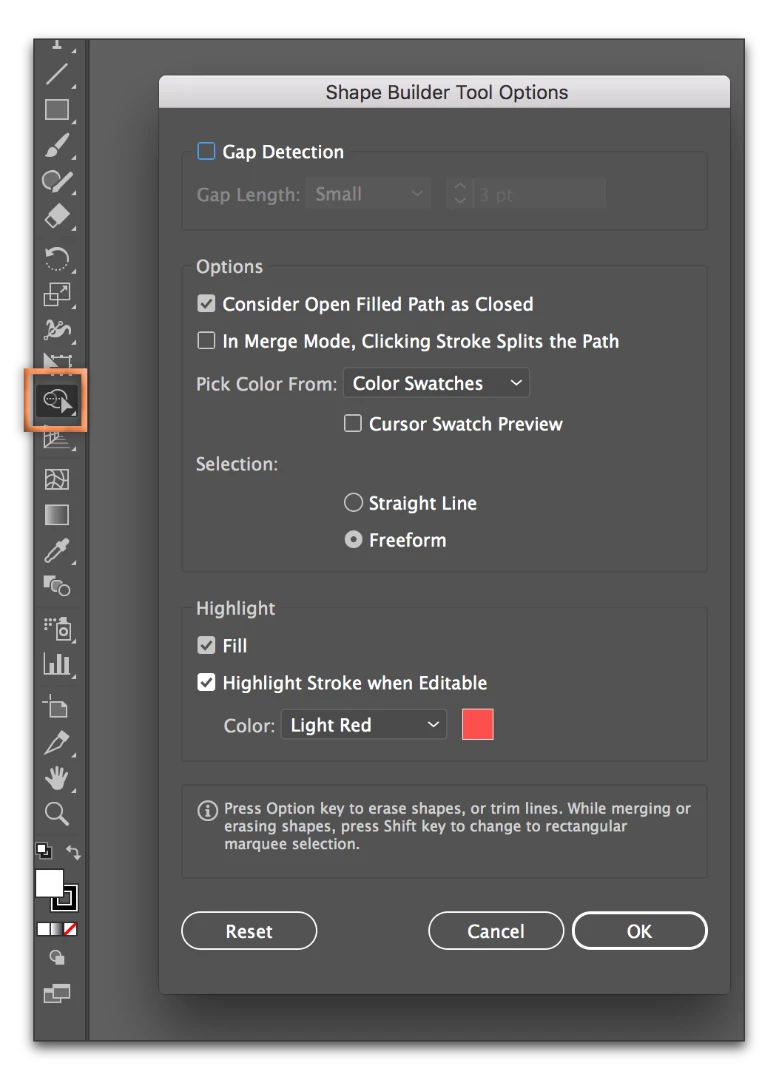
If yes, hover over the Shape Builder tool in the toolbox, and double click directly on the tool (double click inside my orange box).

Adobe Illustrator CC 2017ss_002.png

Translate
Adobe
Community Expert ,
Jun 26, 2017 Jun 26, 2017

Are you working on the butterfly on pp 115–116? Step 8? (If not, let us know what page and what step you are stuck on.)

If yes, hover over the Shape Builder tool in the toolbox, and double click directly on the tool (double click inside my orange box).

Adobe Illustrator CC 2017ss_002.png

Translate
Report
Community guidelines
Be kind and respectful, give credit to the original source of content, and search for duplicates before posting. Learn more
community guidelines
Community Expert ,
Jun 26, 2017 Jun 26, 2017
LATEST

VixWard  wrote

Is there another way to select it?

Yes, there is another way to bring up Options for the Shape Builder tool if Barbara's method does not work.

  1. Select the Shape Builder tool either by clicking on it or by using the keyboard shortcut of Shift + M
  2. Press Return (Enter if you are on Windows)
Translate
Report
Community guidelines
Be kind and respectful, give credit to the original source of content, and search for duplicates before posting. Learn more
community guidelines