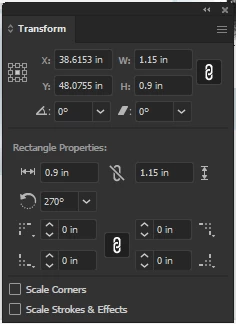
There is no contradiction. The information at the top of the panel is the standard path information, which includes the width and height of the bounding both which contains the path and, unless the path is circular, these dimensions will change as the path is rotated. The information at the bottom of the panel is only present if the path is a Live Shape, created by the Rectangle Tool, Rounded Rectangle Tool, Ellipse Tool, Polygon Tool, Shaper Tool, or Line Segment Tool, and it includes with some caveats) the dimensions and rotation of the shape as it was originally established. In general, the dimensions will not change with the rotation of the object, because, unlike the bounding box dimensions, they are independent of orientation. A line segment created using the Line Segment Tool will be shown as a line segment length and an angle. Rotating the shape wil change the bounding box dimensions, but the line segment length will not change. If you go to the Object menu > Shape > Expand Shape the object will cease to be a Live Object, i.e. will become an ordinary path.The Shape information will disappear, leaving only the bounding box dimensions. I hope this makes sense; I'm struggling to give a clear explanation.
Peter

 AdChoices