
Shared user cannot access project files but does have permission
Hi,
We are experiencing a problem with permission access to the Project folders and files.
We have a team of 5 Creative Cloud users, and they are all invited to the Projects folders and files. All users are under our org Creative Cloud teams account that I administer.
All 5 users have access to edit the files. The other 4 users can access the files without any issues.
1 of the users is unable to access the projects files, but everyone else can.
They can see the files and folders under Projects in the Creative Cloud desktop or online app.
But if they try to open a file, they are seeing messages that they do not have access to the file.
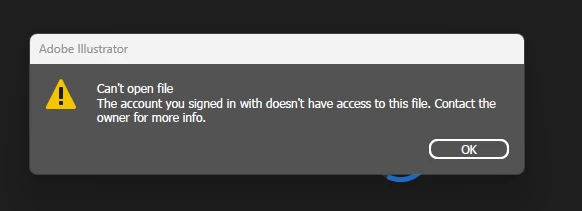
Oddly, if they use "Open in web" from Creative Cloud app they can open the files with AI beta online. So they must have access, but it looks like some kind of problem with their desktop app or cloud app.
I have checked the permissions for the 1 user and also tried removing and adding again their permissions. This made no difference.
I tried uploading a new image to a folder and gave permission again, to see if it was our existing images that may be at fault. But that also made no difference.
I've made sure the user has updated both Illustrator and Creative Cloud cloud app to the latest versions. This made no difference.
I got the user to sign out and sign in again of the Creative cloud. This made no difference.
I also got the user to restart their PC, in case a fresh restart may help. This also made no difference.
What might the problem be? Or is there a known issue with project file permissions?
Thanks
Julian
 AdChoices