
Copy link to clipboard
Copied
Hi,
We are experiencing a problem with permission access to the Project folders and files.
We have a team of 5 Creative Cloud users, and they are all invited to the Projects folders and files. All users are under our org Creative Cloud teams account that I administer.
All 5 users have access to edit the files. The other 4 users can access the files without any issues.
1 of the users is unable to access the projects files, but everyone else can.
They can see the files and folders under Projects in the Creative Cloud desktop or online app.
But if they try to open a file, they are seeing messages that they do not have access to the file.
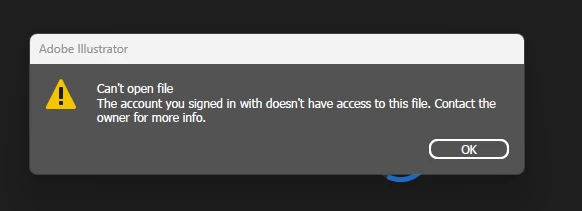
Oddly, if they use "Open in web" from Creative Cloud app they can open the files with AI beta online. So they must have access, but it looks like some kind of problem with their desktop app or cloud app.
I have checked the permissions for the 1 user and also tried removing and adding again their permissions. This made no difference.
I tried uploading a new image to a folder and gave permission again, to see if it was our existing images that may be at fault. But that also made no difference.
I've made sure the user has updated both Illustrator and Creative Cloud cloud app to the latest versions. This made no difference.
I got the user to sign out and sign in again of the Creative cloud. This made no difference.
I also got the user to restart their PC, in case a fresh restart may help. This also made no difference.
What might the problem be? Or is there a known issue with project file permissions?
Thanks
Julian
Copy link to clipboard
Copied
Hello @DEIFDK,
Thanks for reaching out. To get help, please contact your admin: https://adobe.ly/3Yr57fT and ask them to create a ticket for this from the Admin Console.
If you're the admin, you can get help here: https://adobe.ly/3Uowp5y.
Feel free to reach out if you have more questions or need assistance. We'd be happy to help.
Anubhav
Copy link to clipboard
Copied
Hi Anubhav,
OK, thank you.
I am the Admin for our Teams subscription, so I'll raise a support ticket via the console.
Thanks
Julian
Copy link to clipboard
Copied
Hey Julian,
That definitely sounds frustrating, especially since everything looks fine with permissions. I’ve seen a similar issue where one user couldn’t open shared project files even though they were part of the same Creative Cloud team.
Here are a few things worth checking that usually fix it:
Clear Creative Cloud cache
Have the affected user close all Adobe apps.
Then go to this path:
Windows: C:\Users<username>\AppData\Local\Adobe\OOBE
Mac: ~/Library/Application Support/Adobe/OOBE
Rename the OOBE folder to OOBE_old and restart Creative Cloud. This rebuilds sync and permission data.
Check sync status
Sometimes the desktop app stops syncing properly. Make sure the Creative Cloud icon shows “Synced” and not “Syncing” or “Error.” If it’s stuck, sign out and back in after clearing cache.
Reset Adobe ID access
Go to creativecloud.adobe.com, log out, and then log back in again. Sometimes the permissions token gets outdated.
If that doesn’t help, it’s probably a local sync or token issue. Reinstalling just the Creative Cloud desktop app (not the full suite) often resolves it completely.
I had a teammate run into the same problem last month, and clearing the OOBE folder plus reinstalling the CC app fixed it right away.
Copy link to clipboard
Copied
Thanks for the info. I'll get the user to try this and see if it can resolve it.
Copy link to clipboard
Copied
Hi DEIFDK,
We would like to follow up on your issue. Are you able to resolve the issue by following the suggestions shared above? Please feel free to update the discussion if you need further assistance from us.
We would be happy to assist you further.
Thanks,
Harshika
Copy link to clipboard
Copied
Hi Harshika,
No sadly, the above suggestions have not helped for this user. It is really odd as it is only this 1 user who is having problems with the shared files.
Since this post above, I've had a support session with Adobe, and although they tried several different things connected to the users PC and mine, they were not able to resolve the issue and have oddly closed the ticket (Case Number: ADB-42112594-N3K0).
When they closed the case they gave several further suggestions, but these have not resolved the issue either.
The only thing we did not try was a complete uninstall and reinstall of Creative Cloud on the user's PC. We will try this later today to see if that helps.
It certainly seems to be the desktop apps that are having the issue, as the user can open the file in the web apps, like AI BETA. And if they open a file in the web app and use Open in desktop app, they get an error that they cannot access the file due to permissions.
This is the error message that Illustrator gives:
But the user is both granted permission and is signed in with the correct Adobe ID. Guess it wouldn't work in the web app otherwise.
Any help is appreciated.
Thanks
Julian
Copy link to clipboard
Copied
Hi Julian,
This issue often happens due to sync or cache glitches. Try these steps:
If that doesn’t help, have them reinstall Creative Cloud Desktop — this usually resets broken permissions locally.
Copy link to clipboard
Copied
Hi Jim,
We'll give that try before we uninstall and reinstall everything.
Thanks
Julian
Copy link to clipboard
Copied
We tried removing CoreSync, etc, before a complete uninstall, sadly that didn't help.
So we ran the Creative Cloud uninstaller as Repair first (did not help also), so ran Uninstall. Then used the Creative Cloud cleaner tool to remove all of Adobe from the user's PC.
Fresh restart and then reinstall of Creative Cloud desktop app, and it is still not working for this user. They can still access them online though.
This looks to like a cloud problem than the user's own PC. In fact, we have also tried getting the user to sign-in on my PC for their AdobeID. Same problem on my PC for this user.
I will need Adobe to open their support again and take a further look.
Thanks for the help
Julian
Copy link to clipboard
Copied
Quick update, we're still not able to solve this.
I asked the user to create a new project folder and upload an Illustrator file to share with me.
They shared the project folder with me. I did not get an email regarding sharing, which normally happens, and additionally I can not see the shared folder/file under the Creative Cloud desktop app. Even under the Shared with you filter. However, if I use the online Creative Cloud app, I can see this under the Projects area and open it both in AI BETA online and with the local desktop app.
It's just not shown in my Creative Cloud desktop app.
Has their AdobeID or online content become corrupted somehow? I can see from the Teams storage that this user has 176MB of storage used, but cannot see more via the Admin console.
Thanks
Julian
Copy link to clipboard
Copied
Hello @DEIFDK,
I'm sorry to hear you're still having trouble with this. To get help, contact your admin: https://adobe.ly/4oLzc5d
If you're the admin, you can get help here: https://adobe.ly/47QFaMA
Feel free to reach out if you have more questions or need assistance. We'd be happy to help.
Anubhav
Find more inspiration, events, and resources on the new Adobe Community
Explore Now