
Known Participant
July 4, 2023
Answered

Show hidden text-object depending on the name

  • July 4, 2023
  • 3 replies
  • 1529 views

Hello there,

i have a long script with several functions, i just want implement something just right at the beginning of it, before the script execute any of the other stuff.


What i need is to make visible specific text object. These text object are called SAMPLE and are inside some layers of the doc, but not into every layer. (see pic below)
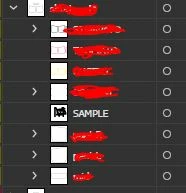


Can you please tell mehow to do it and where to place it? (see pic of the first lines of code below)



Thank you in advance!

This topic has been closed for replies.
Correct answer Charu Rajput

Hi and thank you.

Sorry if i wasnt clear. I dont need to hide the text object with different name than "SAMPLE". I want to make visible only the text objects called "SAMPLE", which in the document are currently hidden.


Thank you in advance.


Ohh, sorry to misunderstood. Use following if statement

if (_textFrames[i].name == "SAMPLE") {
        _textFrames[i].hidden = false;
}

3 replies

pixxxelschubser
Community Expert
Community Expert
July 4, 2023

Hi Charu

😉


Or perhaps - depending on the structure - something more like that?


//…
if (TF[i].name == "Sample" && TF[i].hidden == true) {
    var aTF = TF[i];
    try {aTF.hidden =!aTF.hidden;}
    catch (e) {
        if (aTF.parent.visible == false) {
            aTF.parent.visible  =!aTF.parent.visible;
            if(TF[i].hidden == true) {
                aTF.hidden =!aTF.hidden;
                }
            }
        }
    }
//…


Charu Rajput
Community Expert
Community Expert
July 6, 2023

@pixxxelschubser ,

Ofcourse, a better approach. I write it down the simple solution as nothing is visible in the existing code.

That's correct if layer is hidden, my code will work but since it was not mentioned anywhere in the OP post, I did not consider that.. 🙂


Best regards
pixxxelschubser
Community Expert
Community Expert
July 6, 2023
quote

Hi Pixx and thank you for yoining the post.

Here is a more wide screenshot, sorry i can't show it entirely, hope is enough …


By @Delresto


I meant the first screenshot showing the "Layers" panel. Unfortunately, it is not possible to see how your document is structured and which layers, sublayers, groups and elements are locked or visible.

Hi @Charu Rajput 

everything is fine.

😉
Unfortunately, experience shows time and again that it is precisely such "little things" that are not mentioned that lead to many scripts not working and triggering errors. For this reason, I often programme an additional security level.

pixxxelschubser
Community Expert
Community Expert
July 4, 2023

Unfortunately, your screenshots are cut off in the important places.


It is somewhat difficult without seeing how the layer palette is structured - and what exactly is shown or hidden.
Background: You cannot show a hidden element of a layer if the layer itself is hidden.


Also: How do you proceed if the text layer is shown but the parent layer is hidden?

This can be quite confusing with deeply nested structures, especially if nothing else on the layer is allowed to be displayed at the same time.

DelrestoAuthor
Known Participant
July 4, 2023

Hi Pixx and thank you for yoining the post.

Here is a more wide screenshot, sorry i can't show it entirely, hope is enough.

I tested Charu lines in a brand new jsx file and it works as intended.

Can you suggest me where to place it in the script i have?

Thanks!


Charu Rajput
Community Expert
Community Expert
July 4, 2023

Hi,

The following version will show only those textframes that are named as SAMPLE.

var _doc = app.activeDocument;
_textFrames = _doc.textFrames;
for (var i = 0; i < _textFrames.length; i++) {
    if (_textFrames[i].name != "SAMPLE") {
        _textFrames[i].hidden = true;
    }
}


In your screenshot, code is not completely visible. But what is visible, you can place above section of code, inside you main().

Best regards
DelrestoAuthor
Known Participant
July 4, 2023

Hi Charu, thank you for your reply.

I apologize if i'm wrong but

hidden = true

shouldnt be

hidden = false

since i want them to not be hidden?

I'm not code expert, i just noticed something like that before, that's why i have this doubt.


So i can place it just after the line "main()", correct?


Thank you.

Charu Rajput
Community Expert
Community Expert
July 4, 2023

Hi,

1. You need to place after the line

function main {


2. hidden = true is correct, because the condition in if statement says that if the name of the textframe is not SAMPLE, then hide. See operator !=


Best regards