
Participant
July 19, 2025
Answered

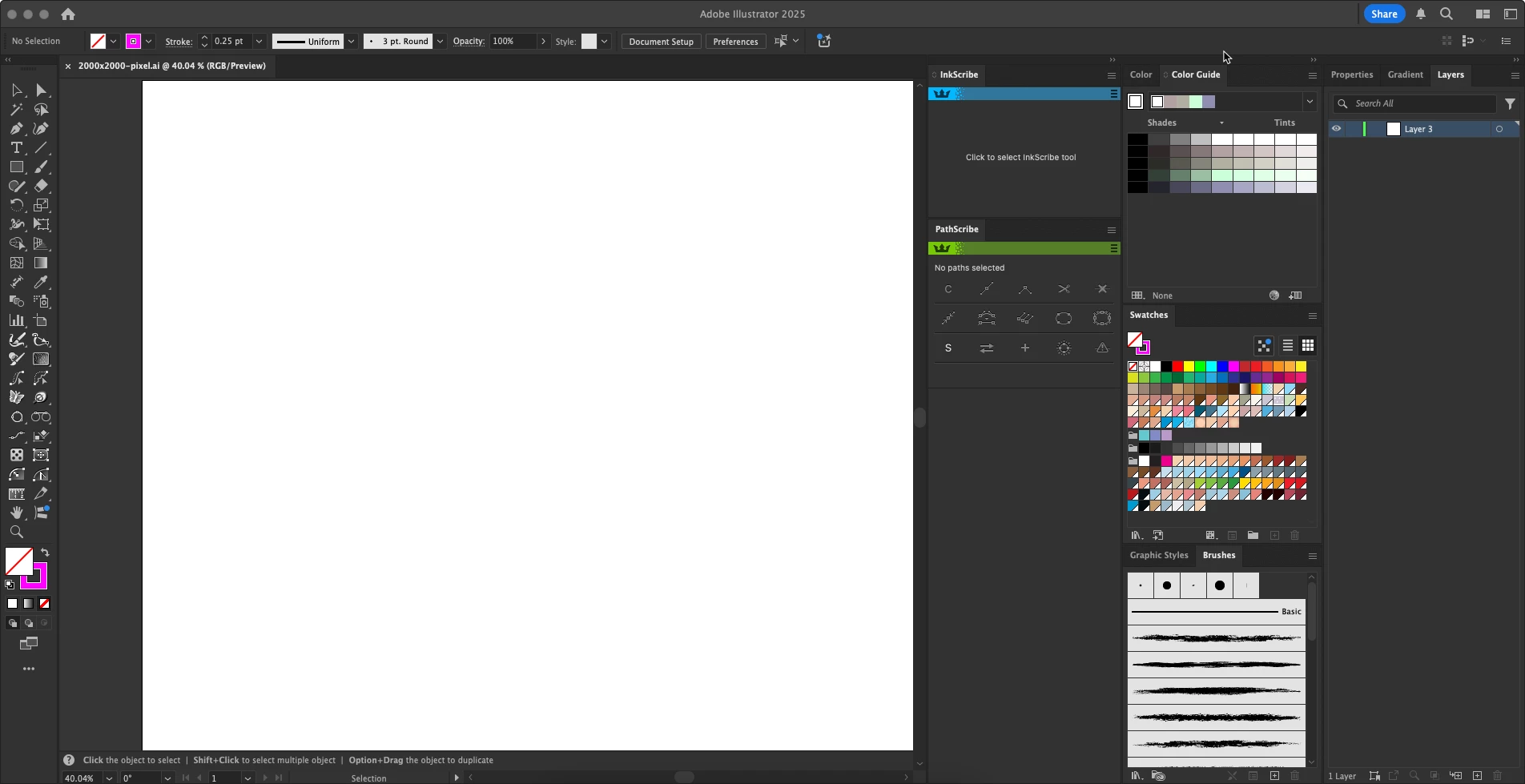
Side panel why is so large.

  • July 19, 2025
  • 1 reply
  • 118 views

I just subscribed to creative cloud.  My mac air m1 , install illustrator 29.6.1  it's work fine.

However , there is things annoyed me about  side panel is too large. It almost half screen.

I have alrady checked screen solution it's right.

I try move out all  and put back one by one , not help.

I don't know how to fix.

anyone help , please.
Correct answer Monika Gause

You have aligned 3 columns of panels there. You can minimize them to icons by clicking on the small double arrow. You can also have them automatically minimize after using by turning on that option in the preferences. 


Please check out: https://helpx.adobe.com/illustrator/using/customizing-workspace.html 

1 reply

Monika Gause
Community Expert
Monika GauseCommunity ExpertCorrect answer
Community Expert
July 19, 2025

You have aligned 3 columns of panels there. You can minimize them to icons by clicking on the small double arrow. You can also have them automatically minimize after using by turning on that option in the preferences. 


Please check out: https://helpx.adobe.com/illustrator/using/customizing-workspace.html 

Nont5E84Author
Participant
July 20, 2025

Thank you