
Participant
October 3, 2020
Answered

Simulate a bulge and invert it

  • October 3, 2020
  • 2 replies
  • 574 views

Hi,


I need your help. For my job, I create visuals which are aimed to be printed on chocolate.

No problems for the visuals itselves. The problem appears when I have to print on 3D models, like, for example, an egg. The visual looks completely different once printed, due to the extension of this form.

The only solution I've found so far is to print and adapt the visual. But this take far too much time, I need to print it several times before having an acceptable result.


Is there a (easy) way to simulate a 3D shape and adapt the visual to confront the extension in several clics?

Do know guys what I mean? ^^


Thank you for your help!
 

This topic has been closed for replies.
Correct answer Mike_Gondek10189183

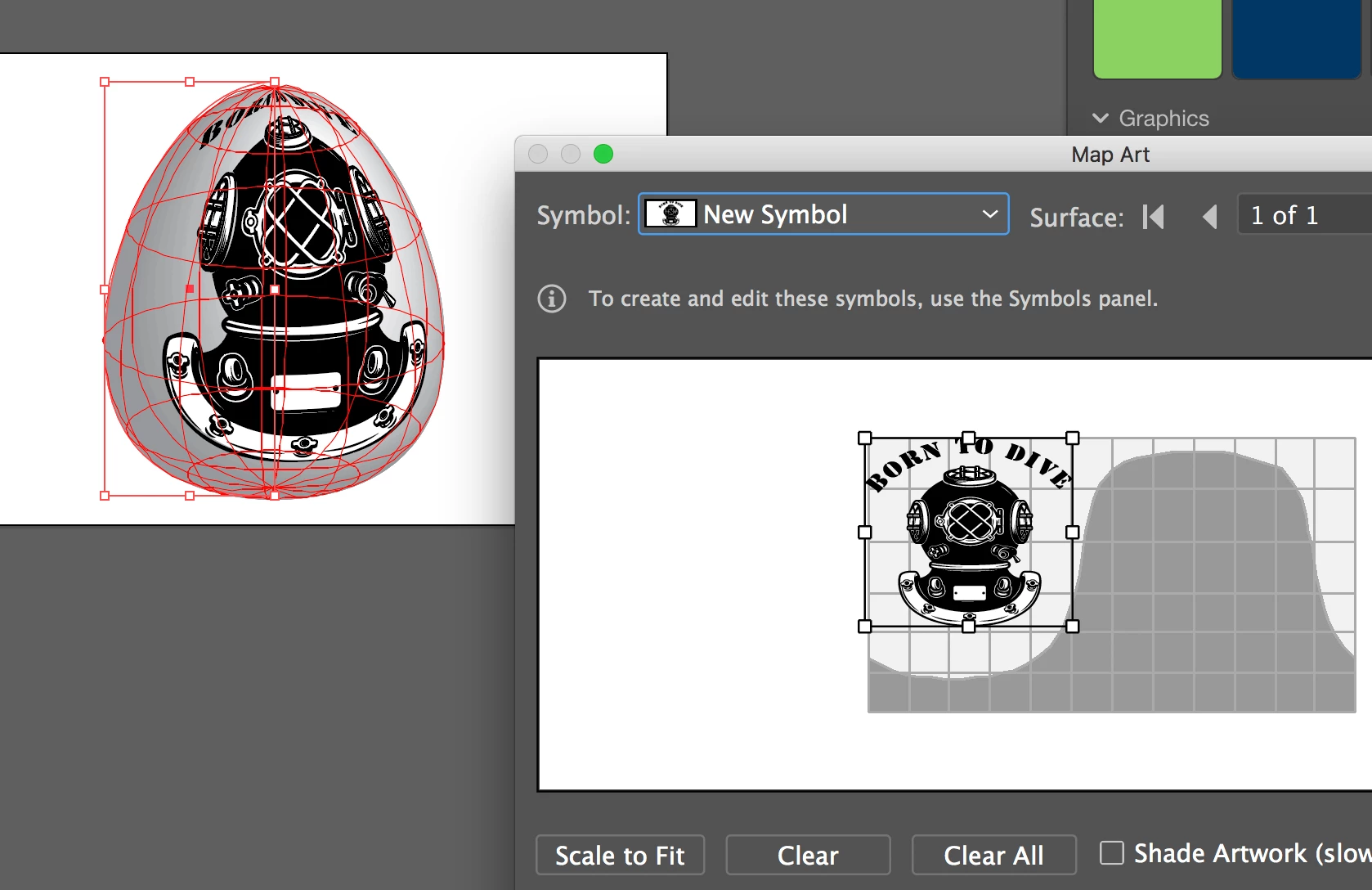
Make your art a symbol

Draw a circle delete the right side, then move the center point down to simulate left side of egg.

Effect >> 3D Revolve

Click map art and choose the symbol you made
Keep editing the symbol until you reverse the distortion.


2 replies

Mike_Gondek10189183
Community Expert
Mike_Gondek10189183Community ExpertCorrect answer
Community Expert
October 4, 2020

Make your art a symbol

Draw a circle delete the right side, then move the center point down to simulate left side of egg.

Effect >> 3D Revolve

Click map art and choose the symbol you made
Keep editing the symbol until you reverse the distortion.


Participant
October 4, 2020

That might work. I'm gonna try it as soon as I'm back at work!

Many thanks MikeGondek 🙂

Mylenium
Legend
October 3, 2020

Learn how to use 3D modelling and rendering and what an UV unwrap can be good for. Once you understand the spatial correlation of your textures to the geometry, it is realtively easy to figure this out. You could even take it as far as simulating all the stretching and crinkling, if you want to be super advanced an cool. Similarly of course you could find some CAD studio that does similar stuff e.g. for building injection molds or bending/ stamping metal tin. They can easily produce unwraps even of complex shapes using simulation tools that could then serve as templates for your work. Really depends on how exact this needs to be and how often you need it because of course both approaches will take time to learn or cost money or both...


Mylenium

Participant
October 4, 2020

Hi Mylenium,


We actually use Fusion360 and ArtCam at work. We create our 3D models on it (both soft.) and (only) Artcam to engrave the models on plates. Could one of these help us? We didn't figured it out that it could be possible on one of these. But we are also obligated to get a vector model at the very end, so we can use it to make our visuals.


Thank you!