

on247
Inspiring
November 14, 2016
解決済み

Simulated colored paper strange behavior.

  • November 14, 2016
  • 返信数 2.
  • 2416 ビュー

At work when I apply the simulated «color paper-function» and sets the color to light grey, I can still use the white color as (visible) white. In other words, the background is light grey and my white elements are white. They´re visible against the light grey background…

When i boot up my other computer at home and log into my Adobe account (the same as work) and start Illustrator, the function works differently. Then all white is replaced with the same color as the simulated background color. Now i can´t see my white elements anymore.

I know I can work around by using another layer with fill, but that´s not ideal.

I´ve tried new documents and I´ve tried opening documents from work on the home computer.

Same thing. Strange.

Anyone?
このトピックへの返信は締め切られました。
解決に役立った回答 on247

on247 schrieb:

I am expecting it to behave like it did at my first encounter with the function: keeping my white objects white and the colored background colored. So I can use the function to view white objects.

That's not what the function is intended for.

It's a simulation of colored paper. And when you print offset white (which other applications would correctly call "Paper") onto colored paper, you get color.

If you want to view your white objects, turn on the transparency grid.


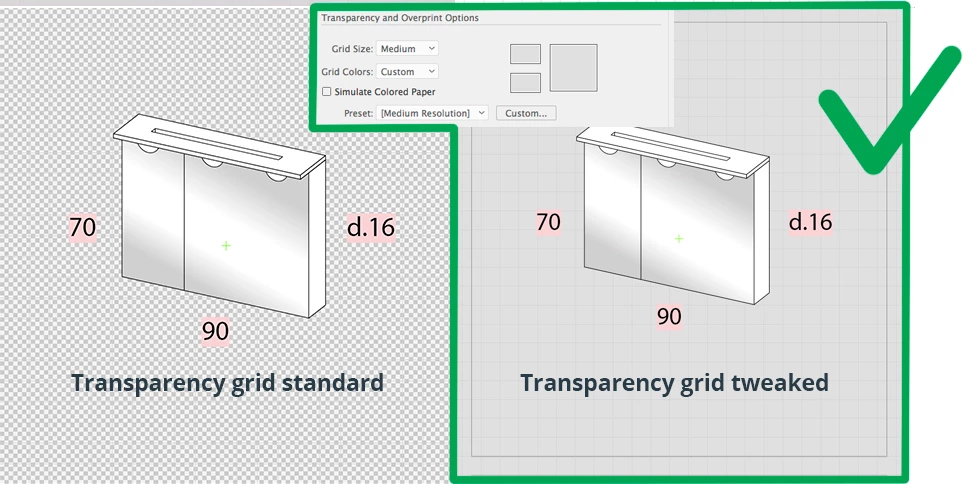
So. I’ve been testing. The transparency grid, as is, did not help me. I also use the («normal») grid and that got messy.
But by tweaking the transparency grid, it works just great! Thank you.

返信数 2

Lavish_reality5EA5
Participant
November 12, 2024

Had It happen to a template and all I did was to "Reset Preferences" at the bottom of the Preferences window.

Monika Gause
Community Expert
Community Expert
November 14, 2016

Which version?

Which system?

How is color management set up?

How is your color defined?

How is your preview set up?

How is soft proof set up?

I'm not quite sure what you are expecting from this function.

on247
on247作成者
Inspiring
November 14, 2016

I am expecting it to behave like it did at my first encounter with the function: keeping my white objects white and the colored background colored. So I can use the function to view white objects. (if this is the actual intent of Adobe, I don't know, but it's how I've used it previously)

System is OSX El Captain and Illustrator is the newest current version, «CC 2017» I think(?). Naming these specs have done very little for me in the past, but your preview-question sounds very interesting. I'll look into that one an report back.

Thank you.

on247
on247作成者解決!
Inspiring
November 14, 2016

on247 schrieb:

I am expecting it to behave like it did at my first encounter with the function: keeping my white objects white and the colored background colored. So I can use the function to view white objects.

That's not what the function is intended for.

It's a simulation of colored paper. And when you print offset white (which other applications would correctly call "Paper") onto colored paper, you get color.

If you want to view your white objects, turn on the transparency grid.


So. I’ve been testing. The transparency grid, as is, did not help me. I also use the («normal») grid and that got messy.
But by tweaking the transparency grid, it works just great! Thank you.