
Exit
  • Global community
    • Language:
      • Deutsch
      • English
      • Español
      • Français
      • Português
  • 日本語コミュニティ
  • 한국 커뮤니티
2

smart guides got dumber?

Contributor ,
Aug 17, 2023 Aug 17, 2023

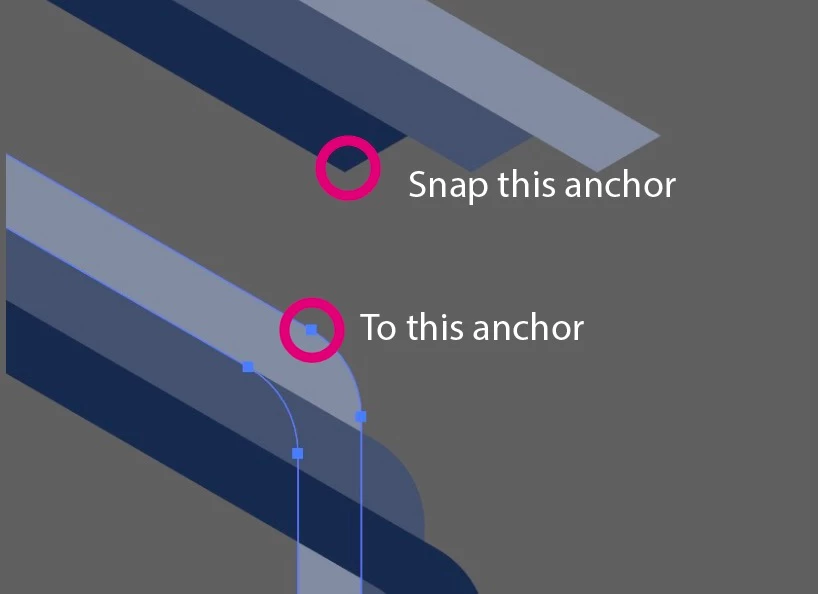
I've noticed illustrator smart guides have gotten quite bad in the last few months. i would drag a shape around waiting for the smart guides to show up so i can snap it to an existing path, or anchor point, and nothing would happen.


Today i figured out you have to press cmd near what you want to snap to for the pink smart guide to show up (and also move your shape to that snap point)


example
 

Screenshot 2023-08-18 at 9.23.11 am.jpg


i have to drag my shape around, while constant pressing cmd until i see anchor pop up.


I use to just be able to drag the shape across the path (and the word path would be visible the entire time)

until i hit the anchor, where the text would change.


Here's a video

https://capture.dropbox.com/bZsExGQ3sjvvwwVc


Not infuriating at all

TOPICS
Bug , Draw and design , Tools
707
Translate
Report
Community guidelines
Be kind and respectful, give credit to the original source of content, and search for duplicates before posting. Learn more
community guidelines
Adobe
New Here ,
Aug 31, 2023 Aug 31, 2023

I noticed this "bug" in the last month. I have since had to install Illustrator 22 to get the old functionality back. How has this not been addressed? It's like a top 5 feature that is used. Its like driving a car that does not come with brake lights.

Translate
Report
Community guidelines
Be kind and respectful, give credit to the original source of content, and search for duplicates before posting. Learn more
community guidelines
Contributor ,
Aug 31, 2023 Aug 31, 2023

i don't understand how there isn't more people complaining about it!

Translate
Report
Community guidelines
Be kind and respectful, give credit to the original source of content, and search for duplicates before posting. Learn more
community guidelines
New Here ,
Sep 01, 2023 Sep 01, 2023

I noticed that they work if you hold ALT (on PC) but that is worthless as holding ALT expands shapes from the center only. This one function not working makes the entire software USELESS for me.

Translate
Report
Community guidelines
Be kind and respectful, give credit to the original source of content, and search for duplicates before posting. Learn more
community guidelines
Community Expert ,
Sep 01, 2023 Sep 01, 2023

@Pu Koh  schrieb:

i don't understand how there isn't more people complaining about it!


Because it has been working that way since about CS6.

You have to press cmd.

Translate
Report
Community guidelines
Be kind and respectful, give credit to the original source of content, and search for duplicates before posting. Learn more
community guidelines
Contributor ,
Sep 01, 2023 Sep 01, 2023

no........... can't be.......... i would've complained about it way before now

Translate
Report
Community guidelines
Be kind and respectful, give credit to the original source of content, and search for duplicates before posting. Learn more
community guidelines
New Here ,
Sep 01, 2023 Sep 01, 2023
LATEST

Smart Guides can be auto-enabled in the prefrences so you do not have to have to hold CMD or ALT.

Translate
Report
Community guidelines
Be kind and respectful, give credit to the original source of content, and search for duplicates before posting. Learn more
community guidelines