Exit
  • Global community
    • Language:
      • Deutsch
      • English
      • Español
      • Français
      • Português
  • 日本語コミュニティ
  • 한국 커뮤니티
0

Snap centre to grid

New Here ,
Apr 08, 2021 Apr 08, 2021

Winnowintheworld_0-1617945925701.png

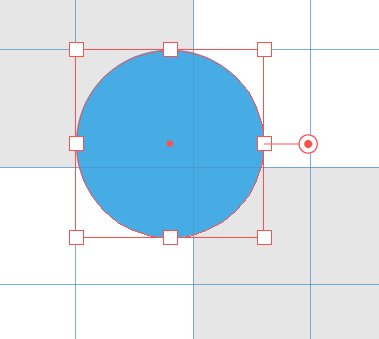
I'm trying to align the centre of this object to the grid, but as you can see it keeps snapping the edges to the grid. Please tell me, how do I snap the centre, not the edges, to the grid? I've tried changing the reference point of the object in the Transform Panel, but that has no effect.


TOPICS
Draw and design
874
Translate
Report
Community guidelines
Be kind and respectful, give credit to the original source of content, and search for duplicates before posting. Learn more
community guidelines
Adobe
Contributor ,
Apr 09, 2021 Apr 09, 2021

You can try to zoom in further and see if that helps.


Alternatively you can install https://astutegraphics.com/plugins/colliderscribe and activate a 7-day trial. The Collision Tools are a great help and give you finer control on snapping adjustments.

Translate
Report
Community guidelines
Be kind and respectful, give credit to the original source of content, and search for duplicates before posting. Learn more
community guidelines
Community Expert ,
Apr 09, 2021 Apr 09, 2021

In the Transform Panel, with the reference point set to center, enter the x and y values for the desired position of the center point.


Peter

Translate
Report
Community guidelines
Be kind and respectful, give credit to the original source of content, and search for duplicates before posting. Learn more
community guidelines
New Here ,
Apr 09, 2021 Apr 09, 2021

Thanks Peter. That works in each instance, but it will be tiresome for lots of objects.


I've tried adjusting the grid now, to make it finer. Not ideal, there is a carpet of gridlines now!, but I can snap to that point.

Translate
Report
Community guidelines
Be kind and respectful, give credit to the original source of content, and search for duplicates before posting. Learn more
community guidelines
Community Expert ,
Apr 09, 2021 Apr 09, 2021

Instead of using a grid, you could create your own made with Guides on a dedicated layer and use Smart Guides.

Translate
Report
Community guidelines
Be kind and respectful, give credit to the original source of content, and search for duplicates before posting. Learn more
community guidelines
Explorer ,
Aug 19, 2025 Aug 19, 2025

Still no fix for this? Illustrator is brain-dead sometimes.

Translate
Report
Community guidelines
Be kind and respectful, give credit to the original source of content, and search for duplicates before posting. Learn more
community guidelines
Community Expert ,
Aug 19, 2025 Aug 19, 2025
LATEST

Looks like the current beta can do this.

Translate
Report
Community guidelines
Be kind and respectful, give credit to the original source of content, and search for duplicates before posting. Learn more
community guidelines