
beverleyh68737695
Known Participant
September 11, 2020
Answered

Solid and dotted blue line boxes around art

  • September 11, 2020
  • 10 replies
  • 4685 views

Since upgrading to 2020 a solid blue box and dotted box surrounds my art. I cannot select it or turn it off. Highly annoying while trying to work on files to have this in the way. How to I get rid of these boxes!
Correct answer trish30067644b1pu

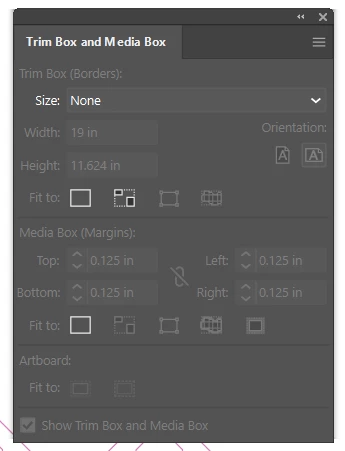
I know this was posted years ago but I had the same issue and found the problem. I have an ESKO plugin. I went to window<ESKO<TrimBox and Media Box it brings up that panel and you can set it to none. That made the box go away for me. Figured I would post for anyone needing a solution. The vendor must have that plugin for setting artwork bounds.

10 replies

trish30067644b1puCorrect answer
Participant
May 25, 2023

I know this was posted years ago but I had the same issue and found the problem. I have an ESKO plugin. I went to window<ESKO<TrimBox and Media Box it brings up that panel and you can set it to none. That made the box go away for me. Figured I would post for anyone needing a solution. The vendor must have that plugin for setting artwork bounds.

Participant
August 2, 2023

trish30067644b1pu

Thank you so much for this, been banging my head against a wall for hours trying to sort this, my designer ocd head hated not being able to remove these unnecessary boxes. Bonus found a coll helpful plugin too, thanks again Gav

Kurt Gold
Community Expert
Community Expert
September 11, 2020

No, Bill, at the moment I have no plugins installed, neither proper ones nor not so proper ones.


Participant
June 29, 2021

It IS an Esko plugin selection. Drop down menu from Window > select ESKO > Trim and Media Box.
You can adjust the size of this box here.

Kurt Gold
Community Expert
Community Expert
September 11, 2020

Which file formats do you receive from your clients?


Native Illustrator files (created in Illustrator)? Or some other obscure files and perhaps unreliable .ai file formats created from some unknown applications?

beverleyh68737695
Known Participant
September 11, 2020

native ai files are being sent. These are coming from ad agencies. 

Kurt Gold
Community Expert
Community Expert
September 11, 2020

Well, rather hard to tell.


By the way, what happens if you create a new (blank) document? Are the blue lines always there?

beverleyh68737695
Known Participant
September 11, 2020

The blue lines do not appear in a new document. Only documents sent to me from the client(s). Which is why I am wondering if it's a version issue. 

Bill Silbert
Community Expert
Community Expert
September 11, 2020

Then it seems possible that your client is using a third party plug-in that would not display properly on your machine. The fact that the lines don't show up for Kurt may mean that he has the proper plug-in.

Kurt Gold
Community Expert
Community Expert
September 11, 2020

At the moment I cannot provide a solution, but just to inform you: In your sample file I don't see the blue lines as per your screenshot above.


I'm almost sure that other participants won't see it as well. Hmh.

beverleyh68737695
Known Participant
September 11, 2020

Could it be the way I have preferences set up? I have gone through all pref settings and don't see anything out of line. Could it be an upgrade bug? 2019 vs 2020?

Very frustrating...

Monika Gause
Community Expert
Community Expert
September 11, 2020

Do you perhaps have third party plugins installed?

beverleyh68737695
Known Participant
September 11, 2020

No plug ins are being used at this time. 

Kurt Gold
Community Expert
Community Expert
September 11, 2020

Can you share a sample .ai file?


You can delete everything in that document and save a blank copy of it.

beverleyh68737695
Known Participant
September 11, 2020

the file format is not one that can be linked to this forum.

Larry G. Schneider
Community Expert
Community Expert
September 11, 2020

Then place the file on something like Dropbox or the Adobe cloud and share a link here.

Joely10623436
Community Expert
Community Expert
September 11, 2020

is this really in Illustrator??? 

beverleyh68737695
Known Participant
September 11, 2020

Yes it is. I work soley in Illustrator for my job

Bill Silbert
Community Expert
Community Expert
September 11, 2020

Try View>Hide Print Tiling.

beverleyh68737695
Known Participant
September 11, 2020

Already did. It is not that. Thank you

Doug A Roberts
Community Expert
Community Expert
September 11, 2020

Can you show a screenshot?

beverleyh68737695
Known Participant
September 11, 2020

Wish I could show you more but due to privacy policies I can't. 

beverleyh68737695
Known Participant
September 11, 2020

I should say they are NOT guidelines or boxes or smart guides.