

tlmurray23
Inspiring
August 29, 2018
Answered

Some Finder icons are generic

  • August 29, 2018
  • 5 replies
  • 1085 views

System: High Sierra 10.13.6; Illustrator CC 2018 v22.1

I have a folder with 34 logos. In icon and list views, two AIs show up as generic, yet I have done fresh saves with PDF previews. And even more odd, it's the same company logo. EPS are okay:
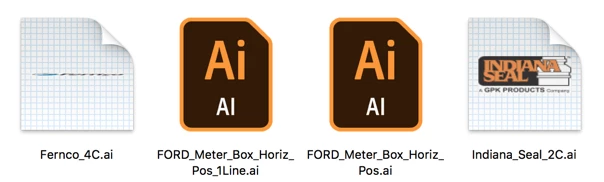
If you want to see the file, one of them is at Dropbox - FORD_Meter_Box_Horiz_Pos_1Line.ai

Any idea why?

This topic has been closed for replies.
Correct answer Mike_Gondek10189183

Does not like your artboard size.

I tried

  • copying & pasting  contents into a fresh new .ai file of similar dimensions - no good.
  • copying & pasting  contents into a fresh new .ai file of more squarelike dimensions -  good.
  • resizing artboard to 20 Inches high on your exisiting file - good (see below)

since  art is very thin in one dimension is hard to see but

maybe there is some finder/illustrator fail safe against artboards that are very thin in one dimension, can you check for a pattern amongst your files.

5 replies

Ton Frederiks
Community Expert
Community Expert
August 30, 2018

I agree with Mike.

Came to the same conclusion, if I make your file taller, a preview gets generated, but I don't know by who, AI or the MacOS.

Mike_Gondek10189183
Community Expert
Mike_Gondek10189183Community ExpertCorrect answer
Community Expert
August 30, 2018

Does not like your artboard size.

I tried

  • copying & pasting  contents into a fresh new .ai file of similar dimensions - no good.
  • copying & pasting  contents into a fresh new .ai file of more squarelike dimensions -  good.
  • resizing artboard to 20 Inches high on your exisiting file - good (see below)

since  art is very thin in one dimension is hard to see but

maybe there is some finder/illustrator fail safe against artboards that are very thin in one dimension, can you check for a pattern amongst your files.

tlmurray23
Inspiring
August 30, 2018

Thanks, that's interesting and I will keep it in mind.

Mike_Gondek10189183
Community Expert
Community Expert
August 30, 2018

For my part you are welcome. Sorry you have to add extra unnecessary canvas you may prefer to be without.

Have you tried the library feature,  the preview icons works there.

Option drag out assets as to get the vector logo versions, unless you prefer a cloud object which acts like a symbol if you are familiar with those.

Thank you for providing screenshots & your file, so many people do not do that. You even stated your OS & Illustraror versions. A model for how to post, deserving an award if we had one.

tlmurray23
Inspiring
August 29, 2018

I should have said I used "Create PDF compatible file". Also I tried it without compression. No joy.

chanaart
Community Expert
Community Expert
August 30, 2018

I know no difference between that.

did you try to reinstall?

tlmurray23
Inspiring
August 30, 2018

Since it's just two files out of 34 in the folder, and other folders okay as well, no, I'm not bothering to reinstall. Also, I used Onyx, a tool to deep-clean caches. I cleaned everything so much even my Dock icons were generic.

chanaart
Community Expert
Community Expert
August 29, 2018

if you are using bridge checkout the file association with Illustrator. Maybe you do not have PDF as part of it!

Larry G. Schneider
Community Expert
Community Expert
August 29, 2018

Any chance you saved them without PDF Compatibility enabled? Most systems use the PDF portion to create the preview.