
Participant
September 28, 2022
Answered

Some keystrokes (like ctrl+z) don't work while tools are open at the top

  • September 28, 2022
  • 3 replies
  • 950 views

If I have an object selected, and I'm using the tools available at the top of the toolbar, the ctrl+z specifically doesn't work. It seems to be disabled. It's tedious to have to exit out of the menu, and then get back into it.

This topic has been closed for replies.
Correct answer Anshul_Saini

Hi @JanelFavero,


Sorry for the delayed response. I investigated with the team, and this is an expected scenario on Mac. In case any floating panels are open, Cmd+Z will not work unless the floating panel is closed.

On small windows, you will have Align option in the floating panel.
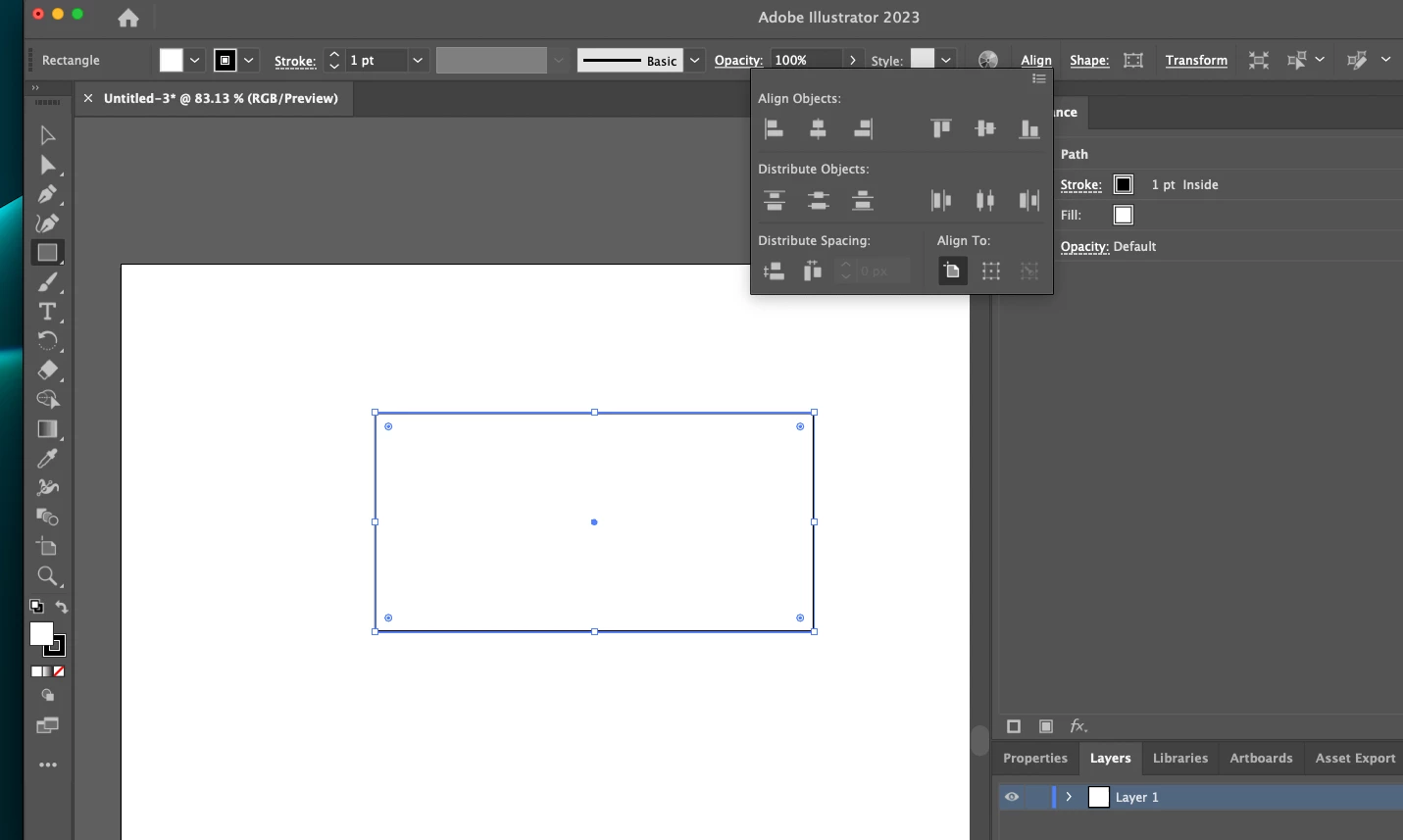
 

However, if you have a high-resolution monitor which is not scaled on macOS, you will get full Align options on the control bar. In this layout, you will be able to cmd+z and use the Align options simultaneously.
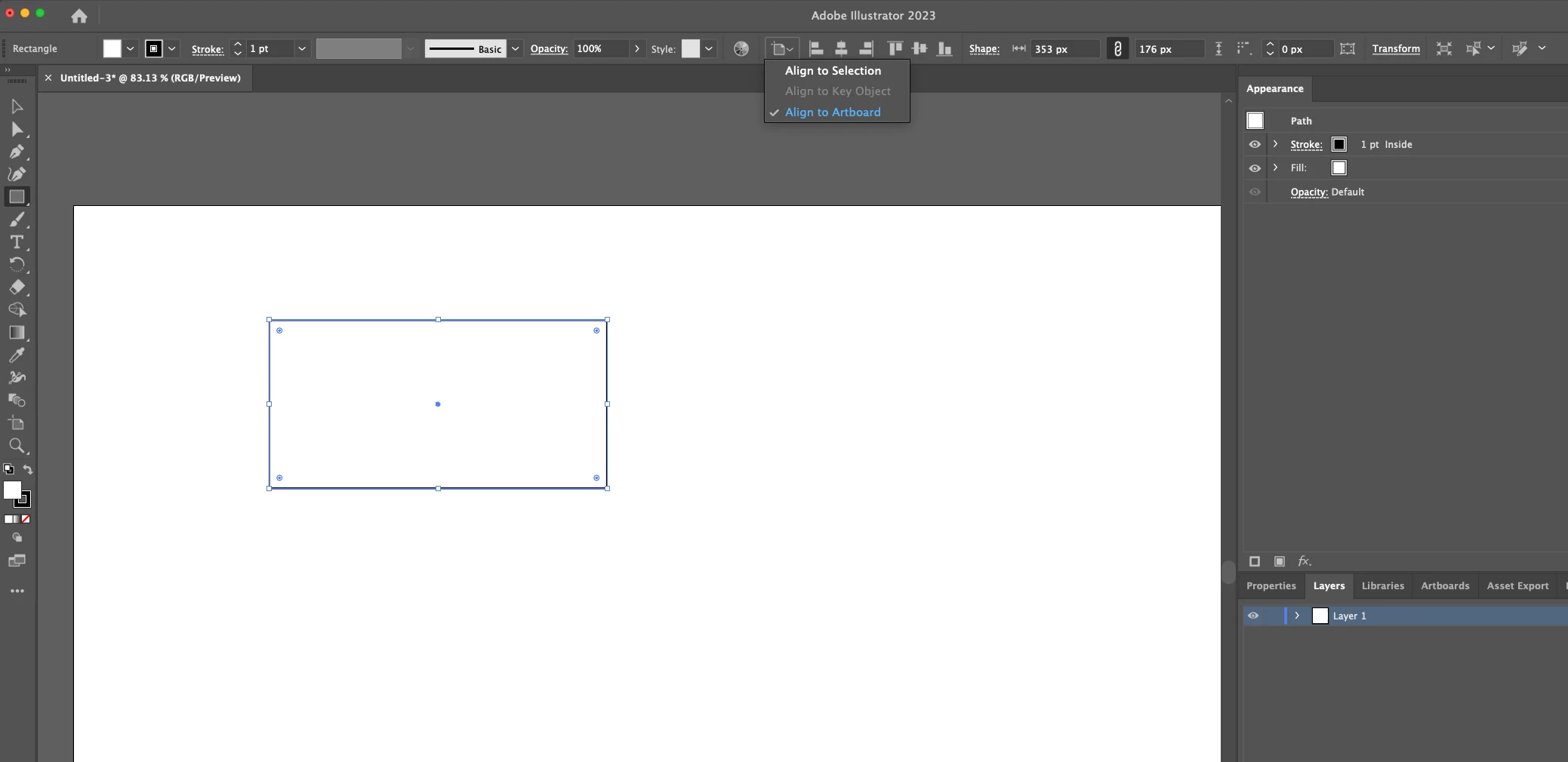
 

Also, this is not related to any specific macOS or Illustrator version. This behavior has been here since the beginning.


I hope this helps!


Thanks,

Anshul Saini

3 replies

Mike_Gondek10189183
Community Expert
Community Expert
September 28, 2022

Hard to tell from your video exactly when you are using the key command CTRL Z. What happens if you pull down Edit >> Undo, or is that greyed out.


are you set to:

Edit Keyboard Shortcuts >> Default?

Anshul_Saini
Community Manager
Community Manager
September 28, 2022

Hi @JanelFavero,


We are sorry for the trouble. I am able to replicate this behaviour on my end. It seems like expected behaviour as I am able to replicate this on the older versions of Ai CC 2021, 2020 & 2019.


Would you mind sharing a few details like:

  • The exact version of OS & Illustrator
  • Have you recently updated your OS or Illustrator?
  • Was this happening earlier, or have you just discovered this behaviour change in Illustrator?


We are here to help. We just need more info.


Thanks & Regards,

Anshul Saini

Participant
September 28, 2022

I'm not sure when I noticed it, but it does operate differently at my work "office" mac and my "home office" mac. The work office is where I'm having issues, not sure when it started since I'm only here a few days a week. For the one I'm experiencing this issue: I'm on MacOS Monterey V 12.6, and Illustrator is AI CC 26.5, which creative cloud tells me is up-to-date.

Anshul_Saini
Community Manager
Anshul_SainiCommunity ManagerCorrect answer
Community Manager
December 8, 2022

Hi @JanelFavero,


Sorry for the delayed response. I investigated with the team, and this is an expected scenario on Mac. In case any floating panels are open, Cmd+Z will not work unless the floating panel is closed.

On small windows, you will have Align option in the floating panel.


However, if you have a high-resolution monitor which is not scaled on macOS, you will get full Align options on the control bar. In this layout, you will be able to cmd+z and use the Align options simultaneously.


Also, this is not related to any specific macOS or Illustrator version. This behavior has been here since the beginning.


I hope this helps!


Thanks,

Anshul Saini

Community Expert
September 28, 2022

Hi JanelFavero,

have you tried to reset your preferences? I’ll leave you a link where you can follow the steps: Reset preferences

Participant
September 28, 2022
<p>Well, all that did was make my layers box way too large and now I have no way to adjust the length when it's a floating panel. Lending to "Anytime I had a problem, and I threw a Molotov cocktail, boom! Right away, I had a different problem." - Jason Mendoza, The Good Place."</p>