
Participating Frequently
February 16, 2023
Question

Some text is disappeared after outlined in Illustrator CC2018, 2020 & 2021

  • February 16, 2023
  • 3 replies
  • 1734 views

I found that when I try to select all the text from my file and some character cannot be selected (like "5" as below screenshot). It will be disappeared after converting outlined text. However if you edit them the problem will be solved. It just happens in the older verison of Illustrator but no issue for CC2022 or 2023.
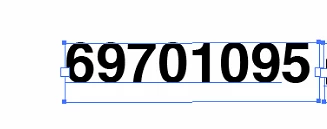
Not sure if it is a bug or any solution can be solved?

This topic has been closed for replies.

3 replies

Anubhav M
Community Manager
Community Manager
February 17, 2023

Hello @Groovy HO,


We understand that encountering technical issues can be frustrating. Would you mind sharing a sample file (https://community.adobe.com/t5/illustrator-discussions/share-your-files-in-6-simple-steps/td-p/12967531), as suggested by Monika, so we can identify the issue and provide the appropriate solution.


Looking forward to your response.


Thanks,

Anubhav

Groovy HOAuthor
Participating Frequently
February 20, 2023
Groovy HOAuthor
Participating Frequently
February 21, 2023

Hi Anubhav, not sure if you know what is the root cause for this happen? or any further information you need. Many thanks!

Met1
Legend
February 17, 2023

Looks like you have two separate pieces of text selected?

Is the five not underlined because it isn't live text?

Groovy HOAuthor
Participating Frequently
February 20, 2023

They are all live text format including "5"

Monika Gause
Community Expert
Community Expert
February 16, 2023

Older versions will not be fixed.

Also: what exactly are we looking at there? This is an area text? In which way can't the 5 be selected?

Groovy HOAuthor
Participating Frequently
February 16, 2023

When I try to select those text to convert, the underline is not included for "5". So it disappears after those text outlined. Not sure what's going on.

Groovy HOAuthor
Participating Frequently
February 17, 2023

With that little snippet it's difficult to see what kind of object that even is.

The layders  panel would be important, character and paragraph formatting, options for the area text, etc.


The problem is I use the same file with same setting in AI 2020 and 2022 version. Only 2020 get this issue but no issue from the 2022. That's why I think is it the bug for the older version or not.