Exit
  • Global community
    • Language:
      • Deutsch
      • English
      • Español
      • Français
      • Português
  • 日本語コミュニティ
  • 한국 커뮤니티
0

Split irregular shape into pieces

Community Beginner ,
Oct 29, 2020 Oct 29, 2020

Hello.


I'm looking to split the attached shape into 8 segments (see attached Shape Split file), whilst maintaining the curve throughout.

With the shape being irregualer I'm struggling to achieve the results required. I have also attached a version (Arc) which was created some time ago showing more pieces and the effect I am looking to achieve. However, I also don't know how this was achieved.


Any help would be greatly appreciated.

Thank you

 

Shape split.png


Arc.png


[ attachment inserted as inline image by moderator ]



889
Translate
Report
Community guidelines
Be kind and respectful, give credit to the original source of content, and search for duplicates before posting. Learn more
community guidelines

correct answers 2 Correct answers

Community Expert , Oct 29, 2020 Oct 29, 2020

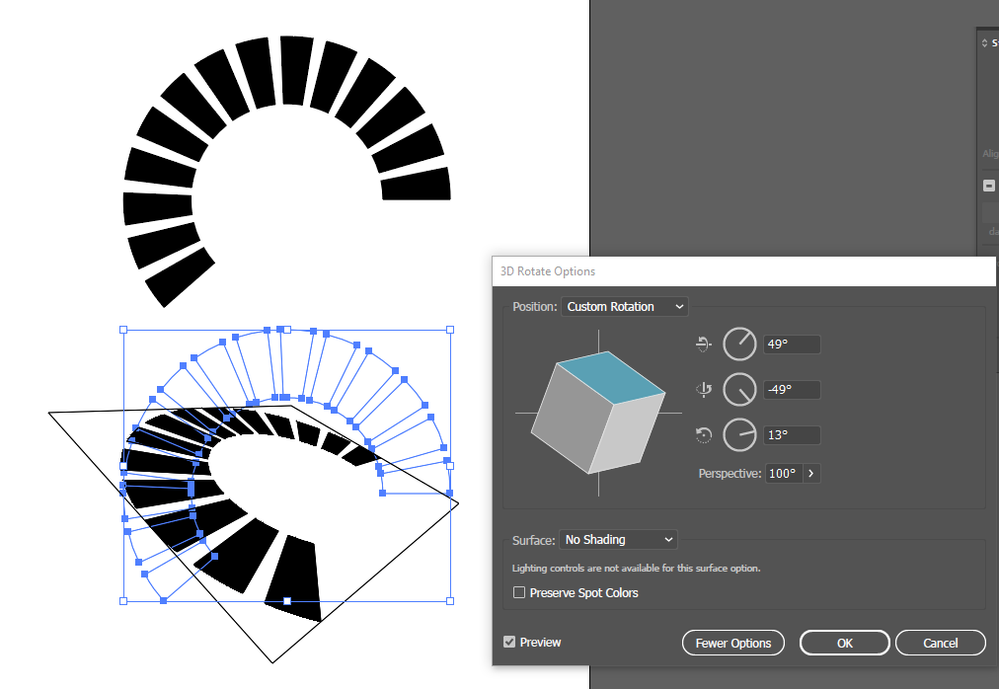
Generally you should draw the 'split' shape out flat and then distort it rather than splitting it after the fact. In this example, a thick dashed stroke is outlined, then 3D rotate used to arrange it:

Screenshot 2020-10-29 111251.png

Translate
Community Expert , Oct 29, 2020 Oct 29, 2020

I used a dashed stroke, then Object > Path > Outline Stroke.

Translate
Adobe
Community Expert ,
Oct 29, 2020 Oct 29, 2020

Generally you should draw the 'split' shape out flat and then distort it rather than splitting it after the fact. In this example, a thick dashed stroke is outlined, then 3D rotate used to arrange it:

Screenshot 2020-10-29 111251.png

Translate
Report
Community guidelines
Be kind and respectful, give credit to the original source of content, and search for duplicates before posting. Learn more
community guidelines
Community Beginner ,
Oct 29, 2020 Oct 29, 2020

Hi. Thanks for the quick reply.  How di you create the splits between segments?

Translate
Report
Community guidelines
Be kind and respectful, give credit to the original source of content, and search for duplicates before posting. Learn more
community guidelines
Community Expert ,
Oct 29, 2020 Oct 29, 2020

I used a dashed stroke, then Object > Path > Outline Stroke.

Translate
Report
Community guidelines
Be kind and respectful, give credit to the original source of content, and search for duplicates before posting. Learn more
community guidelines
Community Beginner ,
Oct 29, 2020 Oct 29, 2020
LATEST

Thank you. We will give this a try

Translate
Report
Community guidelines
Be kind and respectful, give credit to the original source of content, and search for duplicates before posting. Learn more
community guidelines