
Participant
June 27, 2021
Answered

Star tool missing from Illustrator

  • June 27, 2021
  • 2 replies
  • 6579 views

Hi I'm working on a PC and it won't give me the option to draw a star tool.  The only tools I can access seems to be the rectangle tool and the elipse tool.  I have tried clicking on the three dots at the bottom of the tool bar and the rest of tool menu comes up but no other shapes are highlighted or have a letter by them so I can't select them. Can anyone help? Be very grateful. Thanks!


{Renamed by MOD}
This topic has been closed for replies.
Correct answer Srishti Bali

Hi there,


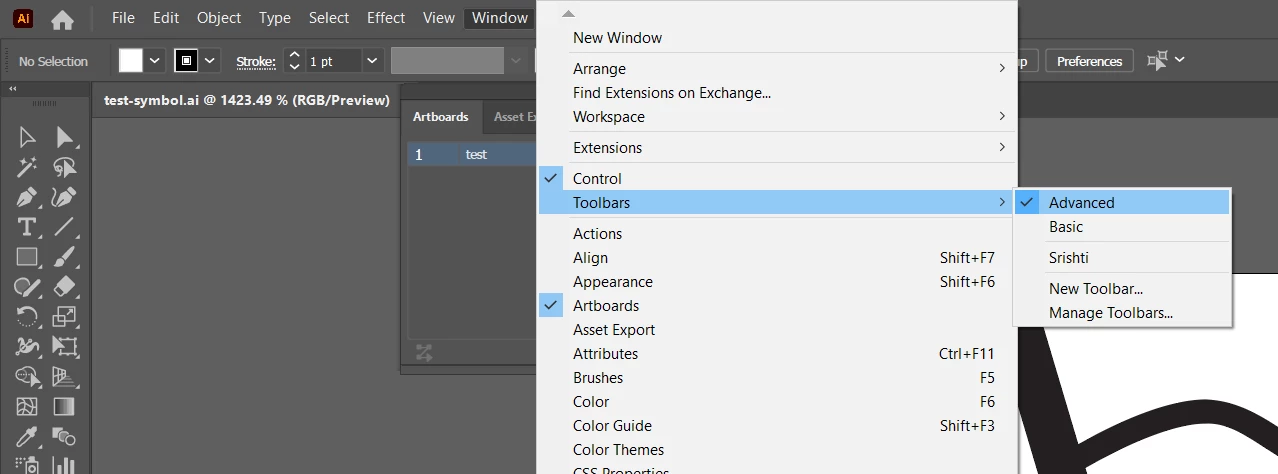
Sorry about this trouble. Please select Advance toolbar from  Window > Toolbars > Advance and let us know if that shows all the tools.


If that doesn't help, try resetting Illustrator Preferences (https://helpx.adobe.com/in/illustrator/using/setting-preferences.html).
Please note that resetting preferences will remove all the custom settings and Illustrator will launch with default settings. You can also take a backup of the folders in case you want to. Location is mentioned in the article.


Please feel free to reach out if you still need assistance, we'd be hapy to help.


Regards,

Srishti

2 replies

Participant
December 31, 2023

Also try clicking and holding for about 1 second on the rectangle icon until a window pops out with all of the other shapes.   Then click the arrow all the way on the right side of that pop out to make your shapes a floating window.

Srishti Bali
Community Manager
Srishti BaliCommunity ManagerCorrect answer
Community Manager
June 27, 2021

Hi there,


Sorry about this trouble. Please select Advance toolbar from  Window > Toolbars > Advance and let us know if that shows all the tools.


If that doesn't help, try resetting Illustrator Preferences (https://helpx.adobe.com/in/illustrator/using/setting-preferences.html).
Please note that resetting preferences will remove all the custom settings and Illustrator will launch with default settings. You can also take a backup of the folders in case you want to. Location is mentioned in the article.


Please feel free to reach out if you still need assistance, we'd be hapy to help.


Regards,

Srishti

Participant
January 7, 2023

Hi Srishti, 

I've had the same issue and have tried your solutions but it's still not working 😞

Monika Gause
Community Expert
Community Expert
February 15, 2024

AI 2023 on Windows


And when you open the hidden tools behind the rectangle, then all are there, but not the star?

Window > Toolbars > Advanced does not help?