
emma.lawrence.design
Participant
November 11, 2022
Answered

Star

  • November 11, 2022
  • 2 replies
  • 394 views

I'm having trouble with my star tool. Every time I try to make a star, it doesn't make the correct shape- like it's the skeleton of the star. I've tried messing around with the setting, fill, stroke and nothing seems to work. Does anyone have any idea what's going on?
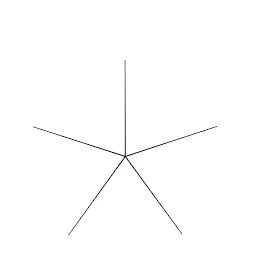
 

This topic has been closed for replies.
Correct answer CarlosCanto

adding to what kevin said, instead of clicking and dragging to create a Star, make a single click to get the Star dialog options where you can add star points, radius 1 and radius 2. Make radius 2 half of radius 1 to bring back your standard star.


More info here

https://www.youtube.com/watch?v=uAKU5YvglDk

2 replies

CarlosCanto
Community Expert
CarlosCantoCommunity ExpertCorrect answer
Community Expert
November 11, 2022

adding to what kevin said, instead of clicking and dragging to create a Star, make a single click to get the Star dialog options where you can add star points, radius 1 and radius 2. Make radius 2 half of radius 1 to bring back your standard star.


More info here

https://www.youtube.com/watch?v=uAKU5YvglDk

Kevin Stohlmeyer
Community Expert
Community Expert
November 11, 2022

Drag out your star and while creating, hit the Option/alt key to reset it then release your mouse while holding the key.