
TheHappyPrinters
Inspiring
March 9, 2023
Beantwortet

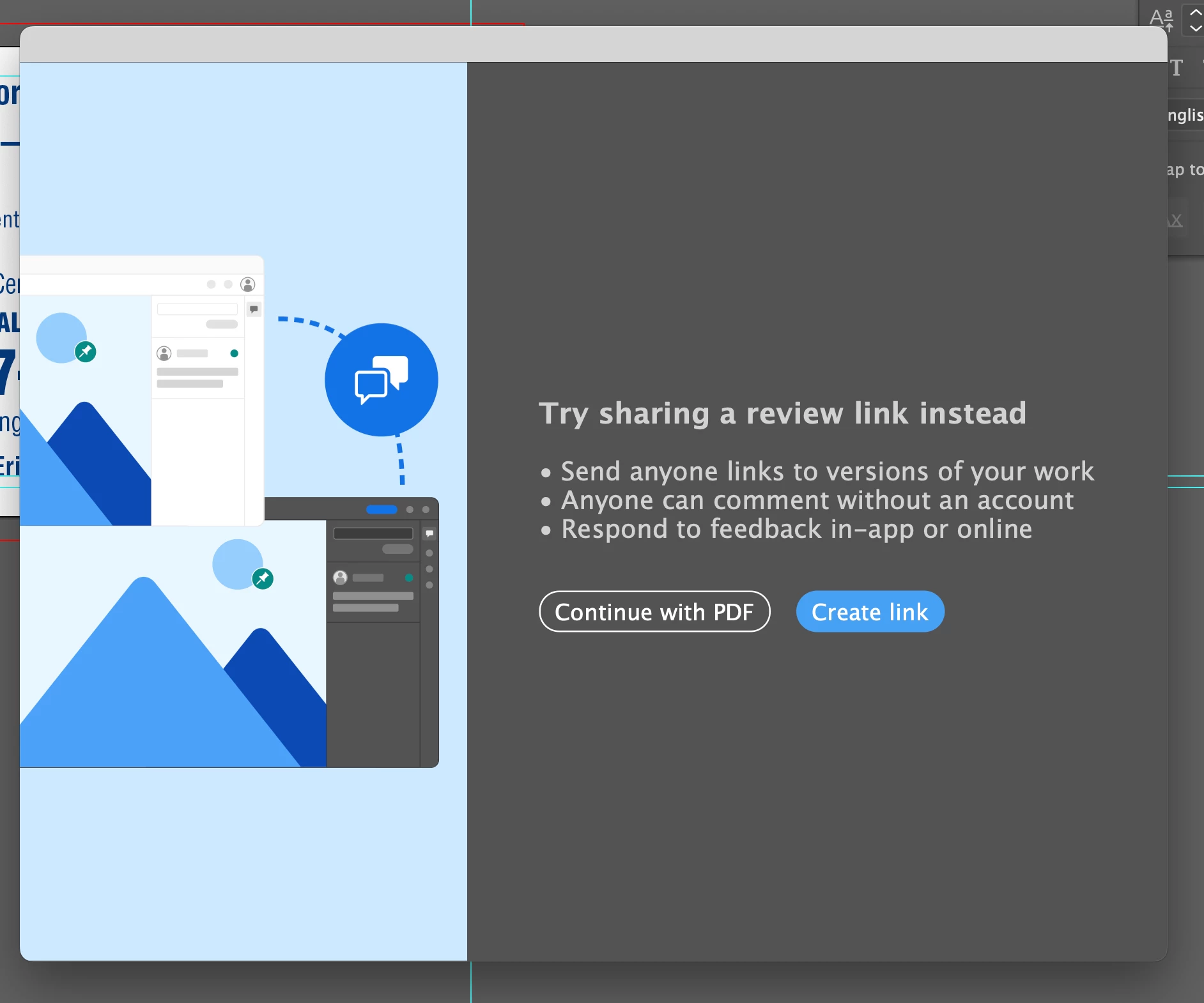
Stop Share for review dialog box pop up to create review link when saving PDF in Illustrator v27.3.1

  • March 9, 2023
  • 17 Antworten
  • 9923 Ansichten

This is beginning to get really frustrating, I'm seeing this almost 40 or 50 times per day since a recent update. I have absolutely no intention of using this service and would love to know how to stop this dialogue box from ever appearing again.
Please any help would be very much appreciated.
Dieses Thema wurde für Antworten geschlossen.
Beste Antwort von Anshul_Saini

Hello everyone,


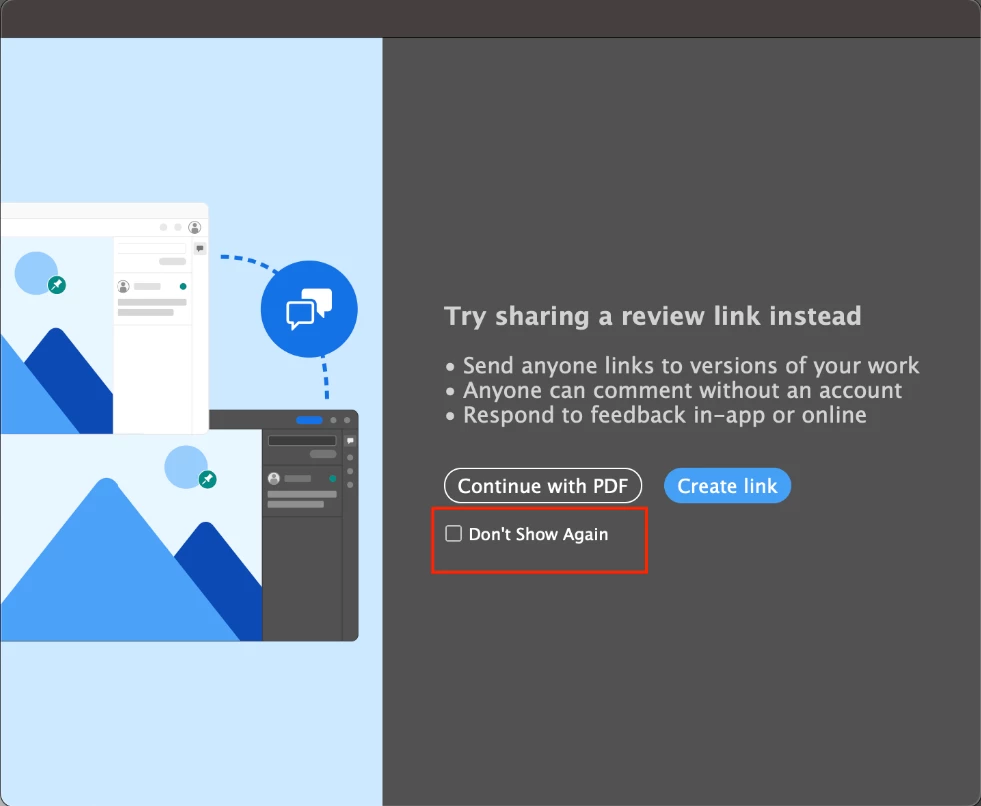
We are pleased to announce that we have resolved the issue related to the Share for Review modal in Illustrator. We have added a "Don't Show Again" checkbox option on the 2nd instance of the modal.


Please ensure that you have updated to Illustrator v27.4.1 to access this feature. If you still encounter any issues or the checkbox option does not appear, please let us know.


Best regards,

Anshul Saini

#Marking this correct to highlight

17 Antworten

Inspiring
June 30, 2023

I'm no Illustrator 27.6.1 and I can't get the DO NOT SHOW AGAIN to come up. Pretty frustrating. And when I click the blue Share button to try and dismiss in there all I get is a blue spinning loading icon so its broke af. Just. Want. It. To. Go. Away.

Dwerb Corporation
Known Participant
June 30, 2023
Yeah I dont know what adobe is doing.
But I am switching to other apps now.
Once you get used to some of the big open source apps out there, adobe no longer is needed anyway. Saves you a lot of money and headaches.

I expect these kinds of mistakes from an open source app, and yet... open source apps are more stable and have many less problems.


raminolta
Participating Frequently
June 24, 2023

This is ahppening to me in Photoshop. Every time I save a file, this dialogue pops up. It's super annoying.

Fine Art P
Inspiring
June 24, 2023

It's annoying to see popups for new features, glowing buttons, or other advertisement-like additions in sofwtware that we already paid money for.

Monika Gause
Community Expert
Community Expert
June 24, 2023

@Fine Art P  schrieb:

It's annoying to see popups for new features, glowing buttons, or other advertisement-like additions in sofwtware that we already paid money for.


Please report this on https://illustrator.uservoice.com

The developers do not read your post in this forum.

Dwerb Corporation
Known Participant
June 20, 2023

This is still a problem in photoshop with no checkbox to make it bugger off.
Does anyone have a solution?

Monika Gause
Community Expert
Community Expert
June 20, 2023

@Dwerb Corporation  schrieb:

This is still a problem in photoshop with no checkbox to make it bugger off.
Does anyone have a solution?


Post to the Photoshop section of this forum would be your best option.

Participant
June 14, 2023

Adobe, your "Don't show again" checkbox reminds me of the "unsubscribe" button I get on spam emails. No matter how many times I click the checkbox, guess what? It comes up again the next time. And the next. And the next. Seriously, graphic designers have busy lives enough without adding more and more clicks to what were previously simple and straightforward tasks. Please can you go back to making software that makes our creative lives easier, not more complicated. 

Anshul_Saini
Community Manager
Community Manager
April 20, 2023

Hello everyone,


We are pleased to announce that we have resolved the issue related to the Share for Review modal in Illustrator. We have added a "Don't Show Again" checkbox option on the 2nd instance of the modal.


Please ensure that you have updated to Illustrator v27.4.1 to access this feature. If you still encounter any issues or the checkbox option does not appear, please let us know.


Best regards,

Anshul Saini

#Marking this correct to highlight

Participant
April 20, 2023

The "Don't show again" check box is no where to be found on any instance of this unwanted panel. Please advise.

Met1
Legend
April 20, 2023

Are you using v27.4.1?

katzw
Known Participant
April 19, 2023

Please provide an option to turn this off. I do not want to "share for review" ever, and the extra step is a headache.

Participant
April 18, 2023

Adobe, please stop this. I'm sure you're very proud of your new feature and that's nice for you. 
This is the type of thing that is very irritating for people that do not work at Adobe and instead need to do work using Adobe. 
You need to never do anything like this, ever. 
Make it stop.

Participant
April 11, 2023

Potential good news: I saw a checkmark this morning that said, "Don't show this again." I'm not sure if it was a one-off, or Adobe listened. I should have taken a screenshot, apologies. But I did get the notice and, knock on wood, haven't seen it again. 

Inspiring
April 10, 2023

Add me to the list of annoyed paid subscribers who saves countless pdfs a day and does NOT need to see this annoying popup box every time I do so. There's no reason there can't be an "off" switch for this. And the only solution is to wait for another update? Really? Oh how I miss the old days of buying software in a store on a disc, installing it once, and then just being done with it.

Park Street Printers
Known Participant
April 10, 2023

And... I also have the same problem. But it only happens to me about 30 times a day, so I guess I'm lucky? Another example of feature bloat that serves little purpose. I used to think that Microsoft had the market cornered on this count, but I guess it's spreading around the digital ecosystem. As so many have asked, Adobe, at least add an off option to disable this behavior. Please.

SwearingDad
Inspiring
April 9, 2023

Adding my name to this. Since the update I am seeing this every day, several times. Simply needs an "off" button.

I am a graphic designer creating 20-100 PDFs every day. As you can imagine this not ideal.


And who tests this software and agrees that this is a good step? I pay £45+ per month. Perhaps ask a person who actually uses your software before adding 'features' like this that interrupt a workflow.


Thanks for reading. Please fix.

Participant
April 11, 2023

Confirmed I am having this issue as well. Incredibly frustrating.
I would love for Adobe to add some sort of checkmark for us which removes all of these popup ads for features we will never need to use. If we want to use a feature, we will use it. Spamming us with these popups is quite annoying. Same goes for the Adobe cloud popups when I try to save something locally. I believe there is a check mark for that one, but it still pops up.