
lindsayh5283792
Participant
July 14, 2021
Answered

Stroke issues

  • July 14, 2021
  • 2 replies
  • 904 views

I and some of my colleges are having different issues with strokes in illustrator. 

It just started recently.

1 - different sized strokes on shapes when I want to go to make them all the same, I type 30 in the stroke weight and the stroke just disappears instead of changing.

2 - i have shapes with different fills and same stroke, i go to change the stroke weight of both shapes to a different weight and it just makes the shape disappear instead

3- i have strokes not aligning to the shapes properly (see attachments)

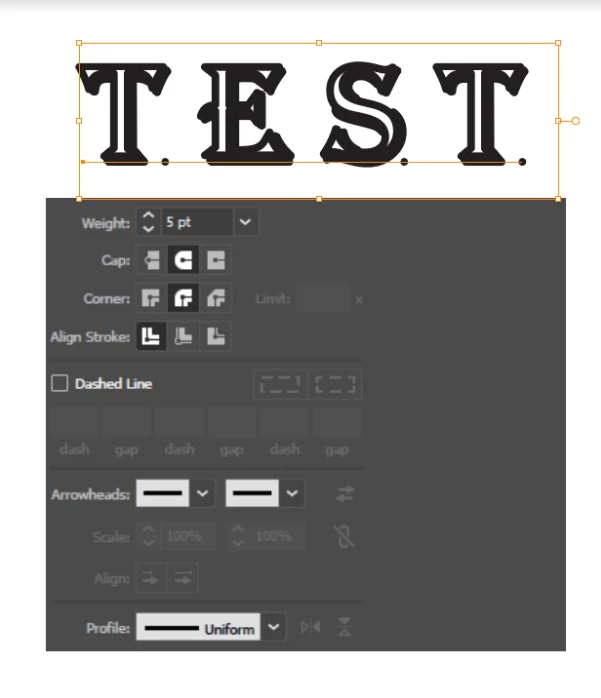
4-i have stroked text adding dots when the stroke is rounded (see attachments)


anyone have any ideas why this has suddenly started happening and how to solve it?


aligned outside

aligned inside

stroked text adding dots
This topic has been closed for replies.
Correct answer Monika Gause

That could be the cause of the issue. There is a new issue with them. Can you try and create a dummy object that has a non-global, non-spot color applied. Just include it in the selection of objects and try again. Does that work?

2 replies

Monika Gause
Community Expert
Community Expert
July 14, 2021

Are there spot or global swatches applied to the objects?

lindsayh5283792
Participant
July 15, 2021

Spot colors

Monika Gause
Community Expert
Monika GauseCommunity ExpertCorrect answer
Community Expert
July 15, 2021

That could be the cause of the issue. There is a new issue with them. Can you try and create a dummy object that has a non-global, non-spot color applied. Just include it in the selection of objects and try again. Does that work?

Jacob Bugge
Community Expert
Community Expert
July 14, 2021

Lindsay,


What happens if you hold Ctrl/Cmd and press E?


lindsayh5283792
Participant
July 14, 2021

Changing the GPU to CPU or vice versa did nothing to change the outcome.