
Stroke oddity
Hi
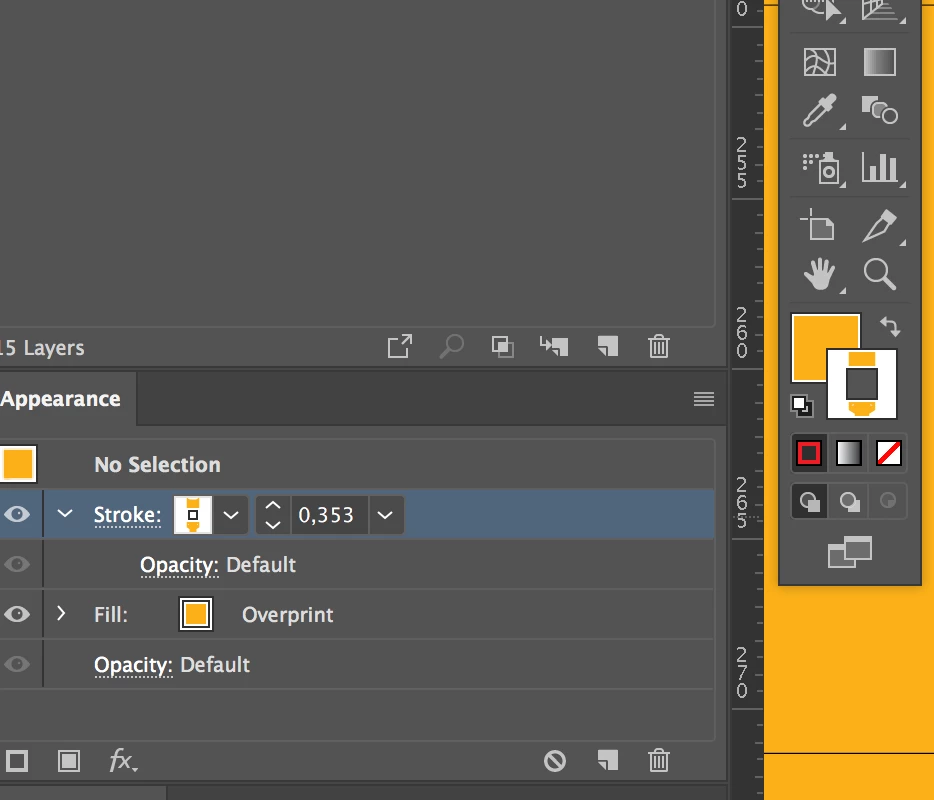
Can someone please tell me if they ever seen their stroke Ink colour tab in the tools bar displaying a kind
of shaped mask on it, like in my case it's not a solid stroke colour box, but rather a strip of white - followed by a shaped strip of stroke colour - followed again
by a strip of white (or substrate colour).
If I switch colours on the fly, it immediately turns into a normal full stroke box.
Is this a brush shape that is being applied to the stroke or a mask?
And it looks suspiciously like the packaging I am working on, which is why I find it so strange as I have
never seen this before. (I've been working with Adobe products / Illustrator for at least the past decade and half.)
Also I can confirm it has a definite impact on where the stroke is, and isn't.
Thanks guys!
 AdChoices