
Copy link to clipboard
Copied
In Illustrator there is a preference to use the center of a stroke. Where is that preference setting? Right now it set to whatever the line pt. is and a stroke shape size changes when the stroke thingness changes. I don't want that. I want Illustrator to use the center of the line rather than the stroke thickness. Does anyone know where the preference setting is?
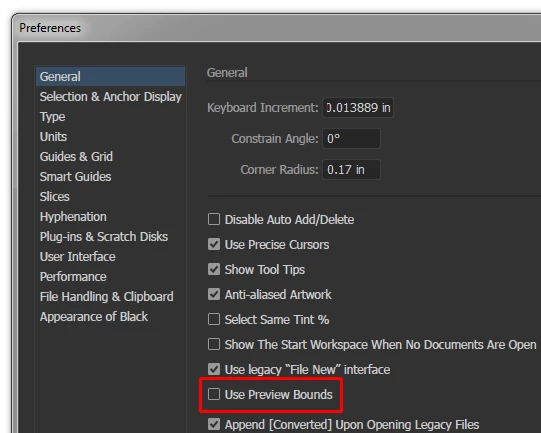
Preferences > General:

When Use Preview Bounds is ticked, an object's measurements include stroke girth.
When Use Preview Bounds is un-ticked, an object's measurements are based on the path only.
Copy link to clipboard
Copied
Its in the stroke panel...

Copy link to clipboard
Copied
Stroke Panel

Copy link to clipboard
Copied
Sorry, that's not it. Or not what I am looking for.
Copy link to clipboard
Copied
christophers71105342 schrieb
Sorry, that's not it. Or not what I am looking for.
So what are you looking for? Your initial post is not clear.
Copy link to clipboard
Copied
Are you talking about resizing the image and the stroke thickness changes?? You can se this in the preferences or use the scale tool - double click on the scale tool...

Copy link to clipboard
Copied
well, then, please, be more specific in your question. It would be very useful if you share the screenshot with the artwork and the detailed description of the problem.
Copy link to clipboard
Copied
then you might want to be more precise. is it this?

Copy link to clipboard
Copied
Preferences > General:

When Use Preview Bounds is ticked, an object's measurements include stroke girth.
When Use Preview Bounds is un-ticked, an object's measurements are based on the path only.
Copy link to clipboard
Copied
John M. was correct with his response. Thank you and thanks to all that help figure this out.
Get ready! An upgraded Adobe Community experience is coming in January.
Learn more