Exit
  • Global community
    • Language:
      • Deutsch
      • English
      • Español
      • Français
      • Português
  • 日本語コミュニティ
  • 한국 커뮤니티
0

Stroke text outside - Problem

New Here ,
Oct 05, 2022 Oct 05, 2022

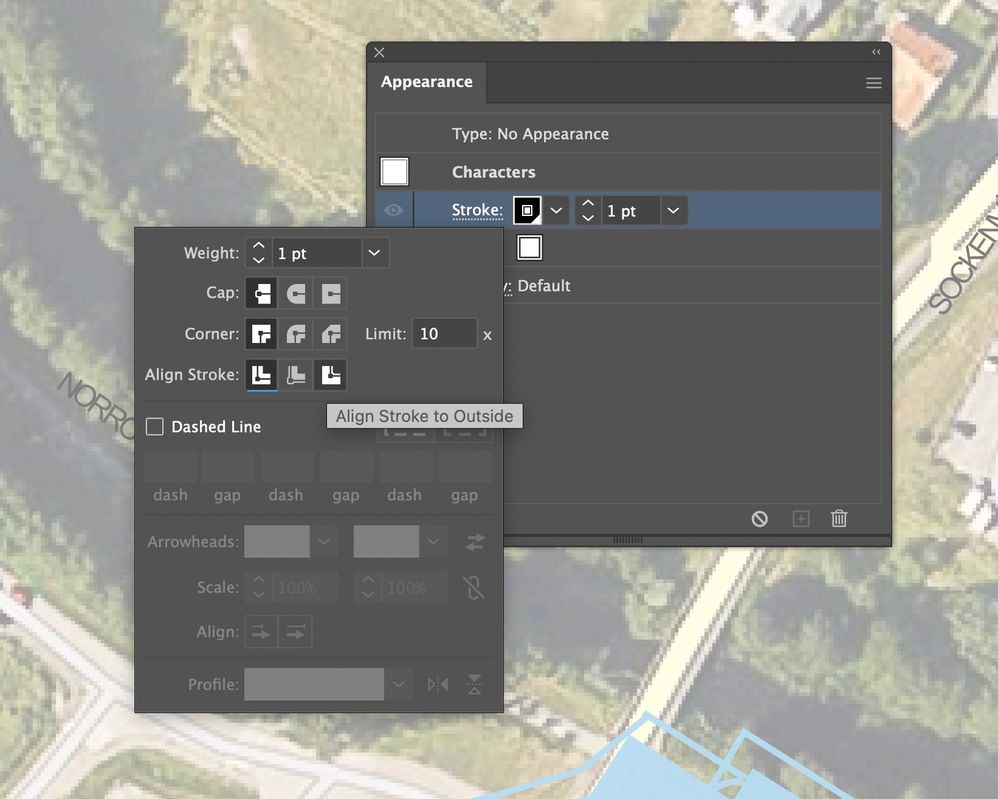
Hej guys I have problem with simple thing, I waana do stroke of text outside but it doesnt work do you have any idea whats wrog ? Thanks


Simply explain that I cannot clik on the function and get Stroke alight to outside.

Skärmavbild 2022-10-05 kl. 11.00.52.jpg


TOPICS
Bug , Feature request , Type
512
Translate
Report
Community guidelines
Be kind and respectful, give credit to the original source of content, and search for duplicates before posting. Learn more
community guidelines

correct answers 1 Correct answer

Community Expert , Oct 05, 2022 Oct 05, 2022

Stroke inside/outside cannot be used on text.

As a workaround, select the text with the Selection tool (not the text tool), open the appearance panel and add a stroke. Drag it below the Characters and give it double the stroke width you intend to use.

Translate
Adobe
Community Expert ,
Oct 05, 2022 Oct 05, 2022
LATEST

Stroke inside/outside cannot be used on text.

As a workaround, select the text with the Selection tool (not the text tool), open the appearance panel and add a stroke. Drag it below the Characters and give it double the stroke width you intend to use.
Translate
Report
Community guidelines
Be kind and respectful, give credit to the original source of content, and search for duplicates before posting. Learn more
community guidelines
