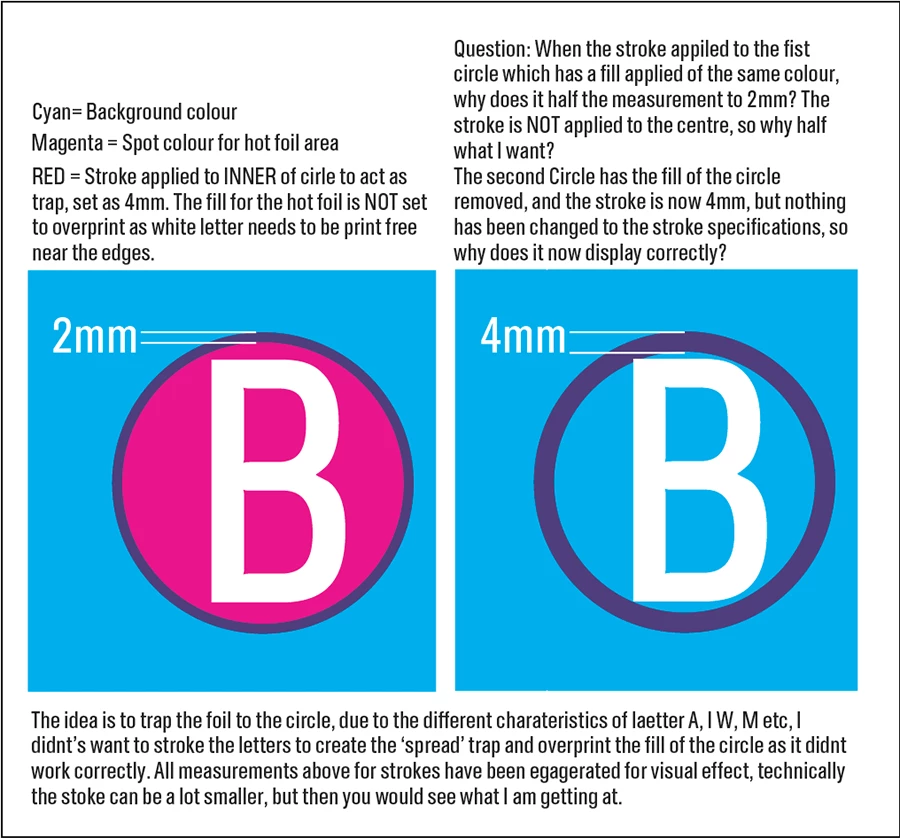
The thing is that when you set the same colour to Fill and Stroke and turn on the Overprint Stroke attribute, the program recognizes this as a manually setting of Trapping. In this case, it changes the Fill size to overlap the half of Stroke weight and provide an external overlapping area. As you have the same colour for Fill and Stroke, you see only the external overprinting part of Stroke. It does not depend on the Stroke alignment. You can check it trying to decrease the Fill Opacity.
So if you want to print with only 2 inks, you have to usee 2 shapes, one with empty Fill and overprinting Stroke, and another with empty Stroke and non-overprinting Fill.
But yes, Ton,
this looks like a bug because using another Stroke colour goes the same way.
A red stroke overprinting a red fill will be invisible, if you add a tint of black to your stroke you will see it is actually there.
An overprinting stroke will split the difference between the fill and the background. InDesign works the same way. You can get around this by copy and pasting the circle to add the stroke as a separate element. You would want to spread back the blue from the type, to avoid blue showing from mis registered foil, or leave the circles white.
I have just tested the same principles in InDesign, it does the same thing, only when a fill is applied to the shape that has the stroke (using the spot colour). I can see that is it splitting the size, but surely this is what align stroke to centre is for, not if I am aligning to the inside.

 AdChoices