Known Participant
April 13, 2023
Answered

stroke to new layer

  • April 13, 2023
  • 2 replies
  • 3047 views

I have a document with 3 shapes that each have a line with a different spot color:


1. Cut contour
2. Big
3. Pnimi

The script is like this:

I need the computer to recognize the spots
and will turn them into spot colors with the following values:


CutContour = R=255 G=0 B=0
Big = R=0 G=255 B=0
Pnimi = R=0 G=0 B=255


After that, will move all the lines to a new layer.

This topic has been closed for replies.
Correct answer jduncan

here the code. it's not working:


// remove all swatches not defined in breakdowns object
var swatch,
counter = 0;
for (var i = doc.swatches.length - 1; i >= 0; i--) {
doc.swatches[i].remove();
counter++;
}

}
}

alert("Deleted " + counter + " swatches.");

// remove any left over swatch groups
var swatchGroup,
counter = 0;
for (var i = doc.swatchGroups.length - 1; i >= 0; i--) {
swatchGroup = doc.swatchGroups[i];
if (swatchGroup.getAllSwatches().length == 0) {
swatchGroup.remove();
counter++;
}
}

alert("Deleted " + counter + " empty swatch groups.");


Here's the entire script and it works fine for me (see the screencast video).
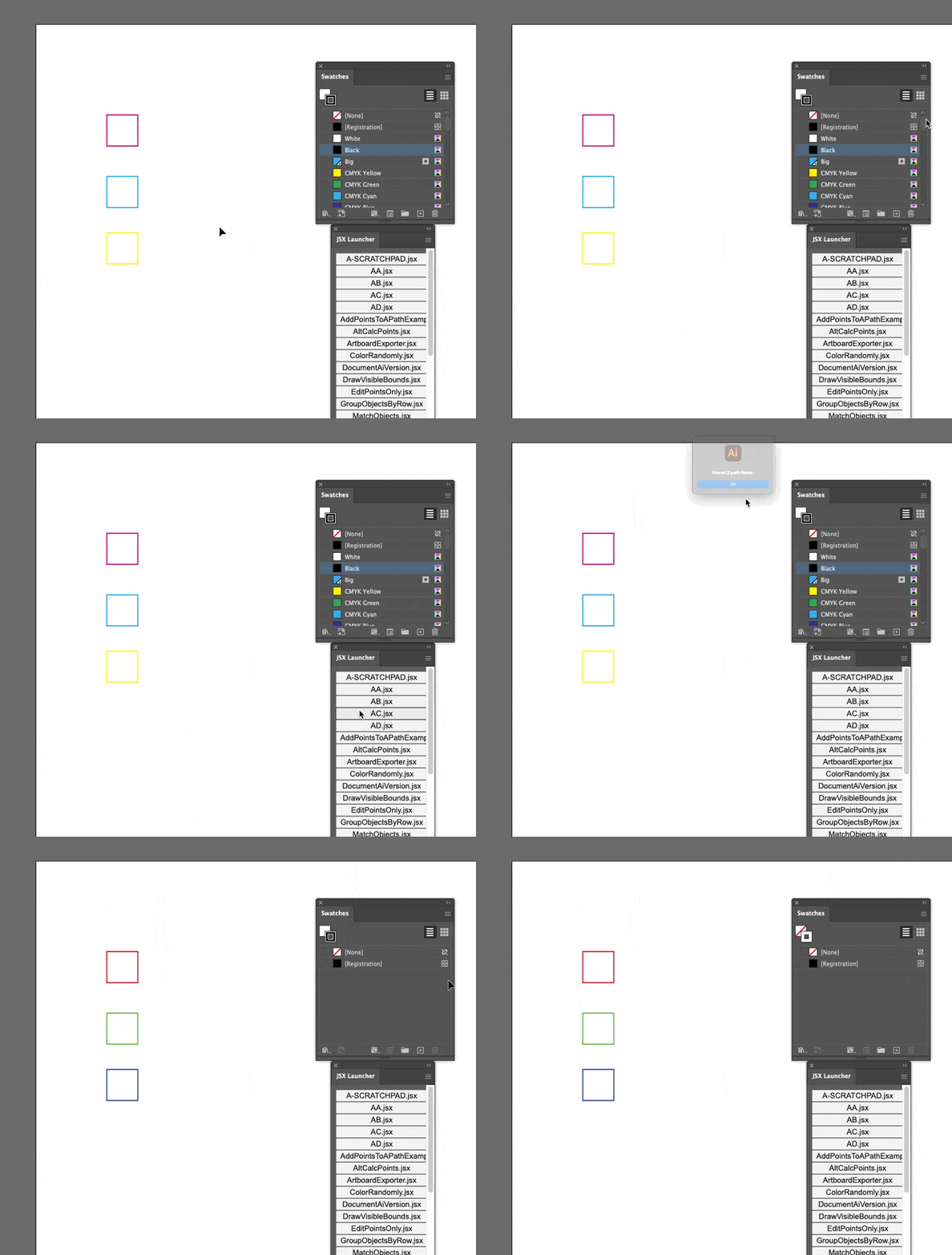
 

/**
 * Change the color model and breakdown
 * of spot colors in active document.
 * @discussion https://community.adobe.com/t5/illustrator-discussions/stroke-to-new-layer/m-p/13725064
 */
(function () {
  var breakdowns = {
    CutContour: [255, 0, 0],
    Big: [0, 255, 0],
    Pnimi: [0, 0, 255],
  };

  var doc = app.activeDocument,
    counter = 0;

  // get the colors
  for (var swatchName in breakdowns) {
    try {
      setSwatchSpotColor(doc.swatches.getByName(swatchName), breakdowns[swatchName]);
      counter++;
    } catch (error) {}
  }

  alert("Changed " + counter + " spot colors.");

  // make a new layer to hold the items
  layer = app.activeDocument.layers.add();
  layer.name = "MOVED HERE";

  // iterate over all path items and check if their stroke, if it matches
  // any of the items in 'breakdowns' then move that path to the new layer
  var item,
    counter = 0;
  for (var i = 0; i < doc.pathItems.length; i++) {
    item = doc.pathItems[i];
    if (
      item.stroked &&
      item.strokeColor.typename == "SpotColor" &&
      breakdowns.hasOwnProperty(item.strokeColor.spot.name)
    ) {
      item.move(layer, ElementPlacement.PLACEATEND);
      counter++;
    }
  }

  alert("Moved " + counter + " path items.");

  // remove all swatches not defined in breakdowns object
  counter = 0;
  for (var i = doc.swatches.length - 1; i >= 0; i--) {
    doc.swatches[i].remove();
    counter++;
  }

  alert("Deleted " + counter + " swatches.");

  // remove any left over swatch groups
  var swatchGroup,
    counter = 0;
  for (var i = doc.swatchGroups.length - 1; i >= 0; i--) {
    swatchGroup = doc.swatchGroups[i];
    if (swatchGroup.getAllSwatches().length == 0) {
      swatchGroup.remove();
      counter++;
    }
  }

  alert("Deleted " + counter + " empty swatch groups.");
})();

/**
 * Sets the color of a spot color swatch
 * based on the breakdown supplied.
 * @7111211 m1b
 * @version 2023-04-17
 * @9397041 {Swatch} swatch - an Illustrator Swatch.
 * @9397041 {Array<Number>} breakdown - the color breakdown [R, G, B] or [C, M, Y, K].
 */
function setSwatchSpotColor(swatch, breakdown) {
  if (swatch.color.typename !== "SpotColor") return;

  var newColor;

  if (breakdown.length === 3) {
    newColor = new RGBColor();
    newColor.red = breakdown[0];
    newColor.green = breakdown[1];
    newColor.blue = breakdown[2];
  } else if (breakdown.length === 4) {
    newColor = new CMYKColor();
    newColor.cyan = breakdown[0];
    newColor.magenta = breakdown[1];
    newColor.yellow = breakdown[2];
    newColor.black = breakdown[3];
  }

  swatch.color.spot.color = newColor;
}

 

2 replies

m1b
Community Expert
Community Expert
April 16, 2023

Here is a script that will do what you ask. I've made a function that works with CMYK as well as RGB colors. You can change the settings in the breakdowns object.

- Mark


/**
 * Change the color model and breakdown
 * of spot colors in active document.
 * @discussion https://community.adobe.com/t5/illustrator-discussions/stroke-to-new-layer/m-p/13725064
 */
(function () {

    var breakdowns = {
        CutContour: [255, 0, 0],
        Big: [0, 255, 0],
        Pnimi: [0, 0, 255],
    };

    var doc = app.activeDocument,
        counter = 0;

    // get the colors
    for (var swatchName in breakdowns) {
        try {
            setSwatchSpotColor(doc.swatches.getByName(swatchName), breakdowns[swatchName]);
            counter++;
        } catch (error) { }
    }

    alert('Changed ' + counter + ' spot colors.');

})();


/**
 * Sets the color of a spot color swatch
 * based on the breakdown supplied.
 * @7111211 m1b
 * @version 2023-04-17
 * @9397041 {Swatch} swatch - an Illustrator Swatch.
 * @9397041 {Array<Number>} breakdown - the color breakdown [R, G, B] or [C, M, Y, K].
 */
function setSwatchSpotColor(swatch, breakdown) {

    if (swatch.color.typename !== 'SpotColor')
        return;

    var newColor;

    if (breakdown.length === 3) {
        newColor = new RGBColor();
        newColor.red = breakdown[0];
        newColor.green = breakdown[1];
        newColor.blue = breakdown[2];
    }

    else if (breakdown.length === 4) {
        newColor = new CMYKColor();
        newColor.cyan = breakdown[0];
        newColor.magenta = breakdown[1];
        newColor.yellow = breakdown[2];
        newColor.black = breakdown[3];
    }

    swatch.color.spot.color = newColor;

};


aviel222Author
Known Participant
April 17, 2023
Excellent, but I want the colors to move to a new layer

Thanks
jduncan
Community Expert
jduncanCommunity ExpertCorrect answer
Community Expert
April 18, 2023

here the code. it's not working:


// remove all swatches not defined in breakdowns object
var swatch,
counter = 0;
for (var i = doc.swatches.length - 1; i >= 0; i--) {
doc.swatches[i].remove();
counter++;
}

}
}

alert("Deleted " + counter + " swatches.");

// remove any left over swatch groups
var swatchGroup,
counter = 0;
for (var i = doc.swatchGroups.length - 1; i >= 0; i--) {
swatchGroup = doc.swatchGroups[i];
if (swatchGroup.getAllSwatches().length == 0) {
swatchGroup.remove();
counter++;
}
}

alert("Deleted " + counter + " empty swatch groups.");


Here's the entire script and it works fine for me (see the screencast video).


/**
 * Change the color model and breakdown
 * of spot colors in active document.
 * @discussion https://community.adobe.com/t5/illustrator-discussions/stroke-to-new-layer/m-p/13725064
 */
(function () {
  var breakdowns = {
    CutContour: [255, 0, 0],
    Big: [0, 255, 0],
    Pnimi: [0, 0, 255],
  };

  var doc = app.activeDocument,
    counter = 0;

  // get the colors
  for (var swatchName in breakdowns) {
    try {
      setSwatchSpotColor(doc.swatches.getByName(swatchName), breakdowns[swatchName]);
      counter++;
    } catch (error) {}
  }

  alert("Changed " + counter + " spot colors.");

  // make a new layer to hold the items
  layer = app.activeDocument.layers.add();
  layer.name = "MOVED HERE";

  // iterate over all path items and check if their stroke, if it matches
  // any of the items in 'breakdowns' then move that path to the new layer
  var item,
    counter = 0;
  for (var i = 0; i < doc.pathItems.length; i++) {
    item = doc.pathItems[i];
    if (
      item.stroked &&
      item.strokeColor.typename == "SpotColor" &&
      breakdowns.hasOwnProperty(item.strokeColor.spot.name)
    ) {
      item.move(layer, ElementPlacement.PLACEATEND);
      counter++;
    }
  }

  alert("Moved " + counter + " path items.");

  // remove all swatches not defined in breakdowns object
  counter = 0;
  for (var i = doc.swatches.length - 1; i >= 0; i--) {
    doc.swatches[i].remove();
    counter++;
  }

  alert("Deleted " + counter + " swatches.");

  // remove any left over swatch groups
  var swatchGroup,
    counter = 0;
  for (var i = doc.swatchGroups.length - 1; i >= 0; i--) {
    swatchGroup = doc.swatchGroups[i];
    if (swatchGroup.getAllSwatches().length == 0) {
      swatchGroup.remove();
      counter++;
    }
  }

  alert("Deleted " + counter + " empty swatch groups.");
})();

/**
 * Sets the color of a spot color swatch
 * based on the breakdown supplied.
 * @7111211 m1b
 * @version 2023-04-17
 * @9397041 {Swatch} swatch - an Illustrator Swatch.
 * @9397041 {Array<Number>} breakdown - the color breakdown [R, G, B] or [C, M, Y, K].
 */
function setSwatchSpotColor(swatch, breakdown) {
  if (swatch.color.typename !== "SpotColor") return;

  var newColor;

  if (breakdown.length === 3) {
    newColor = new RGBColor();
    newColor.red = breakdown[0];
    newColor.green = breakdown[1];
    newColor.blue = breakdown[2];
  } else if (breakdown.length === 4) {
    newColor = new CMYKColor();
    newColor.cyan = breakdown[0];
    newColor.magenta = breakdown[1];
    newColor.yellow = breakdown[2];
    newColor.black = breakdown[3];
  }

  swatch.color.spot.color = newColor;
}


m1b
Community Expert
Community Expert
April 13, 2023

Please post example file. (Save as .pdf because forum software doesn't accept .ai files.)

- Mark

aviel222Author
Known Participant
April 14, 2023
test.pdf