
Participating Frequently
October 6, 2022
Answered

Struggling with Clipping Mask in an Image

  • October 6, 2022
  • 1 reply
  • 2331 views

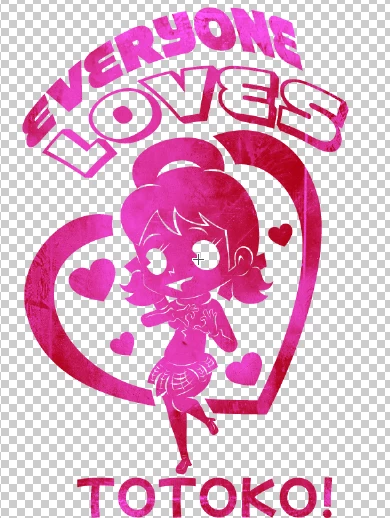
I have been struggling to put an effect in my vector image and have been trying to figure out what to do. What the effect is supposed to look like I can do easily in Clip Studio Paint but Adobe Illustrator makes it a nightmare to complete.


This is what the effect is supposed to look like (Clip Studio Paint Version)


Adobe Version:
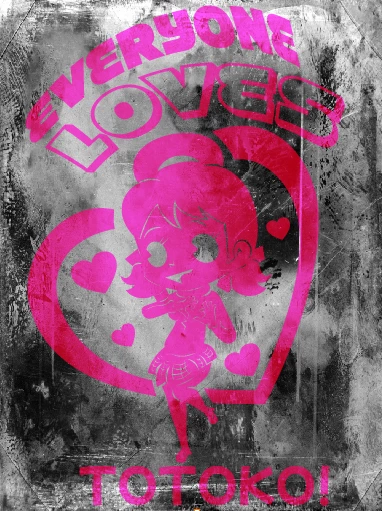
 

I am trying to make the clip mask go through it and tried to make it all compand path but it's not working. I know I am doing something wrong in the process of doing so and keep getting errors that explains issues with the paths, compounds or the image disappearing in general, when I do it to the text that has the wrap effect, it removes it or other issues that arises. I know I am doing something wrong but have no idea what it is. I thank you for your time for reading and have a good one.



This topic has been closed for replies.
Correct answer Monika Gause

Ah I see, though fair enough. I'm unsure on how to explain my question because for me it's easier to show it. I think part of it too though is just lack of understanding in the program at my end. Regardless though, thank you for your help as I believe my answer as been answered otherwise. 


Clipping masks in image editing applications generally work differently. In Photoshop you can declare any layer a mask and let it clip another layer. I don't know about Clip Studio Paint, but assume it's the same.


In Illustrator a clipping mask is strictly based on paths. You need a path to make a clipping mask. Multiple Paths need to be a compound path. Maybe that explains it?

1 reply

Monika Gause
Community Expert
Community Expert
October 6, 2022

So you want to make the pink shapes into a compound path?

Then you first have to get rid of the clipping masks. We would need to see how the artwork has been built. Please show us the Layers panel. Make sure that there is not only the Layer itself in it, but all the objects inside the layer. Or upload your AI file to Dropbox or the like and post a link.

Participating Frequently
October 7, 2022

Not sure if the link got to you so I'll resend the file,


https://wetransfer.com/downloads/56aad853e7fda9fcdace4c5dcae1b41820221006153755/675583

Participating Frequently
October 8, 2022

The image still was inside a clipping mask, which was unnecessary.

Here's your file: https://we.tl/t-8QYjHhSfR0 


Thank you so much for the help 🎉So I was curious to know on how the process can work so I can learn this and apply this to my other drawings in the future. I think the main issue based on comparing my old file to the one you made involoves with making the white part here:


Is there a tutorial that can explain how this works or at least the name of the topic so I can gather a better understanding on how to do this myself for future projects?