
Participant
December 3, 2022
Answered

Struggling with compound path separation

  • December 3, 2022
  • 1 reply
  • 781 views

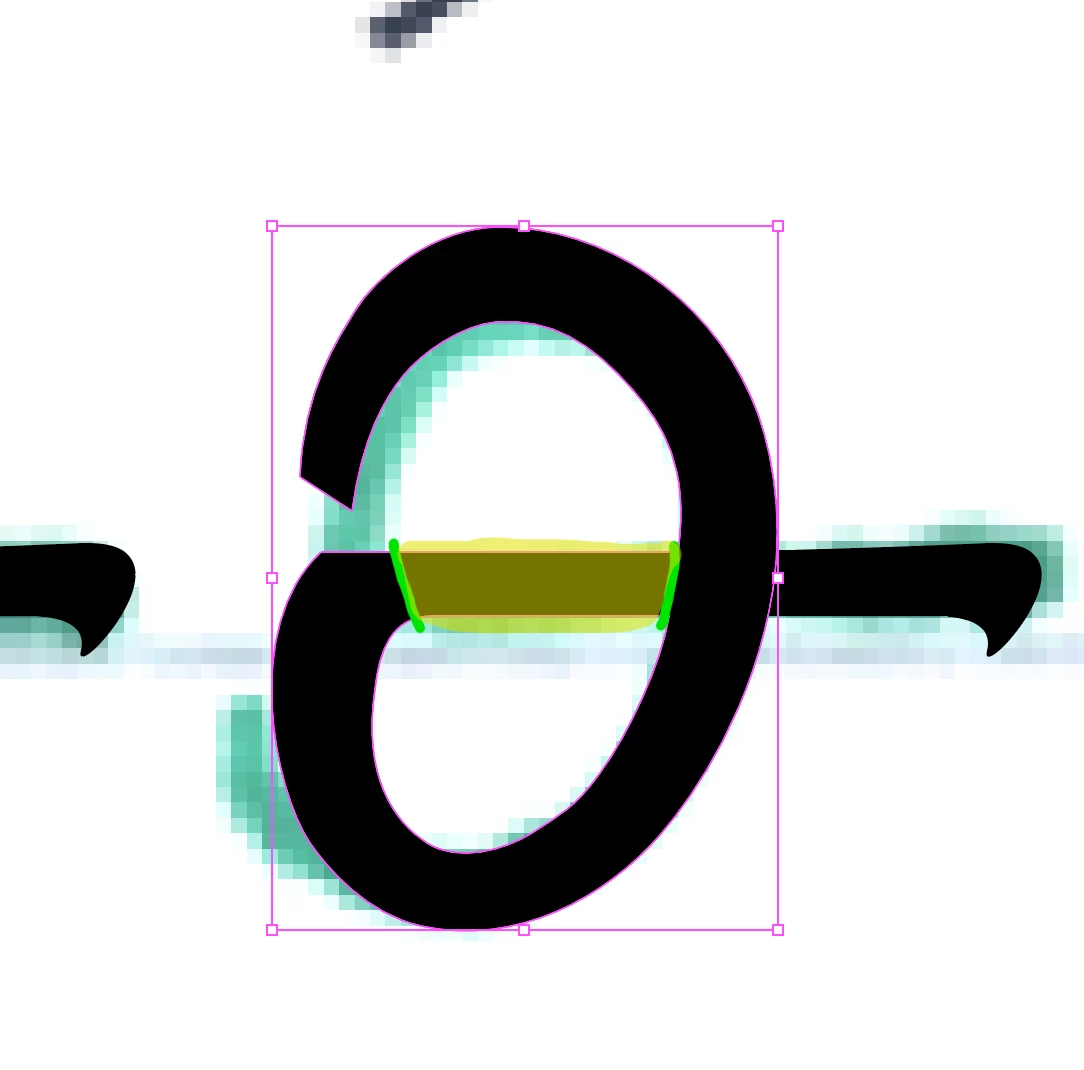
Hello! I'm struggling to cut this compound path the way I need to. I've tried several tools and methods but all of them have failed.

I am looking to separate it smoothly into two different objects without distorting the shape in any way. The part I want seprate is hilighted in yellow and the lines I want to cut along are in green. 


Any help is appreciated!
This topic has been closed for replies.
Correct answer Monika Gause

You could release the compound path via Object > Compound path > Release.

then select those 2 anchors under the green line to the right and click the scissors biutton in the control panel.

Use the scissors tool to cut the paths on the left side.

Then reconnect everything. You might need to adjust handles on the right side of the cut.

1 reply

Monika Gause
Community Expert
Monika GauseCommunity ExpertCorrect answer
Community Expert
December 3, 2022

You could release the compound path via Object > Compound path > Release.

then select those 2 anchors under the green line to the right and click the scissors biutton in the control panel.

Use the scissors tool to cut the paths on the left side.

Then reconnect everything. You might need to adjust handles on the right side of the cut.

Participant
December 3, 2022

Thanks so much!