
December 3, 2025
Question

SVG Image Misalignment After Opening in Browser

  • December 3, 2025
  • 1 reply
  • 358 views

Hi,


I created a harness illustration in Adobe Illustrator with callout numbers on one layer and harness images on another. After saving the file in SVG format, the images appear moved or shrunk when I open it in Google Chrome, causing misalignment between the callouts and the harness images.
How can I ensure that the images do not deform or shift when viewed in a browser?
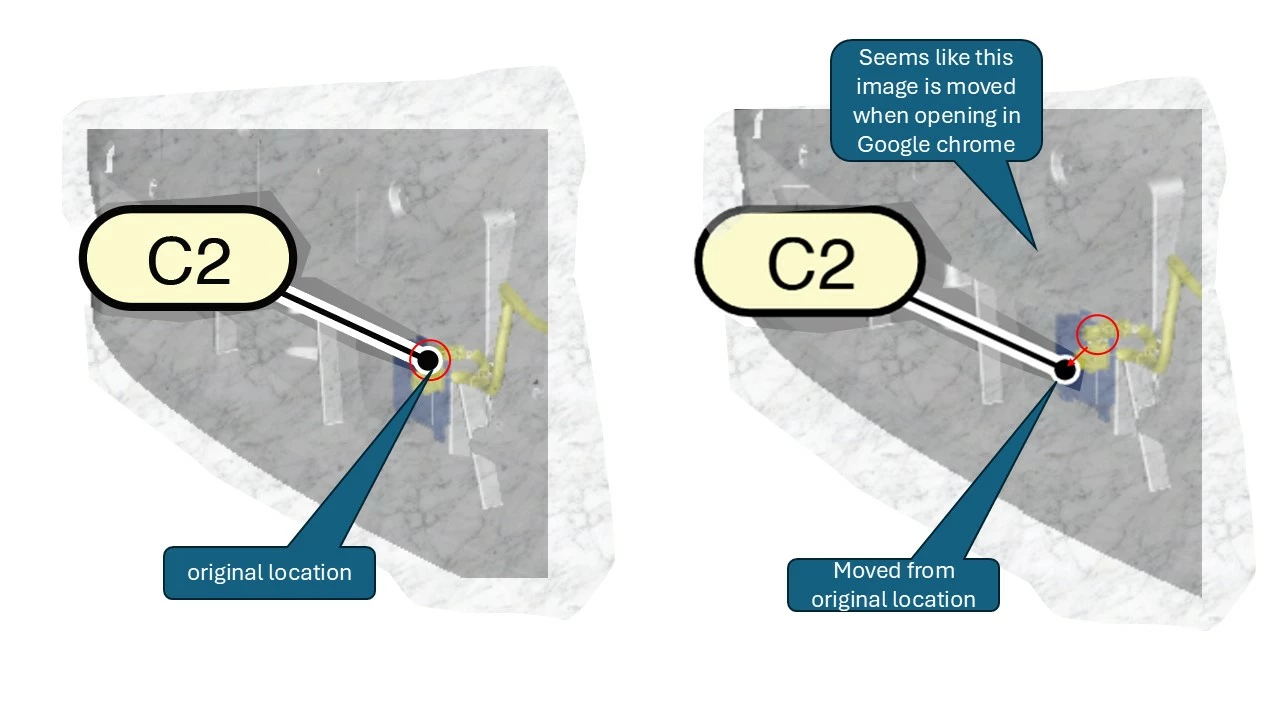


Give below image for better understanding. Let me know for any more clarity.


THanks,

Arul

1 reply

Community Expert
December 3, 2025

Hi Arul,

I don't know if this will help in this situation but I have had issues with SVG being accurate in the past, adding extra points or tiny adjustments (which usually occurred if I exported using the asset export). If you export using File>Export As>SVG you can adjust the 'Decimal setting' and increase it to a higher number like 3, 5, or even 7 (which appears to be the max). 

Hope this is of some use.

Kind regards,

Paul

arul_9657Author
December 8, 2025

We have also check by locking the layer of the image...but it is also no use

Community Expert
December 8, 2025

What is the resolution of the placed image? I'm wondering if the browser is automatically re-scaling the image so it hits a setting like 72ppi.