
Participant
December 11, 2017
Question

SVGs being corrupted after save

  • December 11, 2017
  • 1 reply
  • 2728 views

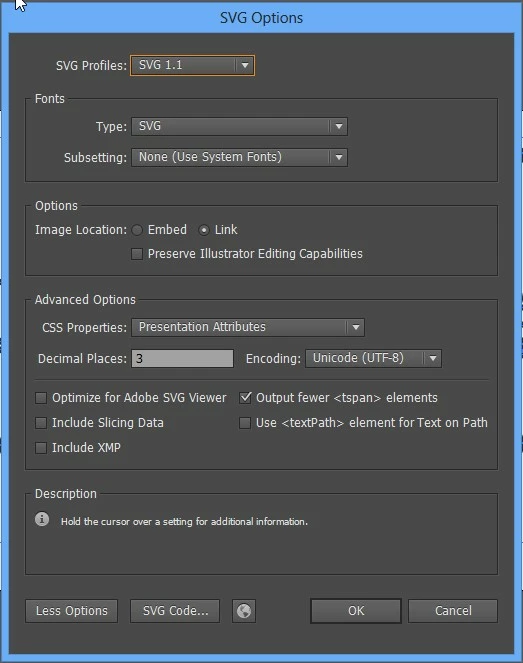
We are working with Video Scribe. We have worked quite a bit before, using the settings I am attaching, and have never had a problem. For some reason after we save the SVG, when we open it back up in Illustrator all the paths and details are wonky and not what they once were. Any help?


    

    1 reply

    Monika Gause
    Community Expert
    Community Expert
    December 11, 2017

    nathanp1840285  schrieb

    We are working with Video Scribe. We have worked quite a bit before, using the settings I am attaching, and have never had a problem. For some reason after we save the SVG, when we open it back up in Illustrator all the paths and details are wonky and not what they once were. Any help?
    Please describe your workflow step by step.

    Participant
    December 11, 2017

    1. place the vector image on something like a 400px / 400px canvas.

    2. Create a new layer, trace over the vector object how we want it to trace in. Un-group items as much as I can.

    3. Set that trace layer to opacity 0%.

    4. Save to the svg settings shown above.

    This is the first time I've run into this after about 6 projects doing this. This is the first time we've had trouble.

    Monika Gause
    Community Expert
    Community Expert
    December 11, 2017

    VideoScribe you trace over the path on a new layer. All it does is setup how the hand draws in Video Scribe. Shouldn't effect the problem we are seeing. You have to keep the layer. http://blog.videoscribe.co/how-to-make-a-svg-for-videoscribe-in-adobe-illustrator/

    In the past, we could open the SVG in Illustrator for further editing. Just recently it started giving us this problem.

    The problem is that is blacking over parts of the drawing, getting rid of sections of the artwork, moving and distorting the artwork.


    The moving and distorting is caused by a lack of precision when saving the SVG file.

    Which settings do you use in Video Scribe?

    As for the blacking - Illustrator misinterprets some SVG constructs.

    You might want to post this as an issue on http://illustrator.uservoice.com and also post SVG files there so someone can evaluate them.

    Did you also upgrade Video Scribe?