
Participant
September 10, 2024
Answered

Swatches imported from other documents do not show

  • September 10, 2024
  • 3 replies
  • 714 views

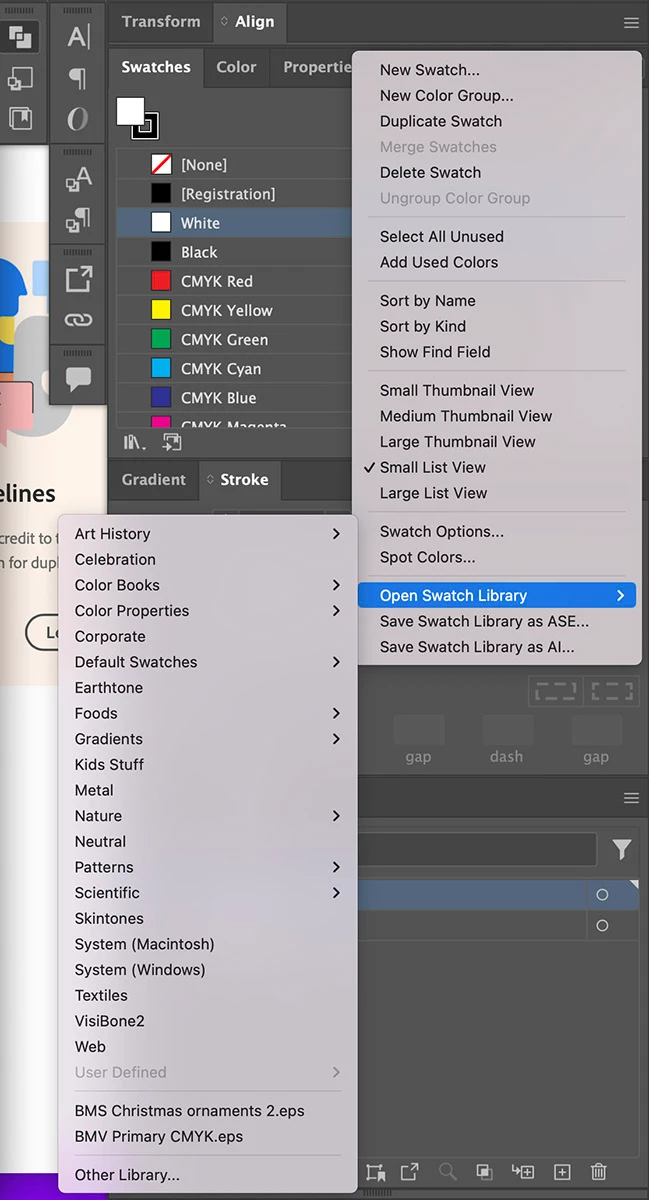
When I go to Swatches>Open Swatch Library>Other Library... and select another Illustrator document, nothing happens. I don't get the new swatch libary appearing anyhwere. I have tried selecting Show All Swatches and still nothing happens.


The name of the swatches does appear on the Swatch flyout window. See the image below. The two documents at the bottom "BMV Chrismtas ornaments.eps" and "BMV Primary CMYK.eps" I selected those files and the swatches are not showing anywhere. Any help is appreciated.


This topic has been closed for replies.
Correct answer Brad @ Roaring Mouse

Depends on the age of the EPS.

Older versions of EPS wrote swatch libraries differently back then, and those aren't what Illustrator expects now.

You'd be better off resaving your EPS files as AI files, and then the Libraries will show up. You could try and resave the EPS as a current version and that may rewrite the swatch library in a form that can be imported, but if you're going to do that, you're better off moving forward in AI format anyway, for many more reasons than swtach libraries.

3 replies

barbara_a7746676
Community Expert
Community Expert
September 11, 2024

If, as Brad suggested, resaving as AI is not an option, you can copy objects that in the EPS that have the colors you want and paste them into Illustrator. Dragging them to the Swatches panel will add them to the file.

Not the most convenient method, but an option.

Brad @ Roaring Mouse
Community Expert
Community Expert
September 11, 2024

Indeed, if all the OP wants to do is import spot colours that were used in those EPSs, they can just place the EPS into the new file and those colours will be added to the Swatches. That won't be the same as accessing an entire list of swatches, be they used or unused, spot or non, or gradients, etc, but I guess it depends on what the intent is.

Brad @ Roaring Mouse
Community Expert
Brad @ Roaring MouseCommunity ExpertCorrect answer
Community Expert
September 11, 2024

Depends on the age of the EPS.

Older versions of EPS wrote swatch libraries differently back then, and those aren't what Illustrator expects now.

You'd be better off resaving your EPS files as AI files, and then the Libraries will show up. You could try and resave the EPS as a current version and that may rewrite the swatch library in a form that can be imported, but if you're going to do that, you're better off moving forward in AI format anyway, for many more reasons than swtach libraries.

Doug A Roberts
Community Expert
Community Expert
September 11, 2024
quote

Depends on the age of the EPS.

Older versions of EPS wrote swatch libraries differently back then, and those aren't what Illustrator expects now.

You'd be better off resaving your EPS files as AI files, and then the Libraries will show up. You could try and resave the EPS as a current version and that may rewrite the swatch library in a form that can be imported, but if you're going to do that, you're better off moving forward in AI format anyway, for many more reasons than swtach libraries.


By @Brad @ Roaring Mouse


I tried with an Illustrator 2020 EPS. Since it opens with artboards and libraries intact, it must contain AI file data, and therefore should work as a swatch library. But it doesn't, as the OP describes. I wonder if this has changed at some point or is a bug.

Participant
September 11, 2024

Thanks Doug and Brad. It was the .eps file that was the problem. I tried importing the .ai version and the swatch panel opened with all the swatches. I didn't realize this even though I've used Illustrator for years.  Thank you.

Doug A Roberts
Community Expert
Community Expert
September 10, 2024

As far as I can tell, EPS files can't be opened as Swatch libraries.

I don't know why this should necessarily be the case -- have you used EPS files as swatch libraries before? If so in what version?