
Participant
December 10, 2020
Answered

Tapered checkered pattern conundrum

  • December 10, 2020
  • 2 replies
  • 1035 views

I've been tasked to create this wavy checkered pattern design by a client. He liked the design, but he wanted the pattern to continue and taper off on both sides. The problem is, I've figured out how to do it on one side using warp flag option on a compound checkered object, but I have no idea how to create the same pattern on both sides in a passable and reasonably simple way.


I'll include an image showing what I mean.


Have any suggestions?
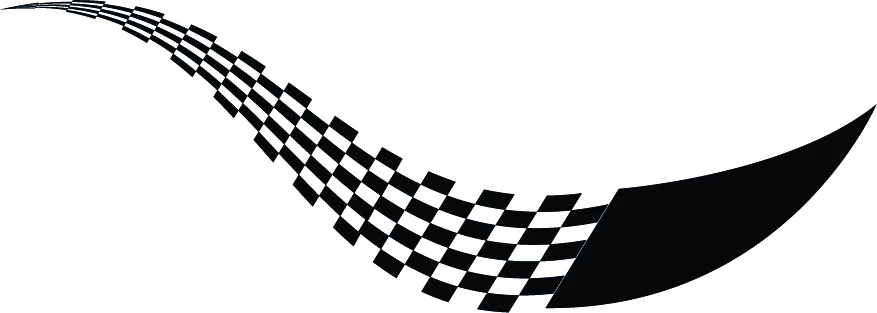


[ attachment inserted as inline image by moderator ]

This topic has been closed for replies.
Correct answer Myra Ferguson

It looks like you made a shape and filled it with a pattern fill. See step #3 for turning your pattern into something you can use to make a brush or the alternate approach to making the pattern. Either way, you need to have just the shapes to be able to turn them into a brush. Then do #4 to make an Art brush.

2 replies

Myra Ferguson
Community Expert
Community Expert
December 10, 2020

If I understand what you want, you can make an art brush with the checkered pattern, draw the curve, and adjust the width at each end.


  1. Draw a square with the Rectangle Tool and fill it with black
  2. Copy the square, drag it next to the first one, and fill it with white
  3. Make copies to create the pattern for however many repetitions you want (You can do it by making a pattern, filling a rectangle with the pattern, releasing the clipping mask, ungrouping, and deleting the parts you don't want)
  4. Drag the checkered arrangement of squares to the Brushes panel and create a new Art brush
  5. Draw the curve how you want it
  6. With the curve selected, click on the brush to apply it 
  7. Select the Width tool (Shift + W)
  8. Click on on one of the ends of the curve and drag it inward to taper the end
  9. Repeat on the other end
HybbemanAuthor
Participant
December 10, 2020

Thank you, but is there a way to maintain the same seven square pattern running along and within the variable width stroke?


The result I got was quite different from the original design.


Monika Gause
Community Expert
Community Expert
December 10, 2020

Make an art brush.

Monika Gause
Community Expert
Community Expert
December 10, 2020

Make the checkered patternas an art brush.

Apply it to a wavy path

Apply a width profile - you should find one in the menu of variable widths.