
panduvittala
Inspiring
October 30, 2013
Answered

temporary title for text ranges

  • October 30, 2013
  • 2 replies
  • 1114 views

I am developing a plugin that retrieves data from external system and fills the data in text ranges. The text ranges have a "type" associated with it. I want to display the type in illustrator above the text range (like a title), but should not be saved as part of the file - it should be dynamically displayed "for info only". I have seen a plugin doing exactly same thing. See the image below - has been rendered by the plugin I mentioned. The "Type" heading with border appears dynamically. If I switch to another window and switch back, the border and "Type" heading is redrawn. When exported, heading does not appear in the image. When saved, heading does not get saved. There are no additional layers, and the heading is not selectable. How can I achieve the same? Thanks.
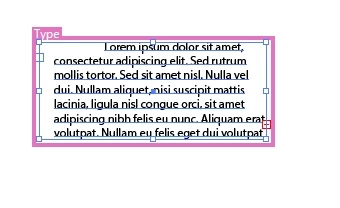
edit: Looks like the heading and border is around the layer that consists of textrange.

This topic has been closed for replies.
Correct answer JLGJeanLouis

Hello,

I think we should use annotations to produce this type of effect.

Use AIAnnotatorDrawer.h suite functions to draw the pink frame and the white text (Type).

JLG.

2 replies

A. Patterson
Inspiring
October 30, 2013

JLG is dead on, that's an annotation. Take a look at the Annotator example in the SDK, it should get you started. For something like this I don't think it'll be too difficult, though annotations are -- in general -- a bit of a pain to pull of right.

JLGJeanLouisCorrect answer
Inspiring
October 30, 2013

Hello,

I think we should use annotations to produce this type of effect.

Use AIAnnotatorDrawer.h suite functions to draw the pink frame and the white text (Type).

JLG.

panduvittala
Inspiring
October 30, 2013

Thanks a lot. I am looking at annotationdrawersuite, but drawtext method expects AIAnnotatorDrawer object as input. I am not sure what object this is. I tried passing text range and art handle. Crashes AI. Any pointer towards getting AIAnnotatorDrawer for selected text will be really helpful. Thanks in advance.

A. Patterson
Inspiring
October 30, 2013

Annotations are not intuitive. Essentially, you tell Illustrator you want to draw annoations and then when you want to draw them, you tell Illustrator where you're thinking. You do this by specifying a region of the screen as 'invalid'. This will prompt AI to send you a callback that includes all the stuff you need to draw. You can only draw during these callbacks. So when you want to draw a box around the text, you get the text's bounds, inflate them a little (so you have room to draw your bounding box & text) and then you should get a callback. At that point, draw your decoration.

I strongly advise fiddling with the Annotation SDK sample. It will help you get an idea of how its done. As I said, you don't do it in the obvious way you'd expect, but we use annotations quite a bit in our plugin and they work fairly well.