

brian704
Inspiring
January 4, 2018
Answered

Text converted to outlines - can't change fill or stroke

  • January 4, 2018
  • 1 reply
  • 2660 views

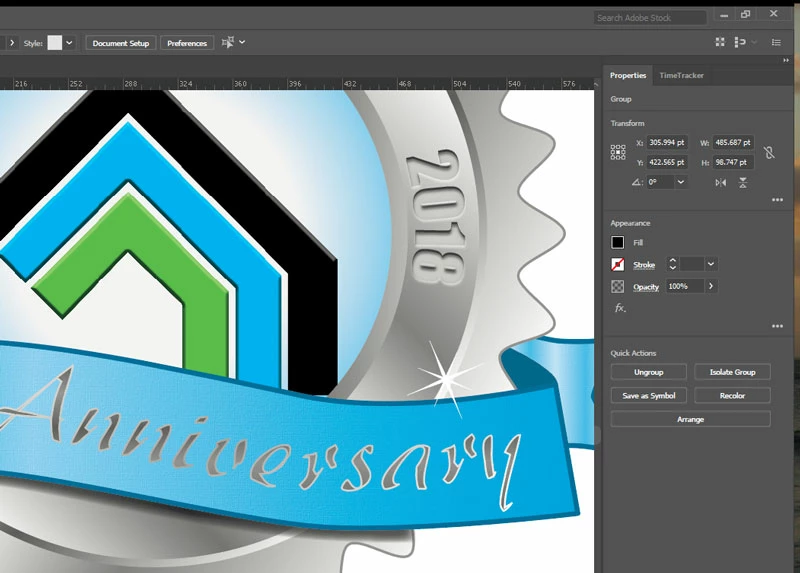
I have some type I converted to outlines so I could add additional shading. I then added a negative path offset. That group of paths has a fill and stroke even though none is showing in the appearance panel or the property panel. In the screen shot the type in question is the "Anniversary" type. The properties panel is shown from when it was selected. I unselected it so you could see the issue better. I'm trying to get rid of the stroke and fill so I can put a gradient fill on it.
    This topic has been closed for replies.
    Correct answer Monika Gause

    There's an appearance applied to the group. So maybe when you ungroup it, your problem will already be solved. But maybe when you ungroup it, you will lose stuff you don't want to lose.

    1 reply

    Monika Gause
    Community Expert
    Community Expert
    January 4, 2018

    Please select the object and then show us a screenshot of the appearance panel and the open layers panel.

    For complex appearances the properties panel is not sufficient.

    brian704
    brian704Author
    Inspiring
    January 4, 2018

    Here they are:

    John Mensinger
    Community Expert
    Community Expert
    January 4, 2018

    It's not much clearer now how you got this to where it is, but given the mash of objects the Anniversary text appears to now be, I'm not sure anything there actually even has a stroke to remove. I'd say your best option is to ungroup it all (personally, before that I'd select it, then invert the selection and hide everything else), and sort through it using manual selections, combined with Select > Same... functions to keep what you want and delete what you don't.