
Participant
November 12, 2020
Answered

Text copied in Illustrator gets pasted outside of Illustrator as an Image

  • November 12, 2020
  • 4 replies
  • 7047 views

Text copied within Illustrator gets pasted outside of Illustrator as an Image or if I try to use that text to name the file, it pastes nothing at all.


Example:

If I copy any text from Illustrator into the clipboard, when I paste into Word or an Email or Mac Notes, or Text Edit, or to name that illustrator file, ....the text is converted to an image.


I can however paste that same copy into the Email Address line or another Adobe product or to name a folder on my desktop. Just a few quick examples.


This is a relatively new problem after using it for 25 years.


Anyone? Thanks >Robert
Correct answer kphotopage

Robert Hi.

Copy your text in Illustrator.

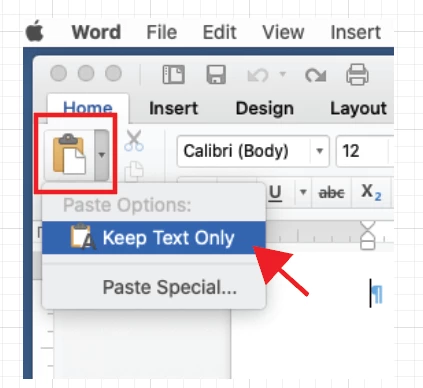
For Word, Click on the Paste option icon, select Keep Text Only.


K

4 replies

Participant
March 31, 2023

Has anyone found a solution to this? It is very frustrating. I used to be able to copy text from Illustrator and paste anywhere else as needed. Destination settings should not matter. Any luck?


Monika Gause
Community Expert
Community Expert
March 31, 2023

So you are copying the text and not the text object?

Where are you pasting? And what do those manufacturers say about it?


Participant
March 31, 2023

Yes, copying the text, not the object. I've been working profesionally in Illustrator for over 20 years. Something changed within the lasy tear or two (on Mac version)


It happens in any other software I try to paste the text. Email, Pages, iMessage ... etc


They changed the matrix, lol 

Inspiring
January 27, 2021

I'm having the same problem. I'm wanting to copy text from Illustrator and paste it into Keynote but when I do this it copies across as an image. There aren't any options to 'Keep text only' in Keynote. The work around is to copy it into Word (by clicking on the stupid paste button and selecting Keep text only) and then from there copying it across to Keynote but this wastes time and is clumsy, surely Adobe must've fixed this bug by now. You've known it about it for some time!

Participant
January 16, 2025

well what i do is i copy the text from illustrator and then i paste it in the search bar of safari and recopy it and it works

kphotopage
kphotopageCorrect answer
Legend
November 13, 2020

Robert Hi.

Copy your text in Illustrator.

For Word, Click on the Paste option icon, select Keep Text Only.


K

Participant
November 13, 2020

Great - Thanks!


That works for Word.


That led me to discover for Text Editor and Notes, I can go to the top menu or shortcut keystroke to choose "Paste and Match Style".


For Mac Mail, you can go to preferences to change Composing/Message Format to "Plain Text"... which is a bit much, but it will work. 


However - I still can't use the text from Illustrator for renaming the file or paste to Messages for example. 


There should be a way to pull the text as "Plain Text" without formatting.

Monika Gause
Community Expert
Community Expert
November 12, 2020

What happens when you select the text instead of the text object?

Participant
November 12, 2020

I get the same result.