
Known Participant
March 10, 2011
Question

text in perspective

  • March 10, 2011
  • 2 replies
  • 29056 views

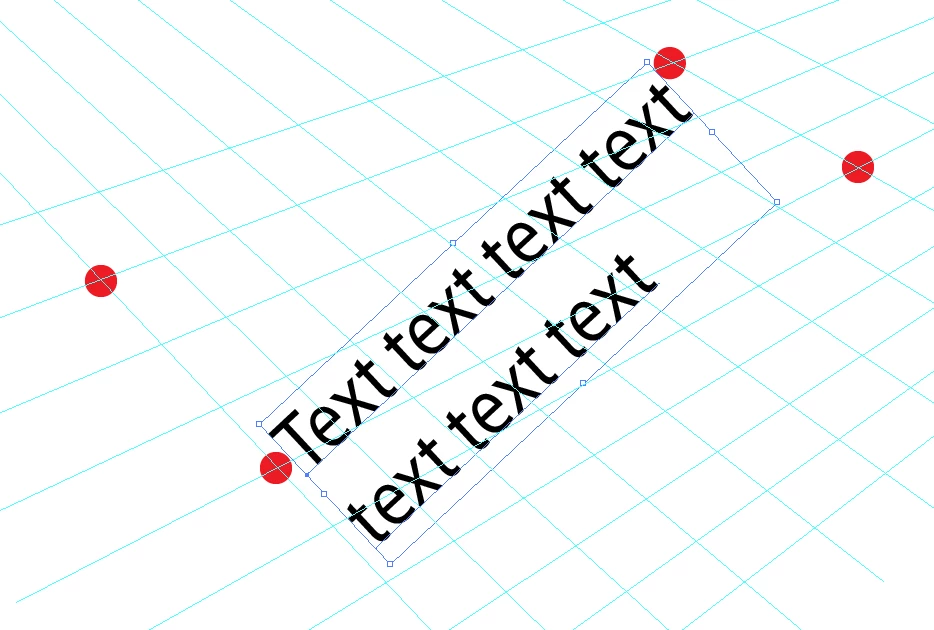
Hi all, I'm trying to manually write text in a two-vanishing point perspective in Illustrator CS4 without using th 3D effect Extrude and Bevel. I created a grid with two vanishing points for alignment purposes. Then I write some text that I want to transform based on the newly created grid (or guides if you wish) using the free transform tool. The problem is that I can move only one point at a time and then the bounding box is reset. What I would like to be able to do is to control the 4 anchors of the bounding box to project the text as disered (The 4 anchors should be located on the red dots of the image below). Is there a technique that can do that ? Thank you
    This topic has been closed for replies.

    2 replies

    Jacob Bugge
    Community Expert
    Community Expert
    March 10, 2011

    plutonak,

    Or you may:

    1) Select the Type and in the Appearance pallete/panel tick Add New Fill, then Effect>Convert to Shape>Rectangle;

    2) Create a quadrilateral based on the red corenrs of the grid (in the front);

    3) Select 1) and 2) and Object>Envelope Distort>Make with Top Object.

    plutonakAuthor
    Known Participant
    March 10, 2011

    thank you both, the "Envelope>Distort>Make with Top Object" helped a lot. Anyway, the anchors of the rectangle become "smooth" instead of "corners" after "Envelope>Distort>Make with Top Object" which is a bit problematic. I would be happy with the smae approach keeping corners of the rectangle as corners. I could get  what follows: it would be perfect with pure corners on the rectangle (since now I have to play with tangent of a spline)

    Jacob Bugge
    Community Expert
    Community Expert
    March 10, 2011

    For my part you are welcome, plutonak.

    Anyway, the anchors of the rectangle become "smooth" instead of "corners" after "Envelope>Distort>Make with Top Object" which is a bit problematic.

    It does not seem to happen to me in 10, so I wonder why.

    Larry G. Schneider
    Community Expert
    Community Expert
    March 10, 2011

    You mean something like this. Use a no fill/no stroke box around the text and use Object>Envelope Distort>Make with top object then use the Free-Distort tool (e) to make the object fit your space.