
xustxn11
Participant
August 19, 2018
Question

The A5 Print Option Doesn't Match Actual A5 Dimensions

  • August 19, 2018
  • 1 reply
  • 1672 views

So i'm currently designing a brochure. I've finished designing on 2 artboards of the same size which is 8.3 x 11.7 in (A5). However i then change the print preset to default web/vid/mob:

I then change the media size to A5:
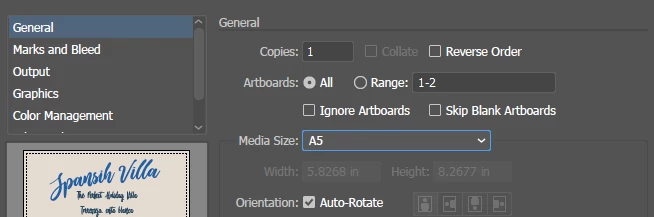
The problem is that my artboards don't fit the media size of A5, even though my dimensions are correct. Am i missing something or?

This topic has been closed for replies.

1 reply

Ares Hovhannesyan
Community Expert
Community Expert
August 19, 2018

Scale a document for printing

To fit an oversized document on a piece of paper smaller than the artwork’s actual dimensions, you can use the Print dialog box to scale the document’s width and height, either symmetrically or asymmetrically. Asymmetric scaling is useful when, for example, you’re printing film for use on a flexographic press: if you know in which direction the plate will be mounted on the press drum, scaling can compensate for the 2% to 3% stretching of the plate that usually occurs. Scaling does not affect the size of the pages in the document, it just changes the scale at which the document prints.

  • Choose File > Print.

  • Do one of the following:

    • To prevent scaling, select Do Not Scale.
    • To scale the document automatically to fit to the page, select Fit To Page. The scaling percentage is determined by the imageable area defined by the selected PPD.
    • To activate the Width and Height text boxes, select Custom. Enter percentages from 1 to 1000 for the width or height. Deselect the Constrain Proportions button to change the document width-to-height ratio.
xustxn11
xustxn11Author
Participant
August 19, 2018

Thanks for the reply, it was helpful. Is there anyway or zooming/enlarging onto the preview just so the dimensions are fully accurate?