
Participant
February 20, 2019
Question

The color of the layer don't change when moved to another

  • February 20, 2019
  • 1 reply
  • 2356 views

Hi!

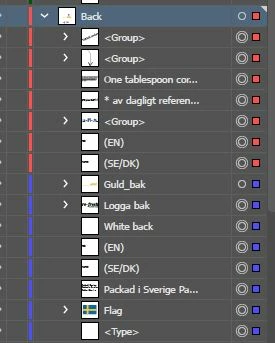
When I move the layers in the layer window the colors of the layers sometimes don't change.They keep the original layer color.

I tried to re-create this and one way is to drag and drop a whole (blue) top-layer to become a sublayer under another (red) toplayer. Then the layer kept their (blue) colors.

(When I drag and drop the same blue layers higher in the "hierarchy" the blue colors spreads to the red one under it - like a virus )

Is this a bug? or a setting somewhere?

(It becomes frustrating when I need to prep artwork for printing, for example for a product with many sides and I mark all the elements in one are to be sure they are under the same top-layer.)
This topic has been closed for replies.

1 reply

Srishti Bali
Community Manager
Community Manager
February 20, 2019

Hi there,

This is definitely not a usual behavior. I would request if you can share a few more details like:

  • OS(Exact version of Windows/MAC)
  • Exact version of Illustrator
  • Is it happening on new files as well?
  • Reproducible Steps: video recording of the issue(this will help us reporting this issue to the engineering team)
  • Does trashing Illustrator Preferences(https://helpx.adobe.com/in/illustrator/using/setting-preferences.html) help resolve the issue? Please do take a backup of the same before trashing them.

Regards,

Srishti

pixxxelschubser
Community Expert
Community Expert
February 20, 2019

In the past sometimes I have had the same behaviour. But I can't remember which steps are required to reproduce this.

If I remember right – creating a new layer and moving the wrong colored items (or all items of the mixed colored layer) to the new created layer does solve the issue for me.

My 2 cent

Re-freshAuthor
Participant
February 21, 2019

Thanks!

I tired, drag and dropped a whole group with two different colors in to third new. .became three colors.

But moving one and one they actually changed colors.

Maybe I'm missing something and it is supposed to be like this.