Participant
August 29, 2024
Question

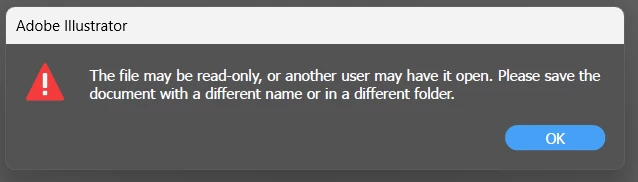
Error when opening files - The file may be read-only
  • August 29, 2024
  • 1 reply
  • 777 views

2024 and I still get this error on illustrator. I tried everything before and it didn't work. How to fix it. Please help me, thanks.


[renamed by mod]

This topic has been closed for replies.

1 reply

Anshul_Saini
Community Manager
Community Manager
August 29, 2024

Hi @master_friendship5EF9,

I’m sorry to hear you’re still facing this issue with Illustrator! To help troubleshoot further, could you let me know where you’re saving the file? Is it on your desktop, an external hard drive, a network drive, or a server?


Also, have you tried using File > Save a Copy to save it to a different location or under a different name? This can sometimes bypass permissions or other issues that may be causing the “read-only” error. Let me know if this helps or if there’s any other detail you can provide!


Best,

Anshul Saini

Participant
August 29, 2024

I save in SSD laptop (C hard drive). And I try save a Copy but it doesn't work. Am so confused right now

Anubhav M
Community Manager
Community Manager
August 29, 2024

Hello @master_friendship5EF9,

Thanks for confirming. Have you tried saving the file to a different folder location, like the Desktop / Documents and checking if it helps? If the problem persists, kindly share more details, like the exact version of the OS/Illustrator and a screen recording of your workflow and the problem (https://adobe.ly/4dZ6atC), so we can investigate this further.

Looking forward to hearing from you.

Thanks,
Anubhav