
Participant
August 25, 2018
Answered

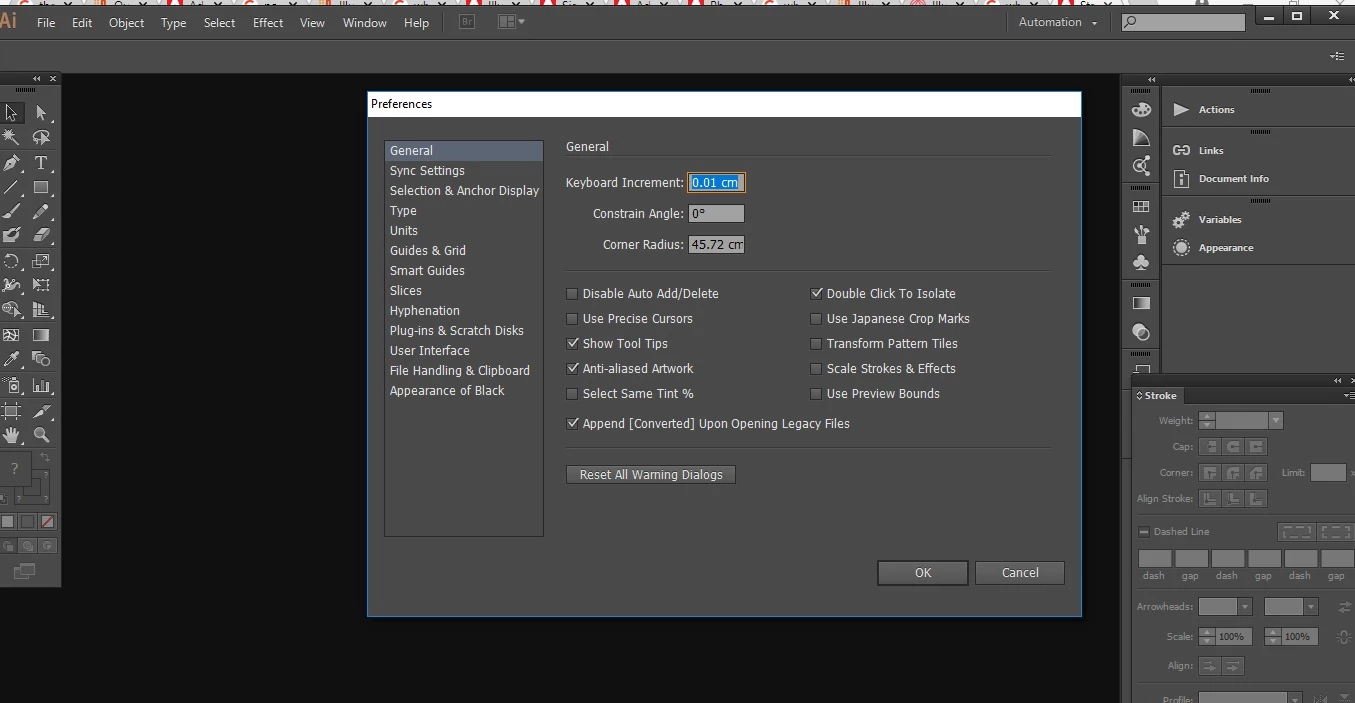
There is no GPU performance settings in Illustrator CC?

  • August 25, 2018
  • 3 replies
  • 3440 views

Hey,

I  would like to enable GPU perfomance in my Illustrator CC, but it is not in the settings( Edit->Preferences), although it appears in photoshop.

Where is it? How can I find t?

I have windows 10 on my pc, AMD Radeon R5 Graphics and R7 M265 drivers.
This topic has been closed for replies.
Correct answer Monika Gause

In that case you need to update.

3 replies

Om Nath Jha
Legend
August 31, 2018

Hi nlabjs,

As Monika suggested, you need to upgrade to a newer version of Illustrator to be able to use GPU feature. It was introduced in the 2014 release of Illustrator CC for computers running Windows with select, compatible, NVIDIA graphics processors. For the 2015 release of Illustrator CC, GPU Performance is available for both Mac OS and Windows, and it works with various GPUs.

Here's an article with more details: GPU Performance

In order to make sure your system has recommended hardware, please check this link: Adobe Illustrator system requirements

Regards,

Om

Bill Silbert
Community Expert
Community Expert
August 25, 2018

Once you've updated your Illustrator to the latest version and have enabled GPU performance its is possible that you may run into the problem that many people have reported. If you start to see that your Illustrator vector art has ragged edges to it then you will know that your computer does not have a video card that fully supports it. It may only require updating the video card but it also could turn out to be more trouble than it's worth.

Monika Gause
Community Expert
Community Expert
August 25, 2018

Which CC is it?

nlabjsAuthor
Participant
August 25, 2018

I think 2013.

Monika Gause
Community Expert
Monika GauseCommunity ExpertCorrect answer
Community Expert
August 25, 2018

In that case you need to update.