
Participating Frequently
October 27, 2022
Pregunta

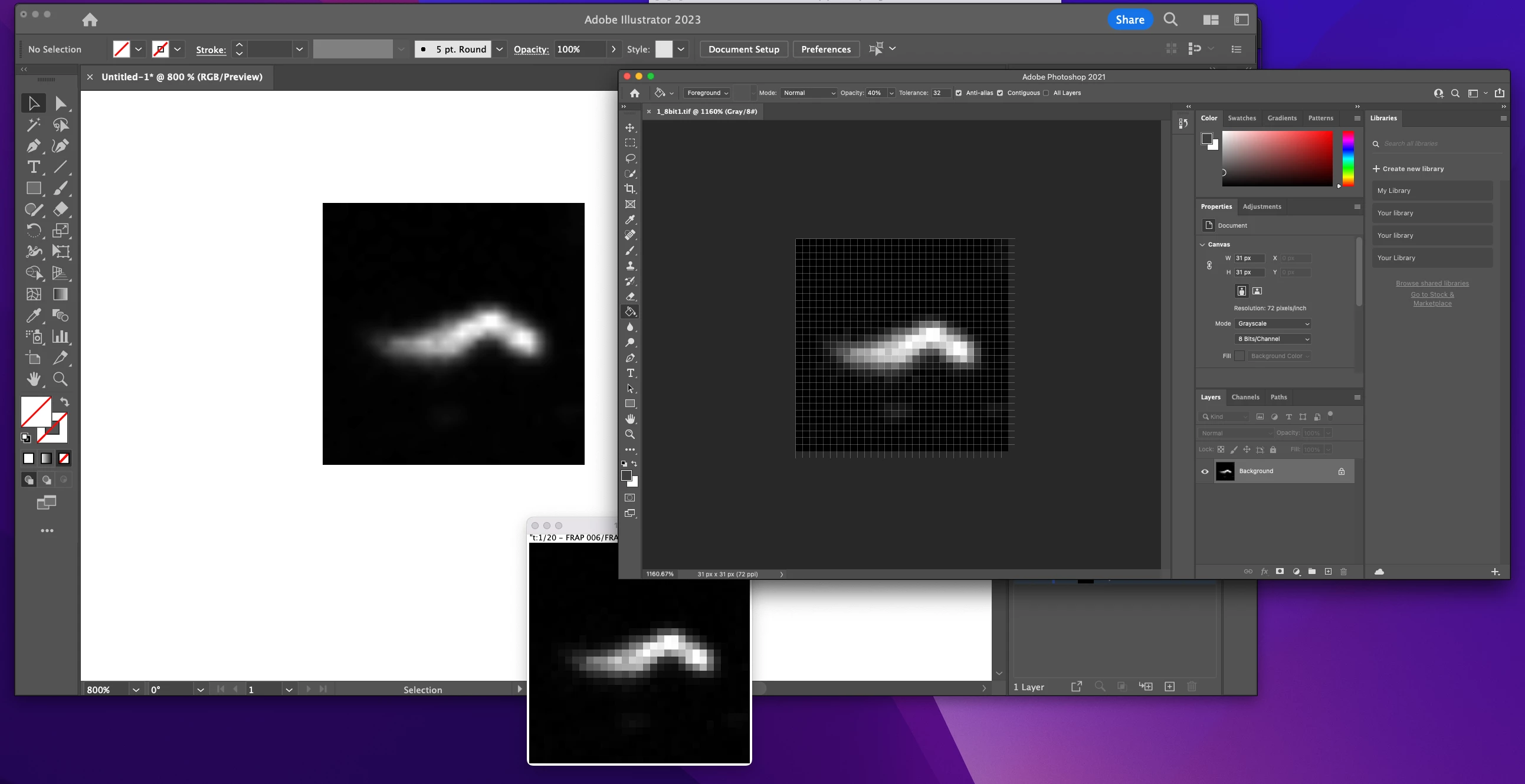
TIF images are displayed not correctly when placed in illustrator 2023

  • October 27, 2022
  • 1 respuesta
  • 2040 visualizaciones

Hi community,

recently I have a wired problem when placing .tif files in Illustrator. On the left top you can see the placed image in illustrator. The individual pixels are not displayed correct the outlining is brighter than the inside. Looks like some filter is on top of the image. As comparison the image opended with photoshop (right top) or another program (imageJ middle bottom image). Any idea what creates this difference?
 

Este tema ha sido cerrado para respuestas.

1 respuesta

Ton Frederiks
Community Expert
Community Expert
October 27, 2022

You are probably looking at the preview that was saved with the tiff file.

Try embedding the image.

Participating Frequently
October 27, 2022

No unfortunately not. It keeps it appearance even after embeding

Ton Frederiks
Community Expert
Community Expert
October 27, 2022

Ok problem solved! This is just a display bug in the software. After embedding it does not change the image from the preview to the real image. Once you print it it looks fine. Thanks again


Good you solved your problem. Looks like it is something OS specific.

You may want to mention it here:

https://illustrator.uservoice.com/