MahaB82A
January 6, 2023
Answered

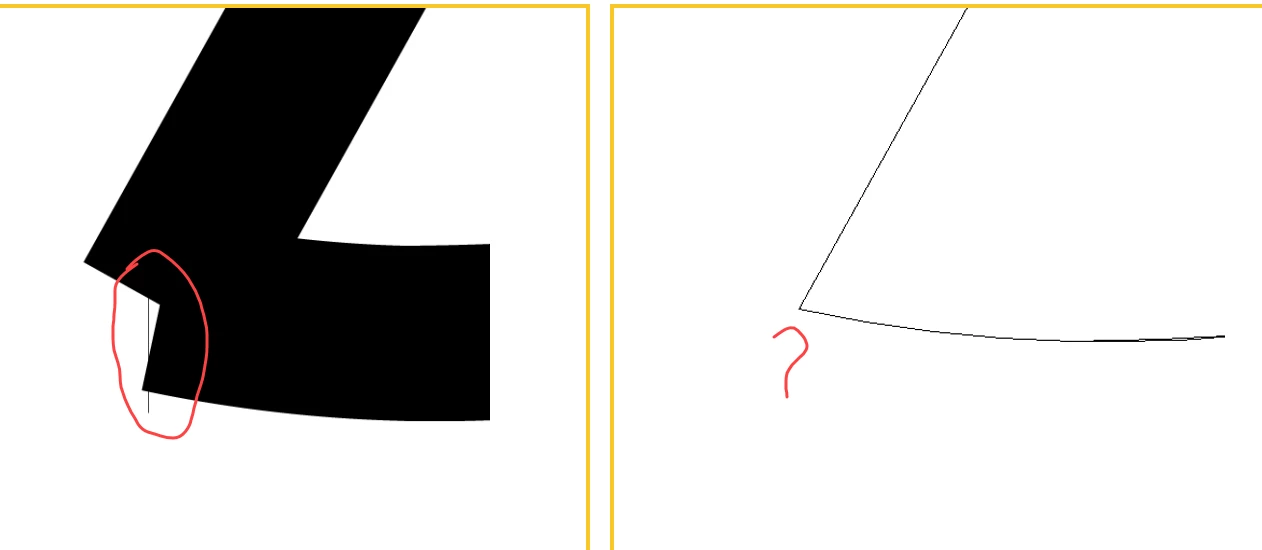
Tiny Line showing on corner/ edges of the shape/ object

  • January 6, 2023
  • 2 replies
  • 683 views

Tiny line  comes when design this logo. This tiny line disappears when logo is in a outline mode. How to get rid of this tiny line ?


This topic has been closed for replies.
Correct answer pixxxelschubser

Hi @MahaB82A 

Try to join the two open paths at the overlapping anchor points.

2 replies

pixxxelschubser
Community Expert
pixxxelschubserCommunity ExpertCorrect answer
Community Expert
January 6, 2023

Hi @MahaB82A 

Try to join the two open paths at the overlapping anchor points.

MahaB82A
MahaB82AAuthor
January 6, 2023

Thanks for the help.

Monika Gause
Community Expert
Community Expert
January 6, 2023

Please show the layers panel

And select the object and show the Appearance panel.


Or better: please upload the file to Creative Cloud and post the link.

MahaB82A
MahaB82AAuthor
January 7, 2023

Is this what you want?


Monika Gause
Community Expert
Community Expert
January 7, 2023

I found easy way to upload file

https://easyupload.io/llsn94


These file exchange sites always make the impression that you can get infected with viruses, so many people do not like them. The Creative CLoud would be a better choice.
