Exit
  • Global community
    • Language:
      • Deutsch
      • English
      • Español
      • Français
      • Português
  • 日本語コミュニティ
  • 한국 커뮤니티
0

Toolbar auto expand in Adibe Illustrator CC 2019

Community Beginner ,
Oct 30, 2018 Oct 30, 2018

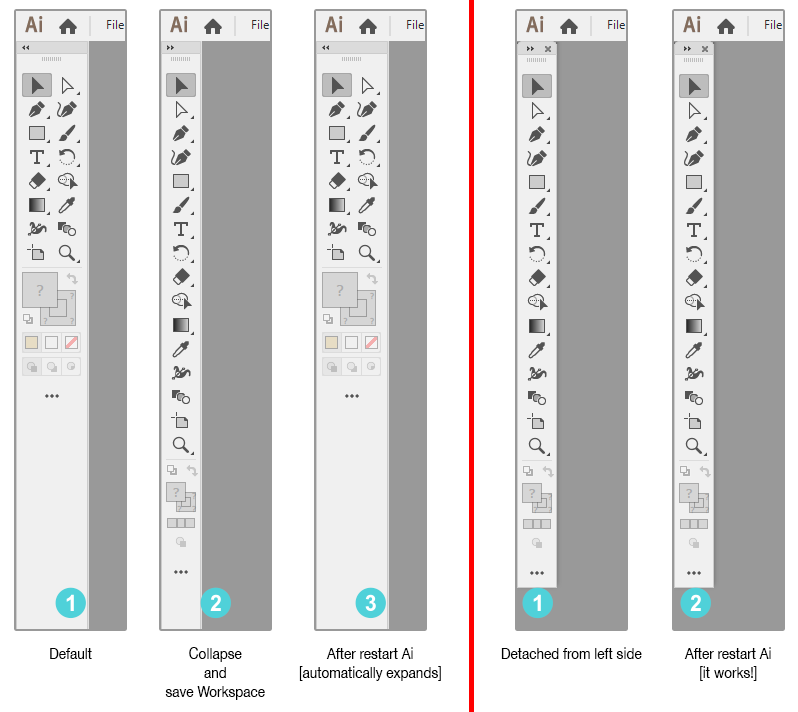
When I collapse "Toolbar" and save as new "Workspace", after restart Ai, the "Toolbar" automatically expands. If I detach "Toolbar" from left side it works! but when snap and attach "Toolbar" to left side and save workspace, after restart "Toolbar" expands again automatically. Another problem! I remove "Screen Mode" controls from bottom of "Toolbar" and after restart Ai the controls are there again! I don't want to create and save a new custom "Toolbar", only change current "Toolbar" [just remove "Screen Mode" controls] and save it as new workspace.

I reported to "User Voice" but no reply.

[Win 10 RS3 x64, Adobe Illustrator CC 2019]
ss.png

2.4K
Translate
Report
Community guidelines
Be kind and respectful, give credit to the original source of content, and search for duplicates before posting. Learn more
community guidelines
Adobe
Community Expert ,
Oct 30, 2018 Oct 30, 2018

I tried it out, and you're right. It's not keeping the setting to remove the screen mode (I'm also on Windows 10). Reporting it to Uservoice does provide information to Adobe engineers, but it isn't tech support. I don't think you'll get notified unless they fix it. I do know they are working on hot fixes for various issues.

In the meantime, it looks like what you may have been trying to achieve with the collapsed workspace was to get your tools in one column. If that's the case, you might try changing to either the Automation or Layout workspace.

Translate
Report
Community guidelines
Be kind and respectful, give credit to the original source of content, and search for duplicates before posting. Learn more
community guidelines
Community Beginner ,
Oct 31, 2018 Oct 31, 2018

Myra Ferguson,

Thanks...

Do you know why "Toolbar" customization doesn't work? For example, when I remove "Screen Mode" controls from bottom of "Toolbar",after restart Ai it will appear again automatically! Is there a solution to save current customization order [Toolbar]? I have to create a new "Toolbar" and put the basic tools one by one and save that "Toolbar"!

Translate
Report
Community guidelines
Be kind and respectful, give credit to the original source of content, and search for duplicates before posting. Learn more
community guidelines
Community Expert ,
Oct 31, 2018 Oct 31, 2018

I would say it's a bug. Adobe has a prerelease version to address certain issues, but the workspace one isn't listed in the pdf. Here's where you can find the prerelease version and more info on getting your feedback to Adobe engineers:  https://adobe.ly/1o2SDsg

Translate
Report
Community guidelines
Be kind and respectful, give credit to the original source of content, and search for duplicates before posting. Learn more
community guidelines
Community Beginner ,
Jul 16, 2019 Jul 16, 2019
LATEST

Almost a year later, the problem still there.

it is not a big problem but it is anoying and it is a bug, right? do they have a plan to fix it?

Translate
Report
Community guidelines
Be kind and respectful, give credit to the original source of content, and search for duplicates before posting. Learn more
community guidelines