TonyaandDextertheDog
Known Participant
October 4, 2020
Answered

Trace/paint

  • October 4, 2020
  • 2 replies
  • 722 views

I'm still just trying to learn how to use AI.  Sometimes I get pretty frustrated because I can't find the tool suggested in various online videos.  😞 This is what I'm trying to learn today.

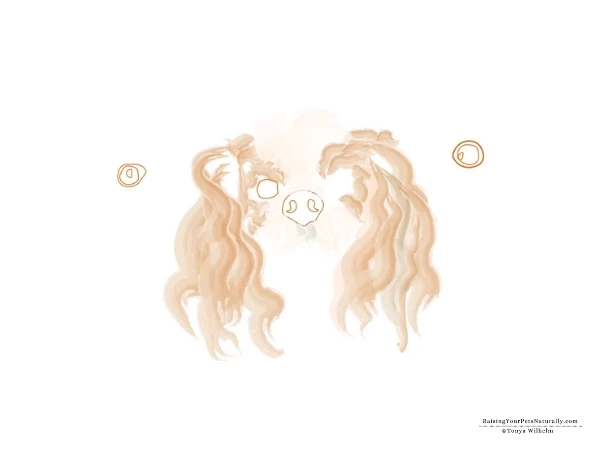
Drawing/painting over a photo to create a new image. I'm really confused about how to find a simple brush that I can decide how wide and just draw a shape and it colors it with my color choice.  I keep clicking the basic brush and when I go to paint, it changes to another brush.  I can then click the thing I drew to change it back, but obviously, I'm doing something wrong. I'm just looking for a simple shape that doesn't change shape on me if that makes sense. For example, I want to trace the nose and it stays that size/shape vs getting all funky.  Thanks.
 

This topic has been closed for replies.
Correct answer barbara_a7746676

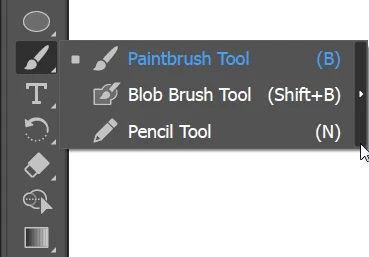
Many tools are grouped. You should be able to find the Pencil tool by clicking on the Paintbrush tool in the Tools panel.

2 replies

barbara_a7746676
Community Expert
barbara_a7746676Community ExpertCorrect answer
Community Expert
October 4, 2020

Many tools are grouped. You should be able to find the Pencil tool by clicking on the Paintbrush tool in the Tools panel.

TonyaandDextertheDog
Known Participant
October 4, 2020

Thank you so much!  That helped!  

Monika Gause
Community Expert
Community Expert
October 4, 2020

"Basic" is not a brush. It deletes an existing brush.

But the brush tool cannot draw without a brush applied. So it will always select one.

Use the pencil tool if you want to draw without a brush.

TonyaandDextertheDog
Known Participant
October 4, 2020

Thank you.  I see a pen tool.  That seems to make paths, click, etc.  Is there a pencil tool that I can select and draw?  Thank you for your help and time.

Monika Gause
Community Expert
Community Expert
October 4, 2020

Try the advanced toolbar in Window > Tools.