Inspiring
September 6, 2021
Answered

Transform FX stroke issue

  • September 6, 2021
  • 1 reply
  • 1420 views

Hi,

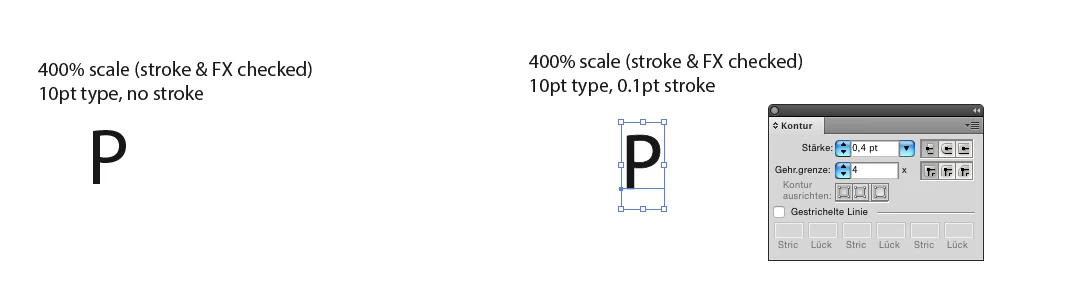
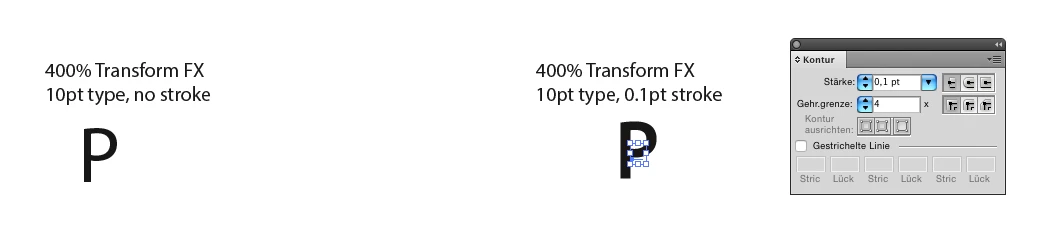
I'm having an issue scaling stroke of type with Transform FX. It doesn't appear to work correctly. I have attached a file where I show type character "P" written without stroke and with stroke (item A, left and right). On item A, I then perform 400% vertical and horizontal scaling for both with Transform FX (item B). After that, once again on item A, I perform 400% uniform scaling with Trasform>Scale with Scale Strokes & Effects checked (item C).

The results for the stroked version of the character differ (items B and C, right column). While the character itself appears to scale correctly, its stroke doesn't scale correctly for item B (scale via Transform FX).

What's going on?

This is for CS4.

Thanks.
This topic has been closed for replies.
Correct answer Monika Gause

In CS4 this looks indeed weird (although the numbers are correct)

In CC2017 this looks OK


You can't change anything in CS4 anymore or get any bugfixes to that version. So maybe it's finally time to get away from your ancient version?


Maybe there has been some strange bug with the effect in CS4 that I don't remember anymore. In current versions there is a setting "Scale strokes and effects" inside the transform effect.


Screenshots are from CS4

1 reply

Monika Gause
Community Expert
Community Expert
September 6, 2021

Please upload the Illustrator file to Dropbox or the like.

sPretzelAuthor
Inspiring
September 6, 2021

Hi Monika. This is a Save As Adobe PDF in Illustrator with editing preserved. You should be able to open it in Illustrator. I've done that before here.

To view the stroke better, set it to a different colour (I forgot to do it in the file).

Monika Gause
Community Expert
Monika GauseCommunity ExpertCorrect answer
Community Expert
September 6, 2021

In CS4 this looks indeed weird (although the numbers are correct)

In CC2017 this looks OK


You can't change anything in CS4 anymore or get any bugfixes to that version. So maybe it's finally time to get away from your ancient version?


Maybe there has been some strange bug with the effect in CS4 that I don't remember anymore. In current versions there is a setting "Scale strokes and effects" inside the transform effect.


Screenshots are from CS4